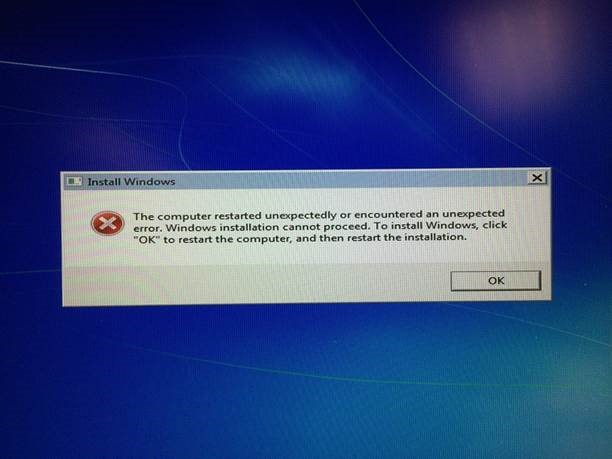
When I try to install Windows 7 with the USB flash drive, an error message “The computer restarted unexpectedly or encountered an unexpected error.” pops up, what should I do?
LastUpdate : Fri, 26 Feb 2016
Answer
Please update the latest BIOS released on MSI website and then perform the system installation once again to solve the problem.
Reference
Models
GE62 6QC Apache, GT72 6QE Dominator Pro G Heroes Special Edition, GE72 6QD Apache Pro, GE72 6QL Apache, GE62 6QF Apache Pro Heroes Special Edition, GT72 6QD Dominator Heroes Special Edition(4K), GT72 6QE Dominator Pro G, GS60 6QD Ghost, GL62 6QF, GT72S 6QD Dominator G, GP72 6QE Leopard Pro, GT72 6QE Dominator Pro Heroes Special Edition(4K), GT72S 6QE Dominator Pro G, GT72 6QD Dominator G, GT72S 6QE Dominator Pro G Heroes Special Edition, PE70 6QE, GE62 6QD Apache Pro Heroes Special Edition, GT72 6QD Dominator G Heroes Special Edition, GE72 6QC Apache, GP62 6QF Leopard Pro, GE62 6QD Apache Pro, GE72 6QE Apache Pro, GL72 6QD, PE60 6QD, GE62 6QF Apache Pro, GL62 6QE, GL72 6QE, GP72 6QF Leopard Pro, GT72S 6QD Dominator G Heroes Special Edition, GP62 6QE Leopard Pro, GS40 6QE Phantom, GE62 6QE Apache Pro , PX60 6QE, GS60 6QC Ghost, PX60 6QD, GT72S 6QD Dominator Heroes Special Edition(4K), GT72S 6QE Dominator Pro Heroes Special Edition(4K), PE70 6QD, GL72 6QF, GE62 6QL Apache, PE60 6QE
If the above answers do not resolve your issue, please
Contact Us