How to check THX version and know THX EQ is installed?
LastUpdate : Wed, 19 Oct 2011
Answer
THX and THX EQ version:
1. Exit all Windows-based programs.
2. Click Start, type regedit in the Start Search box, and then press ENTER.
3. If you receive the User Account Control dialog box, click Continue.
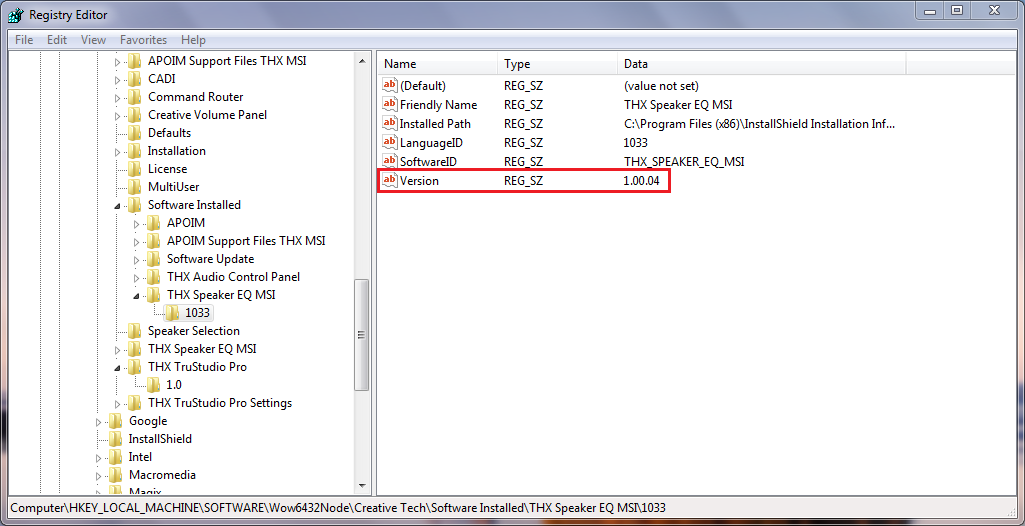
4. Locate and then click one of the following registry subkeys:
HKEY_LOCAL_MACHINE\SOFTWARE\Wow6432Node\Creative Tech\Software Installed\THX Audio Control Panel\1033
HKEY_LOCAL_MACHINE\SOFTWARE\Wow6432Node\Creative Tech\Software Installed\THX Speaker EQ MSI\1033
If THX EQ is installed, you will find a file, MBSpkrEQ, located in in C:\Windows.
Reference

Models
FR720, FX610, FR600, FX720, FX400, GT680, FX603, FX700
If the above answers do not resolve your issue, please
Contact Us