[Troubleshooting] Black screen when watching online video in full-screen mode on external monitor
Answer
On Windows 10, when I set up an external monitor as the main display in extended mode and play online video in full screen mode, the monitor will turn to black but audio goes on.
This would happen on the Notebook with Nvidia Optimus feature, user can solve the problem by one of following methods.
Method 1
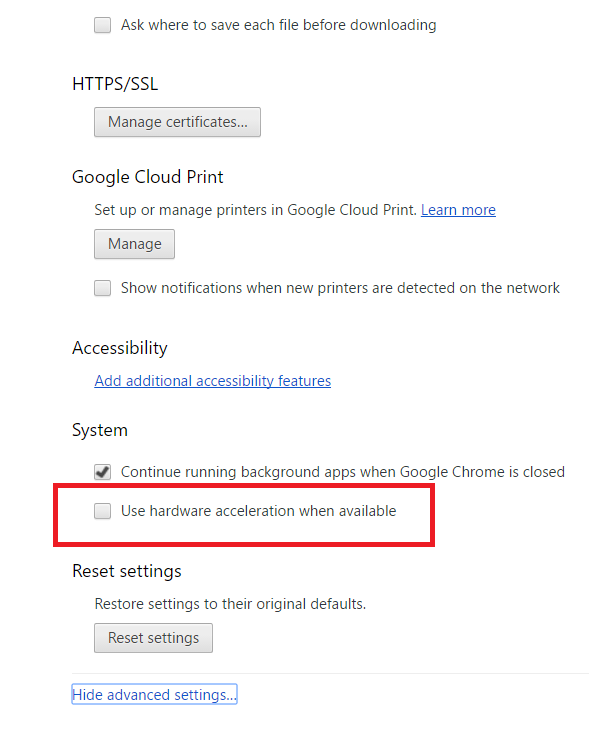
Disable “hardware acceleration” in the browser advanced settings.
Method 2
Windows 10 has released new patch to solve the problem, please update Windows 10 to version 1607 (OS build 14393.1066), or the latest version 1703.
How to check Windows version?
https://support.microsoft.com/en-us/instantanswers/d4efb316-79f0-1aa1-9ef3-dcada78f3fa0/get-the-windows-10-creators-update
For Windows update method, please refer to FAQ: [How To] Get and Install the Latest Windows 10 Build
https://www.msi.com/faq/notebook-2410
Windows 10 release history:
https://technet.microsoft.com/en-us/windows/release-info.aspx
Reference

Models
- GP62MVR 6RF Leopard Pro
- GS63VR 6RF Stealth Pro
- FX603
- CX70
- FX700
- GE72VR 6RF Apache Pro
- CX623
- FX720
- GT60 0NC
- GE600
- FX400
- GE70 0NC
- GS43VR 6RE Phantom Pro
- GT70 0NC
- FX600MX
- GE62VR 6RF Apache Pro
- GS73VR 6RF Stealth Pro
- FX620DX/FR620/FX620
- X460DX
- CX640
- FR600