[Troubleshooting] Abnormal display behavior on VR remote screen
LastUpdate : Mon, 22 May 2017
Answer
Get abnormal display when using VR Headsets to play games or run specific applications without external monitor connected:
1. Low Frame Rate on HTC VIVE
2. Blank Screen on Oculus
As VR headsets are not a typical physical monitor, it may cause the wrong behavior.
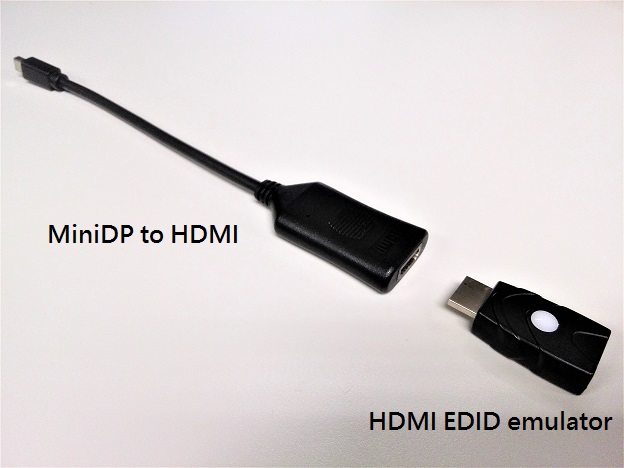
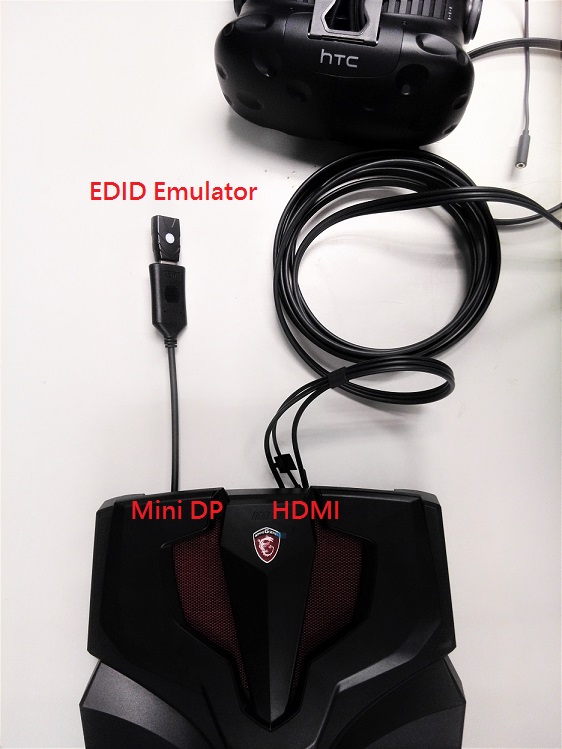
To use VR headsets without external monitor connected, please connect an EDID emulator to “DP to HDMI convertor”, then connect the “DP to HDMI convertor” to system DP port.
EDID emulator can simulate physical monitor, and the system will treat EDID emulator as a real monitor.
Reference
Models
Vortex G65VR 6RE SLI, VR ONE 6RD, VR One 7RD, Vortex G65VR 6RD, Vortex G65VR 6RE, VR One 7RE, VR ONE 6RE, Vortex G65VR 7RF, Vortex G65 6QD SLI, Vortex G65VR 7RE SLI, Vortex G65VR 6RF, Vortex G65VR 7RD, Vortex G65VR 7RE, Vortex G65 6QF SLI
If the above answers do not resolve your issue, please
Contact Us