[How To] Install/Update Intel Dynamic Tuning Driver
Answer
This article explains how to install or update the Intel Dynamic Tuning Driver. Please follow the steps below.
This article applies to all MSI laptop models equipped with Intel CPUs.
1. Download the driver installation package
a. Visit the MSI official website and search for the product name.
b. Click "Download" to enter the download page.
c. Find the "Intel Dynamic Tuning Driver" in the "Drivers" tab and download the file.
d. Store the compressed package on your desktop and extract it.
2. Install the driver
a. In the extracted folder, find and select "install.bat."
b. Right-click and select "Run as administrator."
c. The installer will run automatically; it is recommended to restart your laptop after installation.
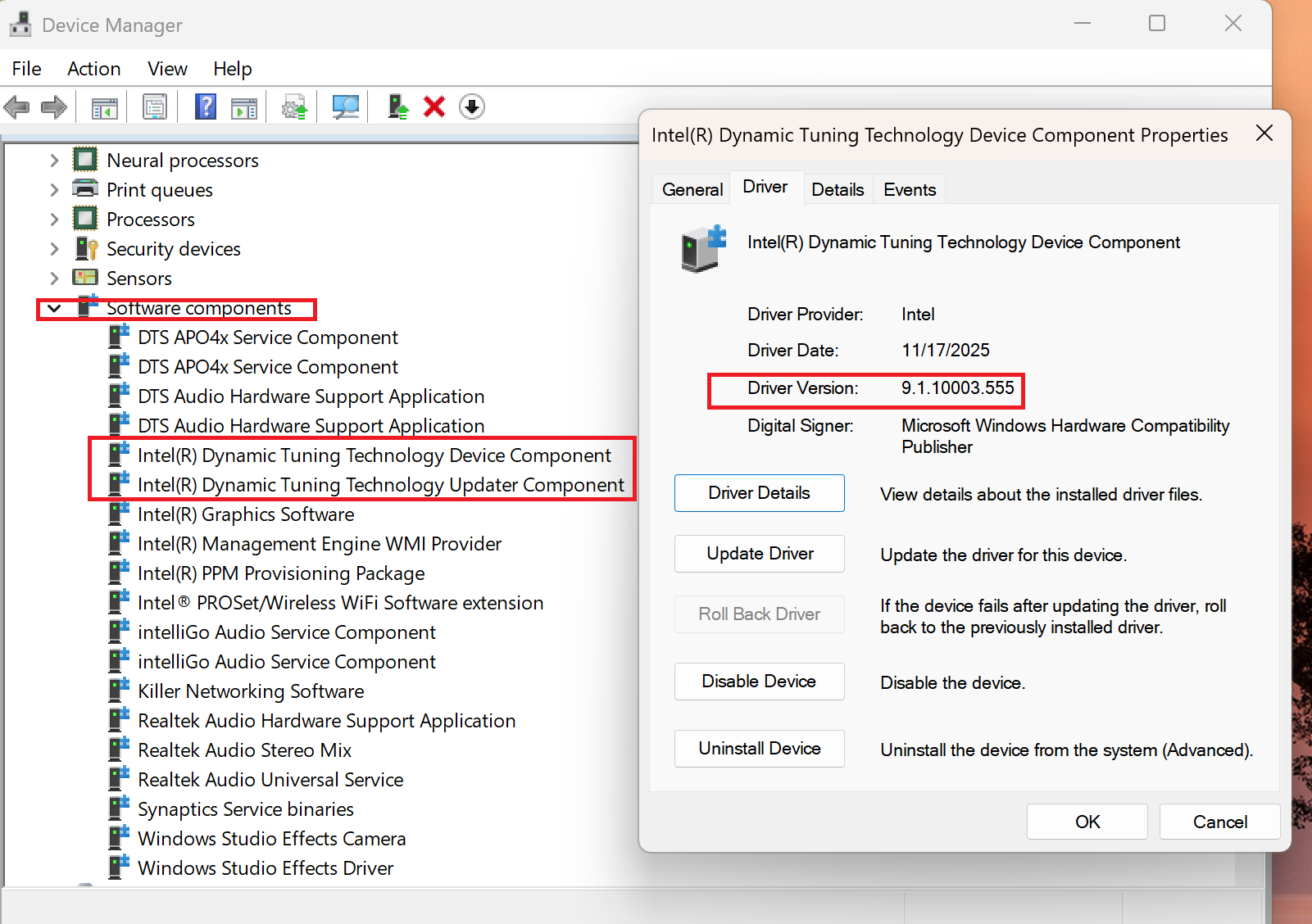
3. Confirm the installed driver version
a. Right-click the "Start" icon on the taskbar.
b. Go to "Device Manager".
c. In "Software Components," find "Intel(R) Dynamic Tuning Technology Component" and "Intel(R) Dynamic Tuning Updater Component."
d. Double-click these devices and go to the "Drivers" tab to confirm that the driver version matches the one listed on MSI's website.