[Product Information] Why Does the Screen Briefly Turn Black When Connecting or Disconnecting the Power Adapter?
Answer
MSI notebooks equipped with a high-refresh-rate display may briefly show a black screen when the AC power adapter is connected or disconnected because the display refresh rate switches automatically. This is normal behavior and does not indicate a display or hardware failure.
This article applies to MSI notebooks equipped with a high-refresh-rate display.
Why does the screen briefly turn black when the power adapter is connected or disconnected?
To balance display performance and battery life, Display Power Saver automatically adjusts the panel refresh rate according to the current power source.
- After the AC power adapter is disconnected, the system reduces the panel refresh rate to 60 Hz or lower, depending on the supported panel specifications, to reduce power consumption and extend battery life.
- After the AC power adapter is reconnected, the system switches the panel back to a higher or the maximum supported refresh rate for a smoother viewing experience.
When the panel refresh rate switches, the display may briefly be interrupted or turn black for a few seconds. If the display recovers automatically, this is normally part of the refresh-rate switching process.
How do I disable Display Power Saver?
After Display Power Saver is disabled, the system will no longer automatically switch the panel refresh rate when the AC power adapter is connected or disconnected, which can prevent the brief black screen caused by refresh-rate switching.
However, the panel may remain at a higher refresh rate while the notebook is running on battery power, resulting in increased power consumption and shorter battery life.
Note: This option is not displayed on models that are not equipped with a high-refresh-rate panel or do not support Display Power Saver.
Follow the instructions for the MSI software installed on your notebook:
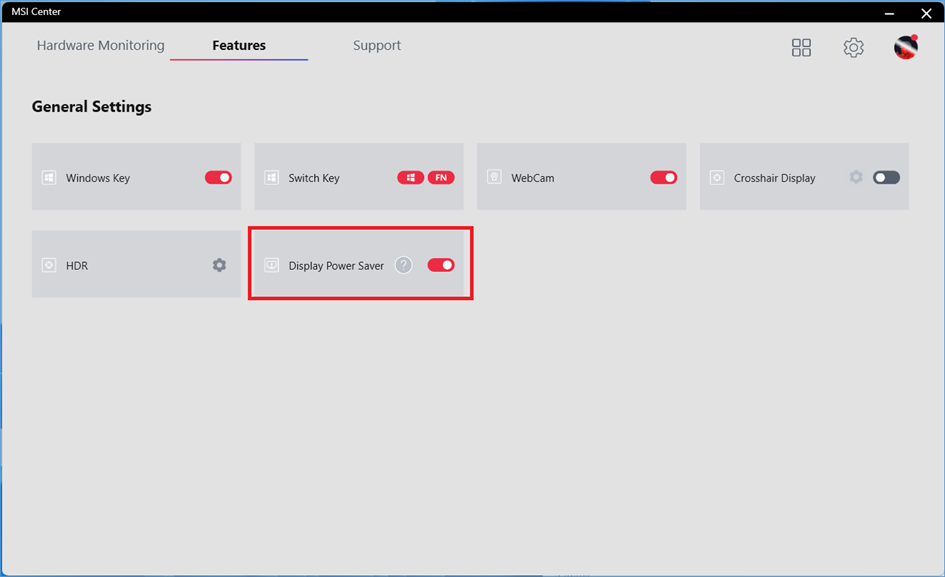
- Disable Display Power Saver in MSI Center
Go to “Features” > “General Settings,” and disable “Display Power Saver.”
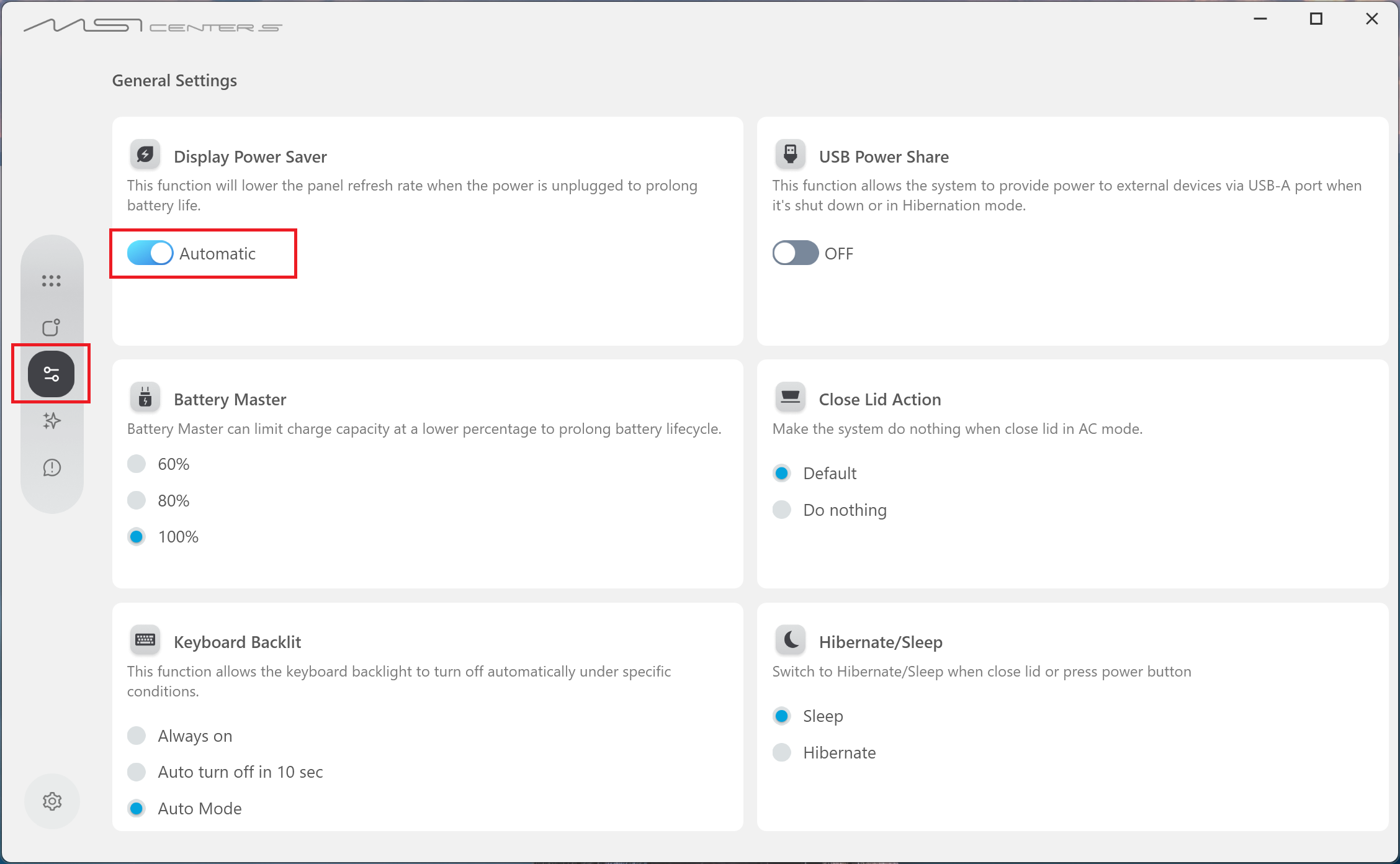
- Disable Display Power Saver in MSI Center S
Go to “Settings” > “General Settings,” and disable “Display Power Saver.”
FAQ
Q: Does a brief black screen when connecting or disconnecting the power adapter indicate a display failure?
A: If the screen only turns black briefly when the AC power adapter is connected or disconnected and then recovers automatically, this is normally caused by Display Power Saver switching the panel refresh rate. It does not indicate a display failure.
Q: Why is the “Display Power Saver” option not available in MSI Center?
A: This option is only displayed on models equipped with a supported panel and the corresponding function. Notebooks without a high-refresh-rate panel or support for this function may not display “Display Power Saver.”
Perform a clean installation of the latest version of MSI Center or MSI Center S first. If the option is still not displayed after the update, the current model normally does not support this function.
Q: What happens if I disable Display Power Saver?
A: After this function is disabled, the system will no longer automatically adjust the panel refresh rate according to the AC power connection status. This can prevent the brief black screen caused by refresh-rate switching, but it may increase power consumption and shorten battery life while the notebook is running on battery power.