What steps should I take to connect USB HUB and Y cable to W20 and remove them from W20?
LastUpdate : Tue, 15 Apr 2014
Answer
In order to support external devices with great performance, MSI recommends users to connect/remove USB HUB and Y cable through following steps.
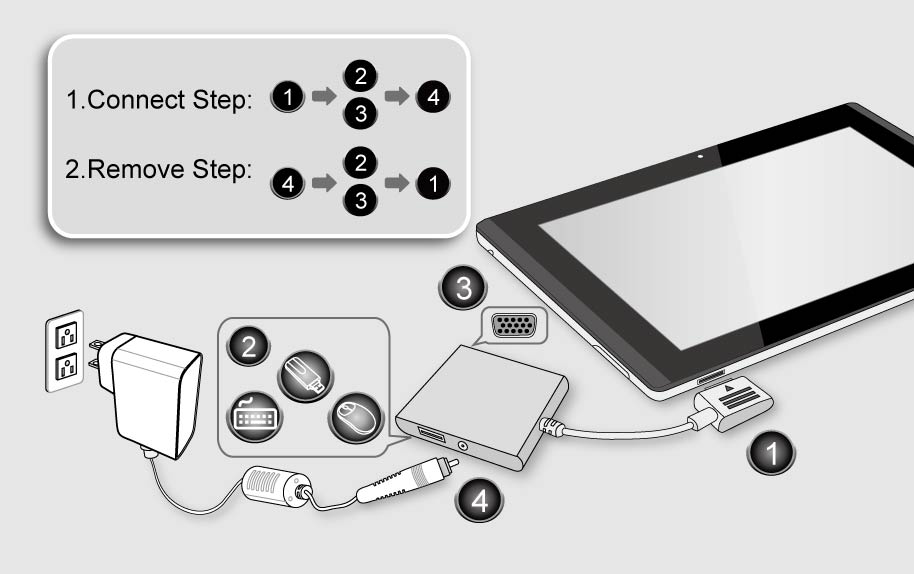
1. Recommended steps for a USB HUB connection (See attachment)
(1) Connect USB HUB with tablet.
(2) Connect USB HUB with USB external devices (keyboard, mouse or USB flash).
(3) Connect USB HUB with D-sub monitor.
(4) Connect USB HUB with AC adapter
[Note: Recommended steps for Remove USB HUB are (4)->(3) ->(2)->(1)]
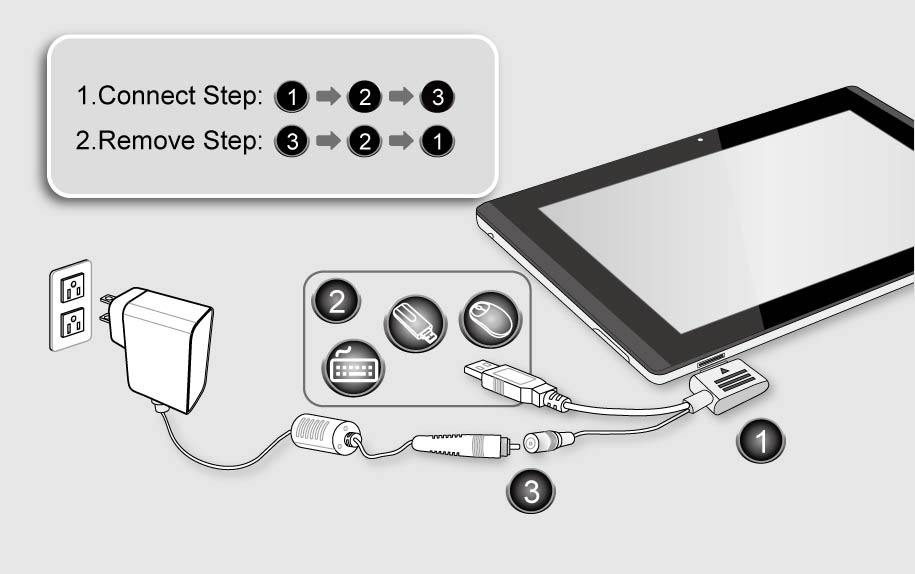
2. Recommended steps for Connect Y cable (See attachment)
(1) Connect Y cable with tablet.
(2) Connect Y cable with USB external devices (keyboard, mouse or USB flash).
(3) Connect Y cable with AC adapter.
[Note: Recommended steps for Remove Y cable are (4)->(3) ->(2)->(1)]
Reference
Models
- W20 3M