[Product Information] Why does the HDR certification not found on Windows ?
Answer
If the product specification page of an MSI notebook indicates that it is equipped with an HDR display panel, but the HDR settings in Windows show "HDR certification not found," this does not necessarily mean that the display does not support HDR.
MSI notebooks whose product specification pages indicate that they are equipped with an HDR display panel have passed VESA DisplayHDR certification. If Windows does not display the correct HDR certification information, the system may be missing a specific configuration file, preventing Windows from properly identifying the HDR certification information of the display panel.
This article applies to all MSI notebooks that support HDR.

Confirm HDR Certification
If Windows shows "HDR certification not found," follow the steps below to confirm the certification status:
- Confirm whether the notebook product specification page indicates HDR support.
- Go to the certified products list on the official VESA DisplayHDR website.
- Search for the corresponding MSI notebook or display panel information to confirm its DisplayHDR certification.
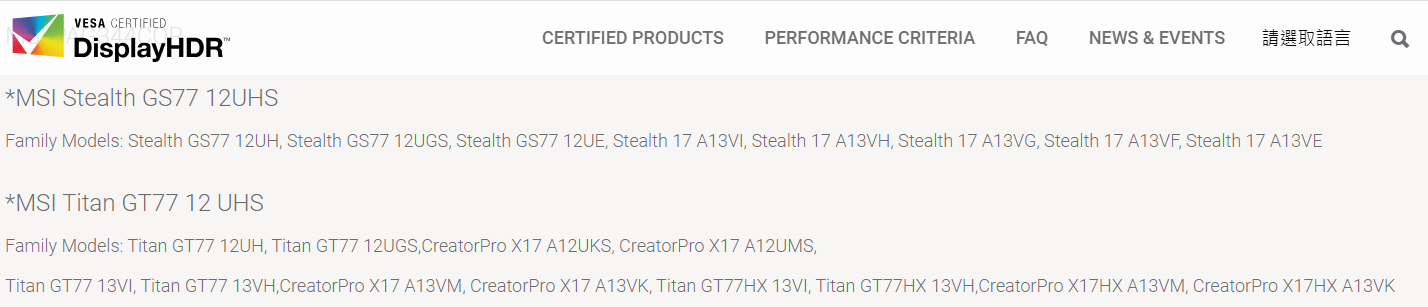
Even if Windows does not display HDR certification information, the HDR certification status can be confirmed if the product is listed on the VESA DisplayHDR certified products list.
DisplayHDR Certified Products List
FAQ
Q: If Windows shows "HDR certification not found," does that mean the display does not support HDR?
A: Not necessarily. If the MSI product specification page indicates that the model is equipped with an HDR display panel, but Windows shows that HDR certification is not found, Windows may not be properly identifying the HDR certification information of the display panel. You can check the VESA DisplayHDR certified products list for confirmation.
Q: Can HDR still be used if Windows cannot find the HDR certification?
A: The HDR certification information displayed by Windows and whether the system supports HDR are not exactly the same criteria. To confirm whether the notebook meets the requirements for using HDR, refer to [Product Information] Display HDR.
Related Topics
[How To] How to Enable HDR and Configure HDR Video Streaming and Games