Scroll function on Sentelic touch pad.
LastUpdate : Tue, 15 Apr 2014
Answer
Sentelic touchpad supports scrolling function. In order to support the scrolling function, you need to install its driver. Please find the driver in individual model driver page.
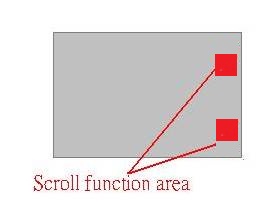
Also Sentelic Scroll area is a little away from right top and right bottom, as you could see in the picture.
Click on the 2 points, then you should be able to use the scroll function.
Reference
Models
- GE700
- CR400
- CR720
- CX720
- CR600
- CX623