[Troubleshooting] Why can't I run Nahimic application anymore after I flash BIOS to latest version?
LastUpdate : Fri, 02 Dec 2016
Answer
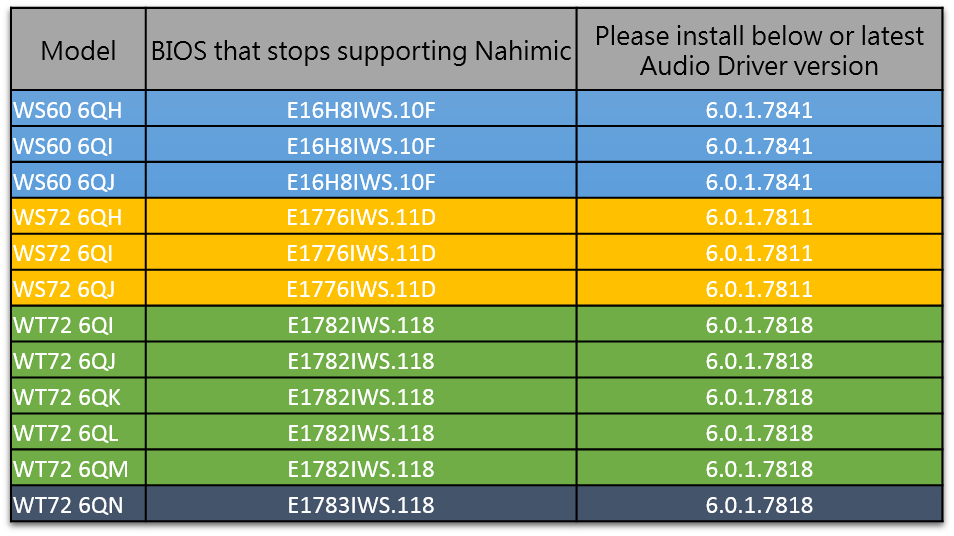
Workstation Notebook series has stopped supporting Nahimic, please uninstall old Nahimic tool and Realtek audio driver, and install latest Realtek audio driver from MSI Notebook driver download page.
1. Download latest Realtek driver from MSI website.
2. Disconnect network and WIFI.
3. Take Windows 10 for example:
Right click on Windows "Start" logo, click on "Control Panel" => Programs =>Uninstall a program, uninstall Nahimic and and Realtek audio.
(1). Uninstall Nahimic tool
(2). Uninstall old Realtek Audio driver
(3). Restart
(4). Install new Realtek Audio driver
Please refer to attached table for the BIOS version that stops supporting Nahimic.
Reference
Models
- WT72 6QN
- WS60 6QI
- WT72 6QM
- WT72 6QI
- WS72 6QH
- WS72 6QJ
- WT72 6QK
- WT72 6QL
- WS60 6QH
- WS60 6QJ
- WS72 6QI