[How To] Install Drivers for Thunderbolt Devices
Answer
The Thunderbolt port provides extremely high data transfer speeds and versatile expansion capabilities. To ensure your external devices function properly, please follow the steps below to correctly install or update the required drivers:
This FAQ applies to all models that require a standalone Thunderbolt driver.
*Note: If your system is preinstalled with Windows 11, it uses the in-box Thunderbolt driver provided by Windows. No additional Thunderbolt driver installation is required.
Step 1: Download the latest driver from the MSI official website
- Go to the MSI official website and enter your laptop’s full model name in the search bar.
- Navigate to the product page → Support → Drivers, and download the latest Thunderbolt driver.
Step 2: Extract and install the driver
Please fully extract the downloaded file and open the folder. Depending on the driver version, there may be three different scenarios. Follow the corresponding method below:
- The folder contains “Install.bat”
- Right-click the file and select Run as administrator
- When the message “The operation completed successfully” appears, click OK to finish installation
- The folder contains two subfolders(Including ThunderboltUwdSetup or ThunderboltDchSetup, and ThunderboltApplicationLauncherSetup)
- The folder contains two subfolders
- Locate "TbtHostController.inf", right-click and select Install。(Note: If “Install” is not visible, click Show more options)
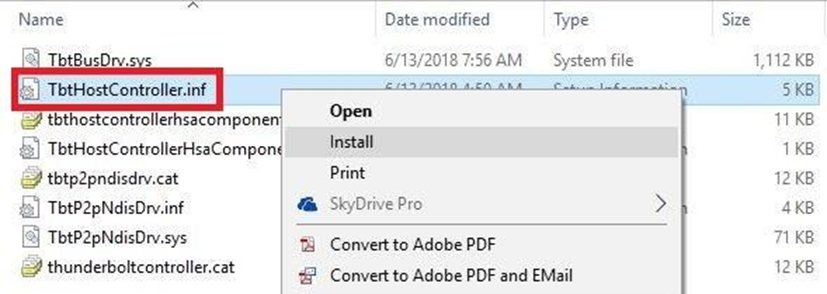
- When the message “The operation completed successfully” appears, click OK
- Go back and enter the ThunderboltApplicationLauncherSetup folder
- Locate "TbtHostControllerExtension.inf", right-click and select Install
- After installation, download Thunderbolt Control Center from Microsoft Store to complete the setup
- The folder contains only one subfolder(ThunderboltUwdSetup)
- Enter the ThunderboltUwdSetup folder
- Locate "TbtHostController.inf", right-click and select Install
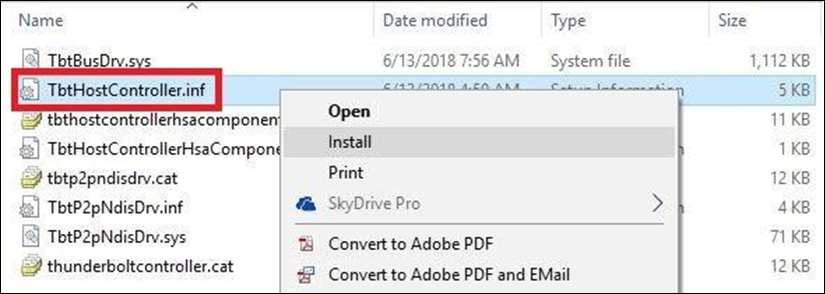
- When the message “The operation completed successfully” appears, click OK
FAQ
Q: When do I need to download Thunderbolt Control Center from Microsoft Store?
A:If the extracted driver package contains a folder named “ThunderboltApplicationLauncherSetup”, it means the control interface has been migrated to a UWP application. In this case, you need to manually download Thunderbolt Control Center from Microsoft Store.