[Product Information] Display HDR
Answer
HDR (High Dynamic Range) is a technology that enhances image and video display quality. HDR expands the difference between the brightest and darkest areas of the screen, presenting richer colors and more details in shadows and highlights for a more realistic and immersive viewing experience.
To use HDR on an MSI notebook, the graphics card, display, video output, connection cable, operating system, and graphics driver must meet the relevant requirements. Refer to the following hardware and software requirements to confirm whether the computer supports HDR.
This article applies to all MSI notebooks.
What Hardware Requirements Must Be Met to Use HDR?
- Graphics card
The graphics card must meet one of the following requirements:
- Intel integrated graphics: A 7th Generation Intel processor with Intel HD Graphics or later
- NVIDIA discrete graphics: NVIDIA GeForce GTX 900 Series or later
- Video output port
The video output port of the notebook must meet the following requirements:
- Supports HDCP 2.2, HDMI 2.0a, or DisplayPort 1.4
- The video output must support 4K resolution at 60 Hz to meet the related requirements of HDCP 2.2 and HDMI 2.0a
- To confirm the video output specifications of the notebook, refer to the product specifications or the related FAQ [Product Information] External Display Output on MSI Notebooks
- Notebook display
The notebook display must support HDR. Check whether HDR is listed on the product specification page as shown below, or follow the Windows settings instructions later in this article to confirm whether the computer supports HDR.

- Connection cable
When using an external HDR display, the connection cable must meet the following requirements:
- Use an HDCP 2.2-certified cable
- Check the cable packaging, instructions, or specifications for an “HDCP 2.2 compatible” label
- It is recommended to use a cable that supports DisplayPort 1.4, HDMI 2.0, USB Type-C, or Thunderbolt video output
What Software Requirements Must Be Met to Use HDR?
*MSI notebooks equipped with NVIDIA GeForce RTX 20 Series, GTX 16 Series, or newer graphics cards already meet the following software requirements.
- Operating system
Confirm that the notebook is running Windows 10 October 2018 Update (version 1809) or later. - HEVC media extension
To play HDR videos encoded in HEVC (High Efficiency Video Coding), download and install the HEVC media extension for Windows 11. - Graphics driver
Confirm that the graphics driver meets the following version requirements:
- NVIDIA: Version 387.68 (23.21.13.8768) or later
- Intel: 22.XX.XX Series, version 4708 or later
It is recommended to visit the MSI official website, search for the full model name of the notebook, and download the applicable graphics driver from the product support page.
How Do I Confirm Whether an MSI Notebook Supports HDR?
Follow the steps below to check the HDR support status in Windows:
- Open Windows “Settings.”
- Go to “System” > “Display” > “HDR” or “Use HDR.”
- Check the HDR support status under “Display capabilities.”
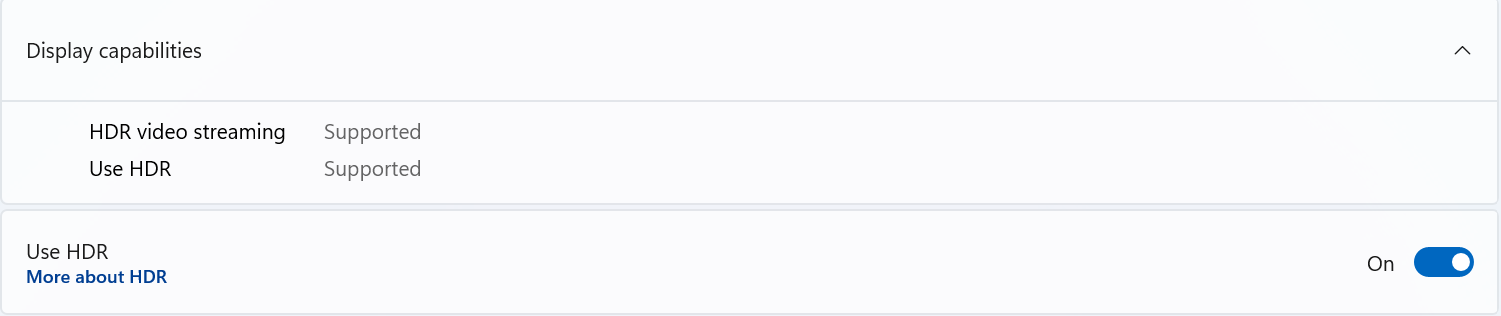
If the above items are not shown as supported, confirm again whether the display, graphics card, video output, connection cable, operating system, and graphics driver meet the requirements.
FAQ
Q: If the graphics card supports HDR, can the display show HDR?
A: Not necessarily. In addition to the graphics card, the notebook display or external display, video output port, connection cable, operating system, and graphics driver must also support HDR.
Q: Why is the HEVC media extension required when playing HDR videos?
A: Some HDR videos are encoded in HEVC format. If the corresponding media extension is not installed, the system may be unable to play the video correctly or display the HDR effect.
Q: How do I enable and configure HDR after confirming that it is supported?
A: After confirming that the hardware and software meet the HDR requirements, refer to [How To] How to Enable HDR and Configure HDR Video Streaming and Games.
Related Topics
[Product Information] Why Does Windows Show That HDR Certification Is Not Found?