




How to check external device compatibility?
Please refer to the compatibility report on MSI official website, which provide the information of CPU, Memory, storage, graphics card, Compatible Devices for your selections.
Please follow the step to check
Input the model name on the top right corner’s search bar at MSI official website.
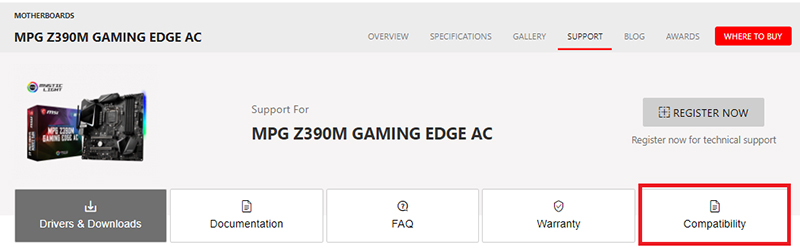
For example: input MPG Z390M GAMING EDGE AC in the [Search] icon, press [Enter] key to find the matching result.

Click on the [Download] button down below the product name

Click the “Compatibility”
Graphics cards
Click [VGA] to view the supported graphic cards.

Storage devices
Click [Storage] to view the supported hard drives and SSD
Please refer to the article: How to check storage specification?

Click [Compatible Devices] for [Optical Devices], [USB devices], [LAN adapters], [Power supply], and [VR ready].

Optical Devices
Click [VR Ready] to view the supported VR devices

USB devices
Click on [USB devices] to view the supported USB devices

PCIe network devices
Click on [Ntwork card] to view the supported PCIe devices

Power supply unit
Click on [Power Supply] to view the supported power supply unit

VR Ready devices
Click [VR Ready] to view the supported VR devices
