

[Notebook] FPS Drops or Stuttering in Certain Games on MSI Laptops with Pre-Installed Windows 11
Applicable only to MSI laptops with pre-installed Windows 11.
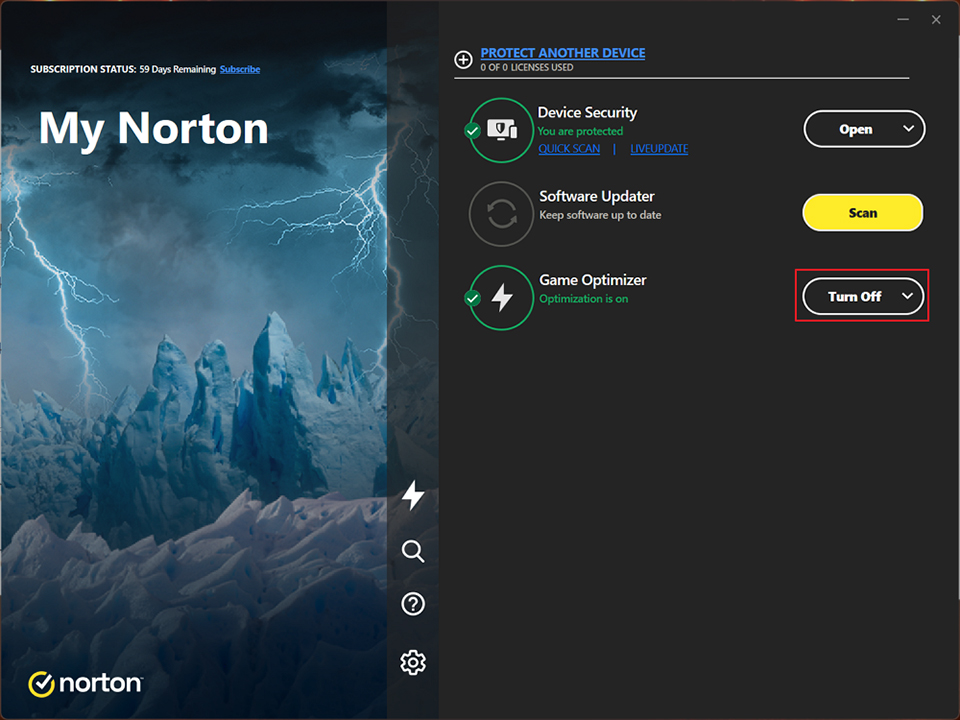
If your system is installed with an older version of Norton 360 for Gamers having Game Optimizer enabled by default, this may cause FPS drops or stutter in games such as Apex Legends or Hunt: Showdown 1896. To resolve the issue, please update Norton 360 for Gamers to the latest v25.3.x via Norton Online Update, or disable the Game Optimizer manually within Norton.
1. For online updates, please refer to: [How To] Live update Norton 360 for Gamers
2. To manually disable Game Optimizer:
Open Norton 360 for Gamers, locate the Game Optimizer option, click the toggle button on the right, and select “Turn Off.”