How to Maximize the Power of MEG Trident X2 for Optimal Performance.
Desktops
MSI gaming desktops have always been famous for their excellent performance. Thanks to the heat dissipation design, MSI gaming desktops' performance is the best among similar products. The powerful performance not only brings gamers the ultimate gaming experience but also allows them to achieve excellent results. However, do you know how to bring out the full performance of an MSI gaming desktop?

High-performance MSI gaming desktop.
Using MSI's latest flagship model, the MEG Trident X2, as an example. It can be adjusted with the built-in MSI Center software. MSI Center is a software that integrates all of MSI's unique functions. Gamers can choose to install the required functions or adjust and monitor the system status. Gamers can switch from Balanced mode to Extreme Performance mode, which improves performance by 8% compared to Balanced mode, providing the complete performance of the MEG Trident X2. (Note: Please use MSI Center version 2.0.9 or later and Gaming Gear version 2.0.0.58 or later to enjoy the best performance.)

Gamers can switch from the default Balanced mode to the Extreme Performance mode.
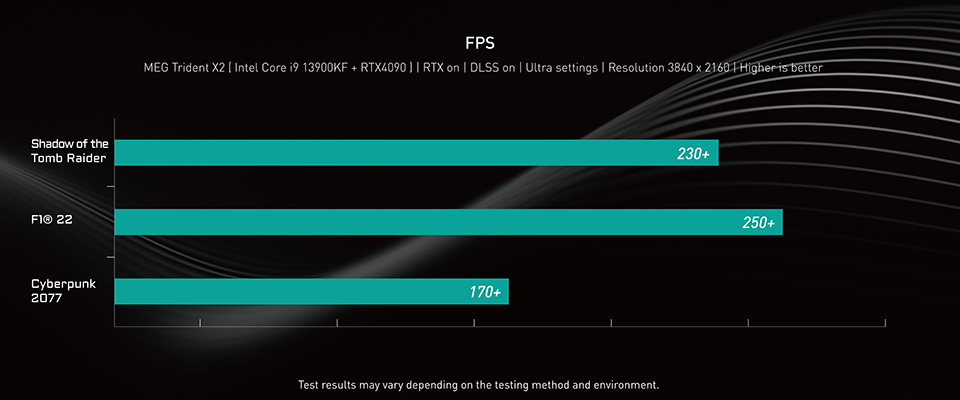
Finally, MEG Trident X2 can provide gamers with benchmark scores for reference. While impressive results have been achieved in various benchmarks, the actual game performance is still the ultimate test. For example, Cyberpunk 2077 at 4K resolution with ray tracing, DLSS 3, and Frame Generation technology all enabled, the average frame rate exceeds 100 fps. Similarly, both F1® 22 and Shadow of the Tomb Raider, which require rigorous hardware requirements, can provide gamers with a 4K gaming experience at over 100 fps under similar conditions.

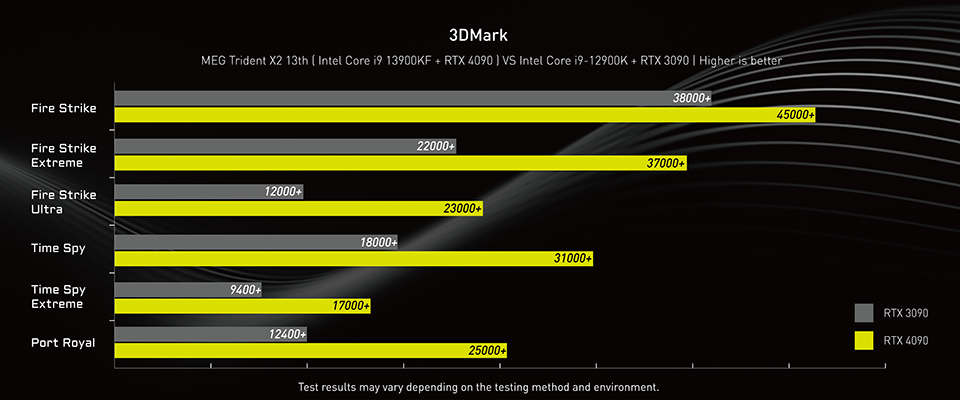
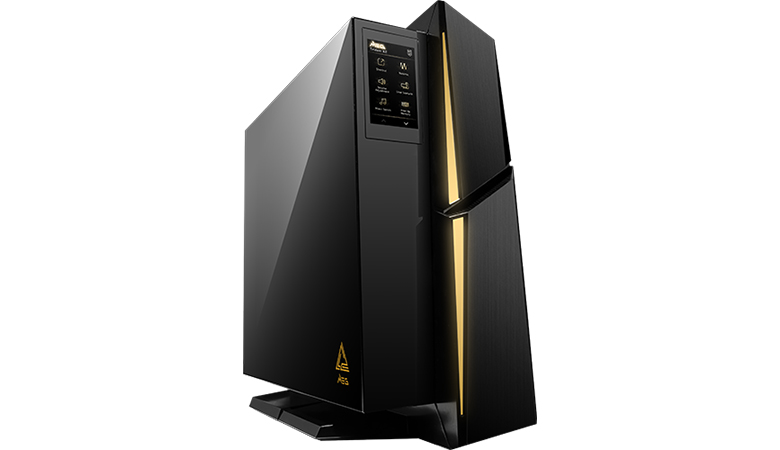
Model that support Extreme Performance mode: MEG Trident X2 13th

Don't worry if you're having trouble choosing the right gaming desktop and monitor. MSI launched a website that makes it easy to select the best gaming equipment. By selecting your favorite game, the site will generate the FPS for various gaming desktop models based on the game's performance requirements. To access the website, simply click on the 'Which game do you like?' banner.