MSI AI Noise Cancellation Pro: A Laptop-Exclusive Audio Feature for Clear Online Meetings
Laptops
Remote collaboration has become the new normal. Teams move fast, deadlines get tighter, and online meetings have quietly turned into the backbone of modern workflows. Yet anyone who has tried to join a call from a crowded café, a busy airport, or even an open office knows the pain: typing sounds, clinking cups, nearby chatter—noise that instantly breaks the rhythm of a productive discussion.
This is exactly the kind of real-world scenario MSI designed AI Noise Cancellation Pro for. It’s not merely another noise filter. It is an intelligent, two-way, direction-aware audio system engineered to deliver studio-level clarity—no matter where you work.

▲ MSI AI Noise Cancellation Pro keeps voices crisp and focused during online meetings—even in noisy environments like cafés, airports, and open offices.
A Smarter Approach to Noise: Two-Way, Not One-Way
Most noise-canceling solutions only clean up what you hear.
MSI AI Noise Cancellation Pro cleans both sides:
- Incoming noise from the other speaker
- Outgoing noise from your microphone
That means the meeting stays clear whether you are in a chaotic setting—or the person on the other end is.
Users simply choose their audio device and noise-cancellation mode.
Two additional enhancements elevate call quality further:
- Auto Volume Balance – keeps voices consistently audible, even when the other side is noisy.
- Voice Amplifier Mode – boosts your voice without lifting background sounds—essential for pitching, presenting, or multi-speaker calls.
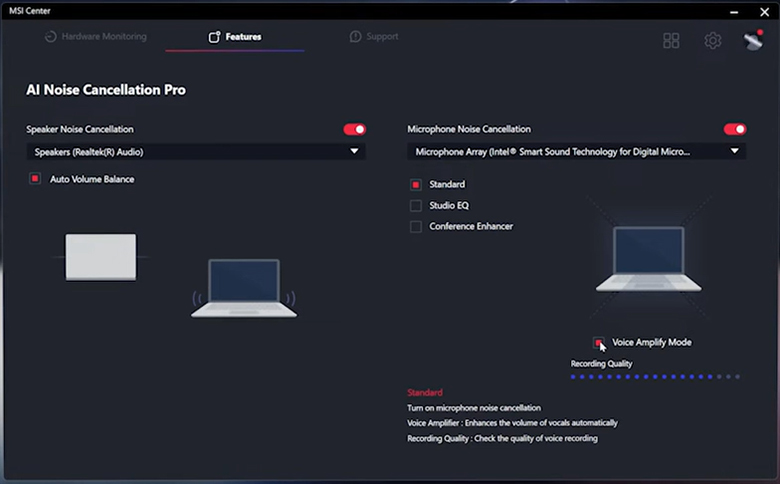
▲ AI Noise Cancellation Pro in MSI Center offers two-way noise filtering, Auto Volume Balance, and Voice Amplifier Mode—giving users full control over both speaker and microphone clarity.
For professionals who record briefings, podcasts, training clips, or product demos, the Pro version adds a new capability: Studio EQ.
Studio EQ simulates the acoustics of a real recording studio. It enhances tone, clarity, and vocal presence, even when you’re recording from a basic room or shared workspace. Through an intuitive interface, users can test clarity, loudness, and timbre in real time.
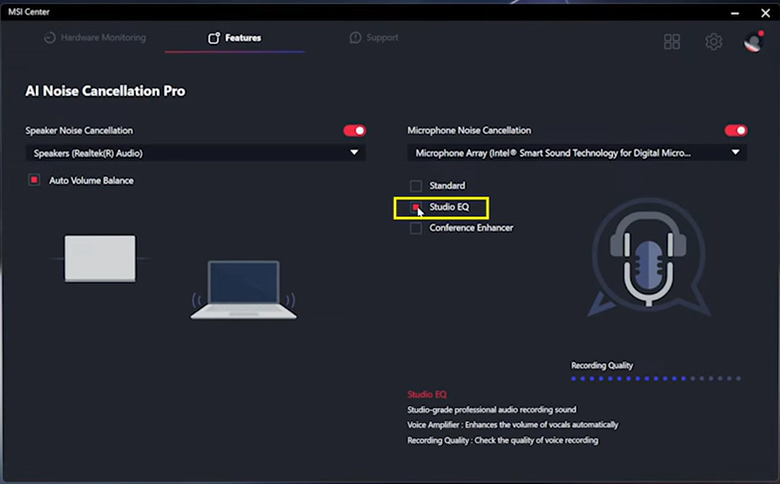
▲ Studio EQ brings studio-grade vocal tuning to your laptop—enhancing tone, clarity, and presence for recordings, demos, and podcasts.
Directional Audio That Understands Where People Sit
This is where AI Noise Cancellation Pro truly distinguishes itself.
On MSI’s business and productivity laptops—including the Summit, Prestige, and Venture series—the spatial array microphone (3 Mic) unlocks hardware-level directional precision. Users can define exactly where participants are seated—Front, Front + Right, Front + Left, or Front + Rear—and the system intelligently captures voices within those zones while suppressing audio from everywhere else. Very few solutions in the industry offer directional control at this level of granularity, making it a standout capability for real-world collaboration.
In busy meeting rooms, hotel lounges, or even bustling expo booths, this transforms your laptop into a credible, conference-grade communication device: it hears only the people you intend it to hear, no matter their distance or speaking volume. No external microphones required. The Spatial array microphone (3 Mic) intelligently captures only the voices in selected zones, minimizing surrounding noise and keeping meetings focused—even in busy spaces.
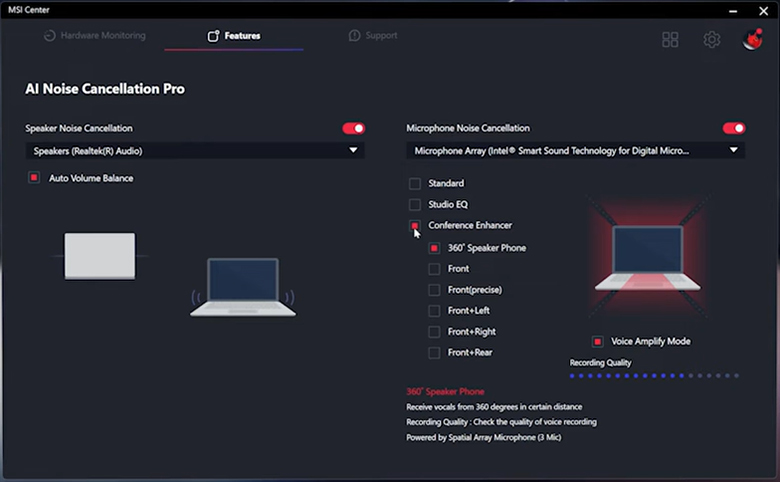
▲ The Spatial array microphone (3 Mic) intelligently captures only the voices in selected zones, minimizing surrounding noise and keeping meetings focused—even in busy spaces.
Simple Setup, Maximum Clarity
To enable AI Noise Cancellation Pro, users only need to update:
MSI Center 2.0.64.0 or newer, or
MSI Center S 1.1.2512.1701 or newer
Once updated, users can access the feature through audio settings—switching modes, testing recordings, and adjusting directional preferences in a few clicks.
Why It Matters in Today’s Hybrid Work Era
Clear communication is not a luxury anymore—it’s a productivity multiplier.
MSI’s AI Noise Cancellation Pro helps:
- Remote workers sound professional anywhere
- Teams reduce miscommunication and meeting fatigue
- Creators produce cleaner voice content without extra equipment
- Businesses run high-quality conference calls from a single device
It’s a blend of acoustic engineering and AI-driven signal processing designed for the messy, unpredictable realities of modern work.

▲ Once MSI Center is updated, AI Noise Cancellation Pro is ready to deliver professional-grade clarity—from home offices to hybrid workspaces.
Learn more:https://msi.gm/SD702BE5