ATX vs Micro-ATX vs Mini-ITX: Dimensions, Case Compatibility, and Which Size Should You Choose?
Motherboards
TL;DR: Always check which motherboard sizes your PC case supports first, then choose between ATX, Micro-ATX, and Mini-ITX motherboards based on your desk space, storage PCIe expansion needs, and cooling clearance. For a broader guide to choosing a motherboard, including platform and specification considerations, see our motherboard buying guide.
Ordering a massive full-tower PC that swallows half your desk, or buying a compact motherboard only to discover your 3-slot graphics card blocks the bottom headers, is one of the most common regrets shared across PC building communities. That’s basically why it’s so important to understand form factors before grabbing parts for your next build.
What Does Motherboard Form Factor Mean?
A motherboard's form factor is its physical footprint – defining the board's length and width, in addition to positions of expansion slots, power connectors, etc.
Because ATX, Micro-ATX (mATX), and Mini-ITX belong to the same standard, they share an aligned upper-left mounting grid and rear I/O cutout. That shared layout is what determines compatibility across different PC case sizes — allowing you to bolt a compact Mini-ITX or Micro-ATX board into a larger ATX mid-tower, while preventing a tall ATX board from fitting inside a shorter Micro-ATX or Mini-ITX enclosure.
What Are the Differences Between ATX, Micro-ATX, and Mini-ITX?
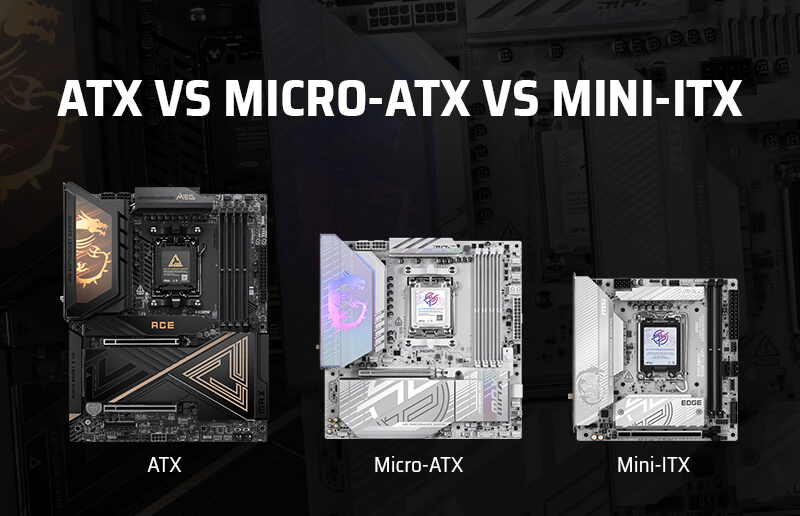
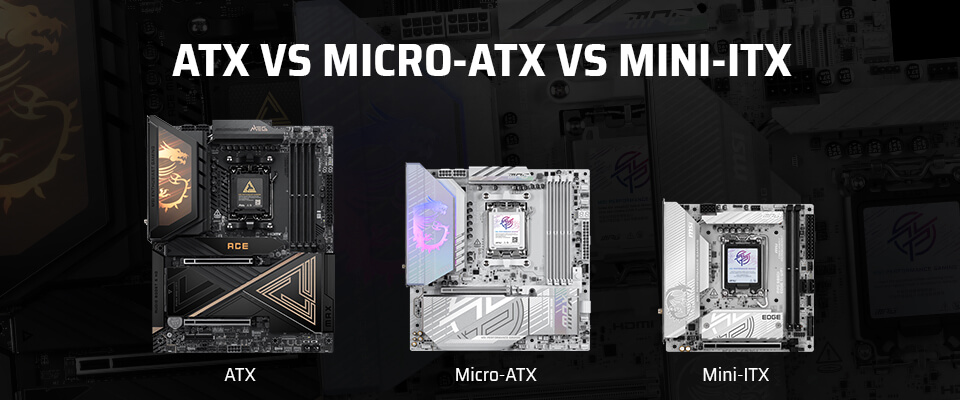
ATX, Micro-ATX, and Mini-ITX motherboards mainly differ in their physical dimensions and in the space available for ports, expansions, fan headers, and so on.
ATX is the largest of the three, while Mini-ITX is the most compact.
Now, it’s important to keep in mind that although a larger board may give manufacturers more room for expansion slots and connectors, the exact number of PCIe, DIMM, and M.2 slots depends on the individual motherboard model and not only its form factor. Make sure you check your case’s supported motherboard sizes and the specifications for the board you plan to use.
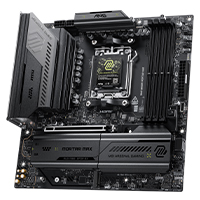
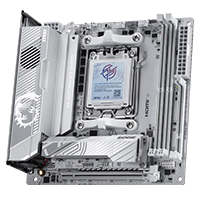
The dimensions below show the standard sizes of each form factor and the actual dimensions of one MSI motherboard with that form factor.
As you can see, even though the motherboards match their expected dimensions from a form factor POV, there is slight variance from model to model, which is why it becomes so important to refer to the technical specifications pages of these products.
Form Factor
Standard Dimensions
Actual dimensions of MSI example
PCB Area vs. ATX
Compatible Case Sizes
Typical Expansion Slots
Key Trade-off
ATX
305 x 244 mm (12 x 9.6 in)
304.8 x 243.84 mm
— MEG X870E ACE MA
— MEG X870E ACE MA
Baseline (744 cm²)
Full-Tower, Mid-Tower ATX
Up to 7 PCIe slots, 4 DIMMs, 4-5 M.2 slots
Maximum expansion and easiest cable access, but requires a larger case footprint
Micro-ATX
244 x 244 mm (9.6 x 9.6 in)
243.84 x 243.84 mm
— MAG B850M MORTAR MAX WIFI
— MAG B850M MORTAR MAX WIFI
-20% (595 cm²)
Full-Tower, Mid-Tower ATX, Micro-ATX Mini-Tower
Up to 4 PCIe slots, 2-4 DIMMs, 2-4 M.2 slots
Cuts 61 mm of vertical height while keeping 4 RAM slots, though thick GPUs can crowd bottom headers
Mini-ITX
170 x 170 mm (6.7 x 6.7 in)
170 x 170 mm
— MPG X870I EDGE TI EVO WIFI
— MPG X870I EDGE TI EVO WIFI
-61% (289 cm²)
All ATX/mATX cases, Mini-ITX Small Form Factor (SFF)
1 PCIe x16 slot, 2 DIMMs, 2-3 M.2 slots
Fits sub-20L SFF builds, but carries higher component costs ("ITX tax") and tighter thermal/cable clearances
How Do Expansion Options Compare on Example Boards?
What do you actually give up when you shrink the board? Comparing three representative MSI AM5 800-series models shows how storage, memory, and PCIe connectivity scale across sizes. Keep in mind that these figures are model-specific examples rather than fixed rules for every board of the same size, because slot counts and PCIe support also depend on the chipset (such as X870E vs. X870 vs. B850) and product tier.
Specification
ATX (MEG X870E ACE MAX)
Micro-ATX (MAG B850M MORTAR MAX WIFI)
Mini-ITX (MPG X870I EDGE TI EVO WIFI)
Chipset
AMD X870E
AMD B850
AMD X870
M.2 Slots
5 total (2x PCIe 5.0 x4 from CPU, 3x PCIe 4.0 x4 from chipset)
4 total (2x PCIe 5.0 x4 from CPU, 2x PCIe 4.0 x4 from chipset)
3 total (1x PCIe 5.0 x4 front, 1x PCIe 4.0 x4 rear, 1x PCIe 4.0 x4 on 5-in-1 XPANDER card)
SATA 6G Ports
4
2
2 (via 5-in-1 XPANDER card)
PCIe x16 Slots
2x PCIe 5.0 x16 slots (x16/x0 or x8/x8) + 1x PCIe 5.0 x4 slot
1x PCIe 5.0 x16 slot
1x PCIe 5.0 x16 slot
DIMM Slots
4x DDR5 UDIMM
4x DDR5 UDIMM
2x DDR5 UDIMM
Maximum Memory Capacity
256 GB
256 GB
128 GB
Which Motherboard Size Fits Your PC Case?
Matching a motherboard to a case is only the first step of a proper PC compatibility check. A compact chassis can legally support a Micro-ATX or Mini-ITX board, while still running into tight clearances once you add a multi-slot GPU, a tower air cooler, or an ATX power supply.
Before buying, you should check out MSI's quick overview on 3 Things You Don’t Want to Miss When Picking a PC Case.
How Do You Check Which Board Sizes a Case Supports?
Before ordering your parts, it’s important to run through a few checks:
- Check the case manufacturer's supported motherboard list: Every case spec sheet explicitly lists which form factors its standoff tray accepts (for example: ATX / Micro-ATX / Mini-ITX for a mid-tower, or Micro-ATX / Mini-ITX for a mini-tower).
- Verify the motherboard's exact dimensions and connector layout: Confirm whether the board uses standard ATX, Micro-ATX, or Mini-ITX measurements, and check whether it uses standard front-facing headers or a rear-facing back-connect layout (like MSI’s Project Zero) that requires a compatible case.
- Measure clearance for your GPU, CPU cooler, radiator, and PSU: Cross-check the case's maximum GPU length (and slot thickness), maximum CPU air cooler height, top/front radiator support, and power supply length limit against the exact components you’re considering for your build.
What GPU and CPU Cooler Clearances Should You Check in a Compact Case?
Motherboard size alone never dictates how big your graphics card or cooler can be; case internal volume and layout do. For example, two cases that both list support Micro-ATX and Mini-ITX motherboards can have very different internal dimensions:
Case Model
Supported Motherboards
Max GPU Length
Max CPU Cooler Height
Radiator Support
Max PSU Length
Micro-ATX, Mini-ITX
300 mm
160 mm
Up to 240 mm (top/front), 120 mm (rear)
180 mm (up to 300 mm without HDD cage)
While a compact panoramic tower case like the MAG PANO M110R / WHITE has room for a 410 mm flagship graphics card and a 360 mm liquid cooler, a more compact mesh mini-tower like the MAG FORGE M110R AIRFLOW caps GPU length at 300 mm and radiators at 240 mm.
Note: Pay special attention to GPU slot thickness on Micro-ATX builds.
Even when a board places its primary PCIe 5.0 x16 slot in the top position, a 3-slot or 3.5-slot graphics card spans three expansion brackets downward.
In a shorter Micro-ATX case, that thick cooler shroud can hang directly over the bottom-edge front-panel audio, fan, and USB headers—or leave no room for bottom intake fans. A good PC building tip is to always plug in and route your bottom-edge motherboard cables before seating your graphics card.
Does Motherboard Size Affect Cooling and Cable Management?
Form factor affects how tightly packed your components are, which directly affects both VRM thermal management and how much patience you'll need for cable management.
VRM Thermals and Case Airflow
Years ago, buying a smaller motherboard often meant settling for weaker voltage regulator modules (VRMs) that ran hot under high-core-count processors. On modern AM5 boards, multi-layer server-grade PCBs and high-amperage Smart Power Stages (SPS) allow all three sizes to power flagship CPUs—though heatsink surface area can still result in real temperature differences.
It’s a good idea to check benchmarks/testing to make sure that the processor you want to run doesn’t throttle on the motherboard you plan to buy.
Simplifying Cable Routing in Compact Builds
The smaller the board, the more crowded the perimeter becomes. On a Mini-ITX or Micro-ATX board, 24-pin ATX power, front-panel USB, fan leads, and ARGB wires all converge within a few centimeters of the RAM and CPU cooler.
Some manufacturer features and design choices can mitigate this issue to a certain degree. For example, two MSI features help cut down that clutter on supported models (check your specific board's spec sheet, as not every motherboard or case includes them):
- Consolidated header cabling: Available across MSI's 800-series motherboards, the exclusive EZ Conn header, available on select models, merges fan power, ARGB lighting, and USB 2.0 signal lines into a single breakout cable – reducing the rat's nest of daisy-chained fan wires.
- Hidden rear connectors: Select ATX and Micro-ATX models in the MSI PROJECT ZERO lineup use a back-connect design that relocates power, fan, SATA, and front-panel pins to the rear of the motherboard. Keep in mind that back-connect motherboards require a compatible back-connect case (such as the MAG PANO 110R PZ / WHITE ).
Does Motherboard Size Affect Gaming Performance and Upgrade Options?
Gaming performance depends more directly on the CPU, GPU, memory configuration, cooling, and game settings, while motherboard size mainly affects case compatibility, internal layout, and expansion options that can shape future upgrades.
Where motherboard size does make a lasting difference is long-term upgrade flexibility:
- Storage and add-in card expansion: If your game library or scratch disks grow over the next three years, having four or five M.2 slots (and a spare PCIe x4/x8 slot for a capture card or 10G network adapter) lets you drop in more storage without replacing existing drives.
- BIOS capacity for future CPUs: Motherboard form factor alone doesn’t affect your BIOS ROM capacity. AllMSI AM5 MAX and EVO motherboards feature a 64MB BIOS ROM, which provides more capacity for BIOS functions and processor-support updates. That said, this additional capacity isn’t a guarantee that every future AM5 processor will be compatible with every motherboard, it’s merely a great Quality-of-Life feature if your chipset does receive support for a future model. Make sure you’re checking the CPU support list and required BIOS version for your exact motherboard model.
- Whole-system upgrade paths: If you’re planning an upgrade for your gaming PC down the line, remember that downsizing later from an ATX case to a sub-20L SFF rig requires buying both a new Mini-ITX motherboard and an SFX power supply. Starting with Micro-ATX or Mini-ITX motherboard gives you more chassis flexibility if you ever want to swap to a smaller footprint.
Which Motherboard Size Should You Choose for Your Build?
The right motherboard size depends on your case, expansion needs, and comfort with component installation.
Choose ATX if you have enough room and expect to need more expansion options. Micro-ATX is a practical choice for a smaller build that still needs room for upgrades. Choose Mini-ITX when a compact case and desk footprint are your priorities, and you’re comfortable checking clearances before settling on a parts list.
In every case, confirm that the motherboard, GPU, cooler, radiator, and power supply all fit your chosen case.
Build scenario
Recommended size
Why it fits
Trade-off to consider
MSI example
A roomy gaming or streaming PC with several expansion needs
ATX
A larger board and compatible case can make component installation and future expansion more flexible
Requires a case that supports ATX; actual expansion options vary by model
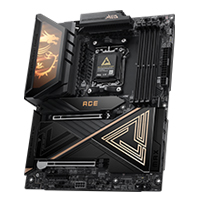
A smaller everyday gaming build with room for practical upgrades
Micro-ATX
Offers a smaller board footprint while retaining useful expansion options on many models
Check available slots and GPU clearance for the exact board and case
A compact PC where case size and desk space are the main priorities
Mini-ITX
Designed for compact builds and smaller cases
Tighter component clearance and fewer expansion options on many models; verify GPU, cooler, radiator, and power supply fit
FAQ
Can a Micro-ATX Motherboard Fit in an ATX Case?
Usually, yes, but you should still confirm that the case manufacturer lists Micro-ATX support on the ATX case in question. Check the case’s motherboard compatibility list before buying.
Do Smaller Motherboards Always Have Fewer Features?
No. Form factor alone does not determine a motherboard’s features. The chipset, product tier, and exact model determine its connectivity and expansion options. Smaller boards may have less physical room for expansion, so compare the specifications of the specific models you are considering to get a better idea of features and support for newer standards.
Is Mini-ITX Harder to Build With?
Yes, it can be more challenging. Because components and cables have less room around them. Before building, check GPU length and thickness, CPU cooler height, radiator support, power supply size, and whether cables like fan power and USB can reach the motherboard headers after a GPU is installed.
oes Motherboard Size Affect Gaming Performance?
Generally, no—not on its own. Motherboard size mainly affects case compatibility, internal layout, and expansion options. Gaming performance depends more directly on the CPU, GPU, memory configuration, cooling, and game settings.
Can an E-ATX Motherboard Fit in an ATX Case?
Not always. E-ATX motherboards are generally larger than standard ATX boards, and their dimensions can vary by model. An ATX case supports an E-ATX motherboard only if the case specifications list E-ATX support and allow the board’s exact dimensions. Check the case’s maximum supported motherboard size and available clearance before buying.