MSI Crosshair Series Guide: Which 16-Inch Gaming Laptop Is Right for You?
Laptops
Midrange does not have to mean middle-of-the-road. In a market where many gaming laptops share the same processor and GPU names, the real differences often come down to how much power the system can sustain, how effectively it stays cool, how good the display feels in motion, and whether the design has any identity beyond a logo on the lid.
That is the space the MSI Crosshair Series is built to compete in. Crosshair focuses on delivering stronger performance headroom, robust cooling, fast QHD+ displays, practical upgradeability, and a deliberately gamer-first design.
This guide explains the three 16-inch models currently at the center of the lineup: the AMD-powered Crosshair A16 HX, the Intel-powered Crosshair 16 HX, and the more fully equipped Crosshair 16 Max HX. We will look at what makes the series different, how each model fits, and why Crosshair is relevant beyond gaming alone.
What Makes the MSI Crosshair Series Different?
Crosshair sits in the broad middle of MSI's gaming portfolio, but it is not designed to feel average. Its value does not come from undercutting every competitor on price. It comes from prioritizing the parts of a gaming laptop that directly shape the experience: CPU and GPU power, cooling, display speed, memory and storage expansion, and an exterior that clearly belongs in a gaming setup.
Performance Goes Where It Matters
The Crosshair 16 HX and Crosshair 16 Max HX can deliver up to 200W of combined CPU and GPU power through MSI OverBoost Technology on supported configurations. This matters because the GPU name alone does not tell the full performance story. A laptop also needs sufficient power and cooling to sustain performance during long gaming sessions and demanding workloads. With MSI OverBoost Technology and Cooler Boost cooling, these Crosshair models give the CPU and GPU more headroom to perform at their best.
Across the family, HX-class processors and GeForce RTX 50 Series graphics provide a strong foundation for AAA gaming, competitive play, content creation, and heavy multitasking. Exact performance will vary by configuration and test conditions. When comparing two gaming laptops with the same GPU, it is worth looking beyond the badge—the power design and cooling system can make a meaningful difference in real-world performance.
QHD+ Displays Built for Fast Games and Detailed Work
The Crosshair A16 HX and Crosshair 16 HX pair a 2560 x 1600 QHD+ resolution with a fast 240Hz refresh rate and 100% DCI-P3 color coverage, delivering fluid motion for competitive games and detailed visuals for creative work.
The Crosshair 16 Max HX offers two QHD+ display options. The 240Hz IPS-level panel prioritizes responsiveness and fluid motion, while the 165Hz OLED panel with VESA DisplayHDR True Black 1000 delivers deeper blacks, richer contrast, and more immersive visuals. Buyers can choose based on whether refresh rate or OLED image quality matters more to them.
Room to Upgrade Instead of Starting Over
All three models support two DDR5 memory slots and two M.2 SSD slots, including one PCIe Gen 5 x4 slot and one PCIe Gen 4 x4 slot. The Crosshair A16 HX and Crosshair 16 HX support up to 96GB of memory, while the Crosshair 16 Max HX supports up to 128GB. That gives the platform room to grow as games, creative projects, and local AI workloads become more demanding.
A Gamer-First Design with Its Own Identity
Performance is only half of the Crosshair story. The series uses a mecha-inspired visual language that feels more purposeful than simply adding RGB to a generic black chassis. On the Crosshair 16 Max HX, an RGB Dragon Shield emblem creates a clear visual signature on the lid, while reflective linework reveals more detail as light moves across the surface.
Inside, tactical palm-rest graphics draw from targeting systems and cockpit control panels. The Crosshair wordmark reinforces the series' themes of precision and performance, while the multi-zone RGB keyboard gives the system a stronger gaming presence when opened. Select rear-facing ports also help move cables away from the sides, keeping a desktop gaming setup cleaner without hiding the machine's aggressive character.
The result is not a minimalist laptop pretending it could be anything. Crosshair is designed for buyers who want their gaming hardware to look distinctive - without turning every surface into a light show.
The 16-Inch Crosshair Lineup at a Glance
The three models share the same performance-first philosophy, but each emphasizes a different buying priority. The right choice depends on whether you prefer AMD or Intel, prioritize a 240Hz IPS-level display or OLED contrast, and need the Max model's additional memory capacity and connectivity.
Model
Platform
Graphics
Display
Best for
Crosshair A16 HX
Up to AMD Ryzen 9 8940HX
Up to RTX 5070
QHD+ 240Hz IPS-level
Users who prefer an AMD platform
Crosshair 16 HX
Up to Intel Core i9-14900HX
Up to RTX 5070
QHD+ 240Hz IPS-leve
Users who want Intel HX performance and a QHD+ 240Hz display for competitive gaming
Crosshair 16 Max HX
Up to Intel Core Ultra 9 290HX Plus
Up to RTX 5070
QHD+ OLED 165Hz / QHD+ IPS-level 240Hz
Users who want an OLED display option, expanded connectivity, and a 24-zone RGB keyboard
Configuration note: Available processors, GPU memory, displays, system memory, storage, and retail configurations vary by model and market. Always confirm the exact SKU before purchase.
Crosshair A16 HX: The AMD Performance Choice
The Crosshair A16 HX brings the series’ performance-first approach to an AMD platform. Available with up to an AMD Ryzen 9 8940HX processor and a GeForce RTX 5070 Laptop GPU, it delivers strong CPU and graphics performance for modern AAA games, creative applications, multitasking, and entry-level local AI workloads.
Its 16-inch QHD+ 240Hz display combines sharp visuals with fluid motion, making it well suited to both competitive gaming and detail-focused creative work. The 100% DCI-P3 color gamut also provides broader color coverage for content creation and entertainment.
With two DDR5 slots supporting up to 96GB of memory and two M.2 SSD slots, the Crosshair A16 HX can accommodate more demanding games and workloads over time. HDMI 2.1, dual USB-C connectivity with DisplayPort and Power Delivery, an 80Wh battery, and a 4-zone RGB keyboard round out its everyday versatility.
Best fit: gamers who prefer AMD and want a versatile RTX-powered laptop for QHD+ gaming, content creation, multitasking, and entry-level local AI workloads.
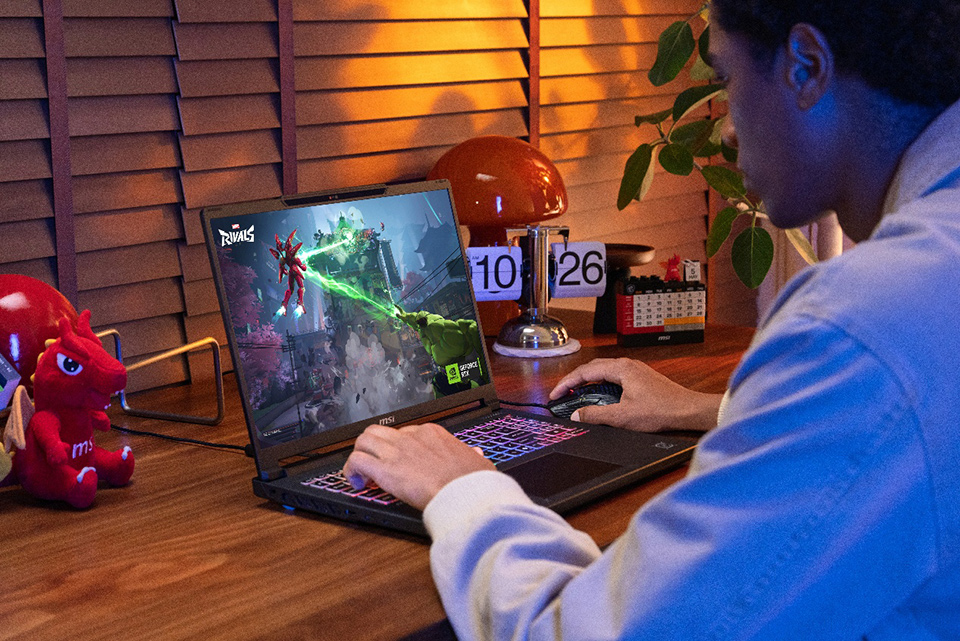
▲ The MSI Crosshair A16 HX pairs an AMD Ryzen 9 8940HX processor with GeForce RTX 5070 graphics for QHD+ gaming, content creation, and entry-level local AI workloads.
Crosshair 16 HX: High-Power Intel Gaming
The Crosshair 16 HX is the direct Intel choice for gamers who prioritize processor and graphics performance, a fast display, and long-term upgradeability over the Max model's OLED panel and expanded feature set.
It is available with up to an Intel Core i9-14900HX processor and GeForce RTX 5070 Laptop GPU with 8GB of GDDR7 memory. Supported configurations can reach up to 200W of combined CPU and GPU power, giving demanding games and multitasking workloads meaningful performance headroom. Its 16-inch QHD+ 240Hz display is especially attractive for competitive players who prioritize fluid motion and responsiveness.
The standard model still includes the essentials that matter over the long term: support for up to 96GB of DDR5 memory, one PCIe Gen 5 and one PCIe Gen 4 M.2 slot, HDMI 2.1, dual USB-C connectivity, an 80Wh battery, and a 4-zone RGB keyboard.
Best fit: competitive gamers, Intel platform buyers, and users who want Crosshair's core high-power gaming experience with a 240Hz QHD+ display.

▲ MSI Crosshair 16 HX delivers up to 200W of combined CPU and GPU power for high-refresh QHD+ gaming and demanding multitasking.
Crosshair 16 Max HX: The Most Complete Crosshair Experience
The Crosshair 16 Max HX is the most feature-rich model in the series. It combines newer Intel Core Ultra HX processors, including up to the Intel Core Ultra 9 290HX Plus, with a GeForce RTX 5070 Laptop GPU for demanding gaming, creative work, and heavy multitasking.
Supported configurations can deliver up to 200W of combined CPU and GPU power through MSI OverBoost Technology. Cooler Boost cooling and phase-change thermal compound help the system maintain consistent performance during extended gaming and creative workloads.
The Crosshair 16 Max HX also offers two QHD+ display options. The 240Hz IPS-level panel prioritizes responsiveness and fluid motion for high-refresh gaming, while the 165Hz OLED panel combines VESA DisplayHDR True Black 1000 with 100% DCI-P3 color coverage for deeper contrast, richer colors, and more immersive visuals.
The Max model supports up to 128GB of memory and adds Thunderbolt 4 connectivity. An illuminated RGB Dragon Shield creates a visible lighting accent on the lid, while reflective mecha-inspired graphics, tactical palm-rest detailing, and the Crosshair wordmark complete the exterior design. A 24-zone RGB keyboard extends the customizable lighting across the keyboard.
Best fit: buyers who want the strongest overall Crosshair configuration, creators who value OLED contrast and color, and gamers who want their laptop's design to feel as purposeful as its hardware.

▲ The MSI Crosshair 16 Max HX offers up to 200W of combined CPU and GPU power, 240Hz IPS-level or 165Hz OLED QHD+ display options, up to 128GB of memory, and Thunderbolt 4 for demanding gaming and creative workloads.
More Than Gaming: What Hybrid AI Looks Like on Crosshair
Crosshair is a gaming series first, and that hierarchy should stay clear. Its RTX 50 Series GPU, HX-class processor, cooling, and upgradeable memory also give the same hardware a second life in AI-assisted creation, streaming, coding, and technical work. The most accurate description is hybrid AI: cloud services handle the largest models and connected tasks, while the laptop's GPU accelerates responsive, private, or real-time work locally.
AI-Accelerated Gaming
NVIDIA DLSS uses AI-powered rendering to improve frame rates and image quality in supported games. On GeForce RTX 50 Series Laptop GPUs, Multi Frame Generation can create additional frames between traditionally rendered frames, helping demanding titles feel smoother when the feature is supported and properly configured.
Cleaner Streams and Calls
NVIDIA Broadcast can use RTX acceleration for background removal, virtual backgrounds, noise reduction, and other audio/video enhancements. For streamers and video creators, that means less cleanup before or after going live - and a more polished feed without sending every effect to a cloud service.
Faster Creative Workflows
RTX acceleration can speed up AI-assisted features in tools such as Adobe Lightroom, Adobe Premiere Pro, Topaz Photo AI, and other creator applications. Practical demonstrations include reducing noise in a high-ISO RAW photo, enlarging an image with Super Resolution, cleaning up speech in a video, or accelerating selected effects and exports.
A First Step into Local AI
With a supported RTX GPU and sufficient system memory, Crosshair can run smaller local language models through tools such as LM Studio, Jan, or Ollama. A 3B-to-8B parameter model quantized to 4-bit is a more realistic starting point for this class of hardware than the very large models often shown on dedicated AI workstations. Running locally can also keep prompts and reference files on the device when privacy matters.
Crosshair can also support entry-level ComfyUI image-generation workflows, local transcription with Whisper, and AI-assisted coding for small personal tools. More advanced ComfyUI pipelines, large local models, model training, and multi-agent workloads require substantially more VRAM and system memory. For local AI use, 32GB of system memory is a sensible baseline, and exact performance will vary by model, quantization, software, and GPU configuration.
STEM, 3D, and Technical Work
HX-class processors, RTX graphics, QHD+ displays, and upgradeable memory also make the Crosshair family relevant to engineering students, 3D designers, and developers. It can handle CAD and 3D workloads, GPU-accelerated rendering, code compilation, data visualization, and other technical tasks that benefit from strong CPU and GPU performance. This makes it a versatile choice for users who need one system for gaming, creation, study, and demanding technical workloads.
Crosshair Max vs. Crosshair: What Is the Difference?
The standard Crosshair 16 HX delivers the core Crosshair gaming experience with an Intel HX processor, GeForce RTX 50 Series graphics, up to 200W of combined CPU and GPU power on supported configurations, and a 240Hz QHD+ IPS-level display.
The Crosshair 16 Max HX builds on that foundation with newer Intel Core Ultra HX processors and a choice between a 240Hz QHD+ IPS-level display and a 165Hz QHD+ OLED display, depending on the configuration. It also adds support for up to 128GB of memory, Thunderbolt 4, an illuminated RGB Dragon Shield, and a 24-zone RGB keyboard.
Intel vs. AMD Crosshair: Which Platform Is Better?
Do not choose a laptop based on the processor logo alone. Compare the complete configuration, including the GPU, display, system memory, storage, connectivity, price, and retailer availability.
The Crosshair A16 HX is the AMD option, pairing up to a Ryzen 9 8940HX processor with GeForce RTX 5070 graphics and a QHD+ 240Hz display. The Crosshair 16 HX emphasizes Intel HX gaming performance and a 240Hz display, while the Crosshair 16 Max HX adds newer Intel Core Ultra HX processors, available OLED visuals, and the series’ most complete feature set. The right choice is the configuration that fits your games and workloads—not the processor badge that wins the loudest argument online.
So which MSI Crosshair Gaming Laptop Should You Choose?
Choose the Crosshair A16 HX if you prefer AMD, or the Crosshair 16 HX for Intel HX performance with a 240Hz QHD+ display. Choose the Crosshair 16 Max HX if you want newer Intel processors, greater memory capacity, Thunderbolt 4, enhanced RGB lighting, or the flexibility to choose between a 240Hz IPS-level display and a 165Hz OLED display.
Frequently Asked Questions
Why does the MSI Crosshair Series punch above its class?
Crosshair prioritizes hardware that directly influences sustained performance: HX-class processors, GeForce RTX 50 Series Laptop GPUs, robust cooling, high combined CPU and GPU power on supported Intel configurations, high-refresh QHD+ displays, and upgradeable memory and storage. Comparative results still depend on the exact competitor, configuration, game, and test conditions.
Is the MSI Crosshair Series a midrange or high-end gaming laptop?
Crosshair occupies a mainstream-to-performance segment in MSI's gaming lineup, but it uses high-performance components and configurations that can challenge conventional expectations for that class. It is best understood as a performance-first gaming series rather than a budget line or a full flagship replacement.
Which MSI Crosshair is best for most gamers?
The right MSI Crosshair depends on your preferred processor platform, display, and features. Choose the Crosshair A16 HX for AMD performance with a 240Hz QHD+ display, or the Crosshair 16 HX for a similar high-refresh experience on an Intel HX platform. Choose the Crosshair 16 Max HX for newer Intel Core Ultra HX processors, a choice between a 240Hz QHD+ IPS-level display and a 165Hz QHD+ OLED display, Thunderbolt 4, higher memory capacity, and enhanced RGB lighting.
Is the Crosshair A16 HX good for 1600p gaming?
Its QHD+ 2560 x 1600 display and GeForce RTX 50 Series GPU options are designed for high-resolution laptop gaming. Actual frame rates depend on the exact GPU configuration, game, graphics settings, power mode, and technologies such as DLSS.
Can MSI Crosshair laptops run AI applications locally?
Yes. Supported RTX configurations can run local language models, ComfyUI workflows, local transcription, AI-assisted coding, NVIDIA Broadcast, and GPU-accelerated creator tools. Larger models and advanced generation workflows require more VRAM and system memory than this product class may provide.
Can I upgrade the memory and storage?
Yes. All three models in this guide have two DDR5 memory slots and two M.2 SSD slots. The Crosshair A16 HX and Crosshair 16 HX support up to 96GB of memory, while the Crosshair 16 Max HX supports up to 128GB, according to the provided specifications.