One Claw, Three Ways to Play: From Handheld to Home Console and Mini PC
Handheld PCs
A powerful gaming handheld can do more than game on the go. With dual Thunderbolt™ 4 ports, the MSI Claw 8 EX AI+ can adapt to different ways you play and use your PC—from handheld gaming to a big-screen setup at home, or even a compact mini PC at your desk.
Whether you’re gaming, creating, or catching up on everyday tasks, the Claw 8 EX AI+ gives you the flexibility to move between different setups with one portable device.
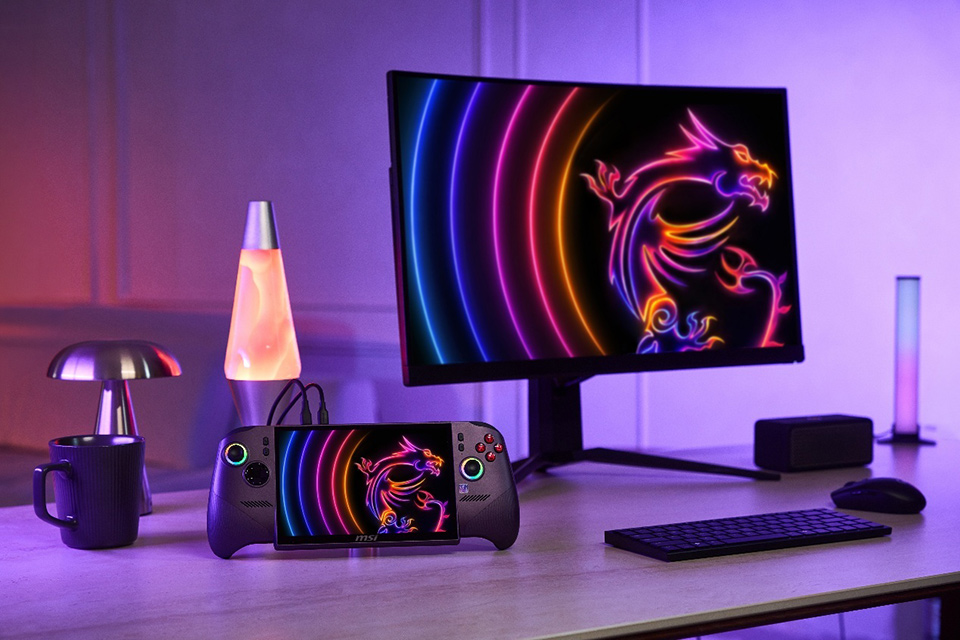
▲ MSI Claw 8 EX AI+ transforms into a compact mini PC with an external monitor, keyboard, and mouse.
One Device, Three Ways to Use It
The MSI Claw 8 EX AI+ is a powerful portable gaming handheld with the connectivity to adapt to different setups depending on where and how you use it.
Play directly on the handheld when you’re on the go. At home, pair it with a compatible dock, TV, and Xbox controller for a console-like gaming setup. At your desk, connect it through a compatible dock to a monitor, keyboard, and mouse to create a compact mini PC setup for productivity and content creation.
Setup
How It Works
Best For
Handheld Gaming
Play directly on the built-in 8-inch display
Gaming on the go
Home Console Setup
Dock to a TV and play with an Xbox controller
Big-screen gaming at home
Mini PC Setup
Dock to a monitor, keyboard, mouse, and peripherals
Productivity and content creation
The result is a handheld that can move with you throughout the day instead of being tied to a single gaming scenario.
Take Your Games from Handheld to the Big Screen
Sometimes you want the portability of a handheld. Other times, you just want to sit back on the couch and play on a bigger screen.
Pair the MSI Claw 8 EX AI+ with a compatible dock and TV, then add an Xbox controller for a familiar console-like gaming setup. For supported local multiplayer games, additional controllers can also be connected so you can play together on the big screen.
The Claw 8 EX AI+ supports external displays through its Thunderbolt™ 4 connectivity with DisplayPort™ support, while a compatible docking solution can expand the setup with additional display and peripheral connections.
Turn the MSI Claw 8 EX AI+ into a Compact Mini PC
When it’s time to put the game down, the Claw 8 EX AI+ can move from your hands to your desk.
Connect the Claw to a compatible dock, then add a monitor, keyboard, and mouse to create a compact desktop-style PC setup for everyday productivity, content creation, web browsing, and other Windows-based tasks.
Its dual Thunderbolt™ 4 ports support DisplayPort™ and Power Delivery 3.0, providing flexible connectivity for compatible displays, docks, and peripherals.
This gives the Claw 8 EX AI+ a role beyond gaming. The same device you use for handheld gaming can become part of your everyday desktop setup when you sit down to work or create.
Why Dual Thunderbolt™ 4 Ports Matter
The versatility of the MSI Claw 8 EX AI+ comes down to connectivity.
With two Thunderbolt™ 4 ports, the Claw provides flexible options for connecting compatible displays, docks, storage, and other peripherals. Both ports support DisplayPort™ and Power Delivery 3.0, making it easier to build different setups around the same device.
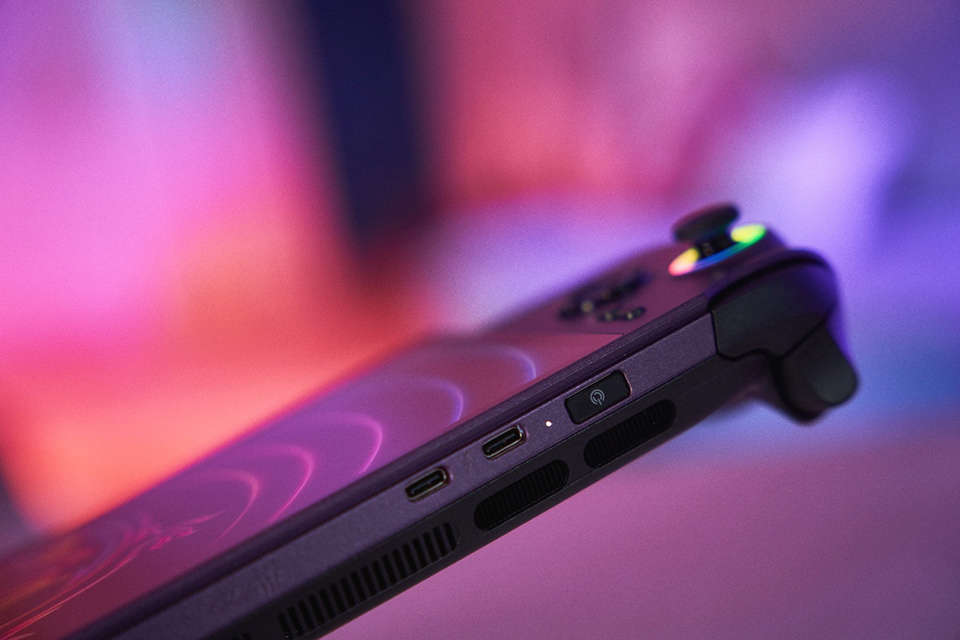
▲ MSI Claw 8 EX AI+ features dual Thunderbolt™ 4 ports for flexible display and peripheral connectivity.
For handheld gaming, this means you are not limited to the built-in screen and controls. The Claw can expand into a larger gaming or desktop environment whenever you need it.
Dual Thunderbolt™ 4 Connectivity
What It Enables
DisplayPort™ support
Connect compatible external displays
Dock connectivity
Expand display and peripheral options
Peripheral connectivity
Add keyboards, mice, storage, and other accessories
Power Delivery 3.0
Supports compatible USB-C power delivery
Rather than defining how you have to use the device, the connectivity lets you build the setup around how you want to use it.
From Gaming on the Go to Your Living Room and Desk
The real advantage of the Claw 8 EX AI+ is not simply that it can connect to more accessories. It is how those connections expand where the device fits into your day.
On the go, play directly on the Claw as a powerful portable gaming handheld.
In the living room, pair it with a compatible dock, TV, and Xbox controller for a console-like big-screen gaming experience.
At your desk, connect it through a compatible dock to a monitor, keyboard, and mouse for a compact mini PC setup.
One device can move between all three scenarios without changing the PC at the center of the experience.
See Three Ways to Use the MSI Claw 8 EX AI+
See how the MSI Claw 8 EX AI+ moves between handheld gaming, a home console-style setup, and a compact mini PC.
MSI Claw 8 EX AI+ Mini PC and Connectivity FAQ
Can the MSI Claw 8 EX AI+ be used as a mini PC?
Yes. Connect the MSI Claw 8 EX AI+ to a compatible monitor, keyboard, mouse, and other peripherals to create a compact desktop-style PC setup for everyday productivity and content creation.
Can the MSI Claw 8 EX AI+ connect to a TV?
Yes. The MSI Claw 8 EX AI+ supports external displays through its Thunderbolt 4 connectivity. Pair it with a compatible dock, TV, and Xbox controller to create a console-like big-screen gaming setup.
Can the MSI Claw 8 EX AI+ connect to an external monitor?
Yes. The Thunderbolt 4 ports on the MSI Claw 8 EX AI+ support DisplayPort output, allowing the handheld to connect to compatible external displays.
How many Thunderbolt 4 ports does the MSI Claw 8 EX AI+ have?
The MSI Claw 8 EX AI+ features two Thunderbolt 4 ports, with support for DisplayPort and Power Delivery 3.0.
Can I use a keyboard and mouse with the MSI Claw 8 EX AI+?
Yes. Connect the Claw 8 EX AI+ through a compatible dock to a keyboard, mouse, monitor, and other peripherals to create a compact desktop-style setup for gaming and everyday PC tasks.
What can I use the MSI Claw 8 EX AI+ for besides handheld gaming?
The MSI Claw 8 EX AI+ can expand beyond handheld gaming into a big-screen gaming setup or compact mini PC. With compatible displays and peripherals, it can also be used for everyday productivity and content creation.