Beast of Reincarnation: Best Settings and GPU Benchmarks for RTX 5080, 5070 and More
Graphics Cards
The short answer: for Beast of Reincarnation at 1440p with ray tracing on, the MSI GeForce RTX™ 5070 12G is the card to buy — 94.4 FPS natively on the Highest preset and 113.0 FPS with DLSS Ultra Quality, with 154.6 FPS on tap from the Performance profile if you want to fill a 144 Hz panel. For 4K, step up to the RTX 5080, the only card past 70 FPS natively at Highest. The best settings on any RTX 50 card at 1440p or 1080p are Highest fidelity + DLSS Ultra Quality, ray tracing on.
Key takeaways
- Best card overall: RTX 5070 12G at 1440p, 113.0 FPS with DLSS at maximum fidelity.
- Best card for 4K: RTX 5080 16G, 74.9 FPS native and 94.8 FPS with DLSS at Highest.
- 1440p is the sweet spot. All five cards clear 60 FPS natively at Highest with ray tracing on, from 63.6 FPS on the RTX 5060 to 119.7 FPS on the RTX 5080.
- VRAM: 8GB is enough at 1080p and workable at 1440p. At 4K on Highest the game allocates around 10 GB, so 16GB is the safer buy.
- DLSS raised frame rates and cut power draw in all 30 pairs we logged. Up to +92.8% FPS on the RTX 5060 at 4K Medium, and 32% less power on the RTX 5080 at 1080p Medium.
Game Freak's Beast of Reincarnation launched on August 4 and went straight to No. 1 on Steam's global top-sellers chart (Gamemeca, 2026). You play Emma, a swordswoman crossing a ruined, overgrown Japan with her wolf companion Koo, and with ray-traced lighting doing most of the visual heavy lifting, it asks a real question of your graphics card.
We benchmarked five GeForce RTX 50 graphics cards — the RTX 5080, RTX 5070 Ti, RTX 5070, RTX 5060 Ti and RTX 5060 — at 4K, 1440p and 1080p, with DLSS off and DLSS on, across 60 logged configurations.
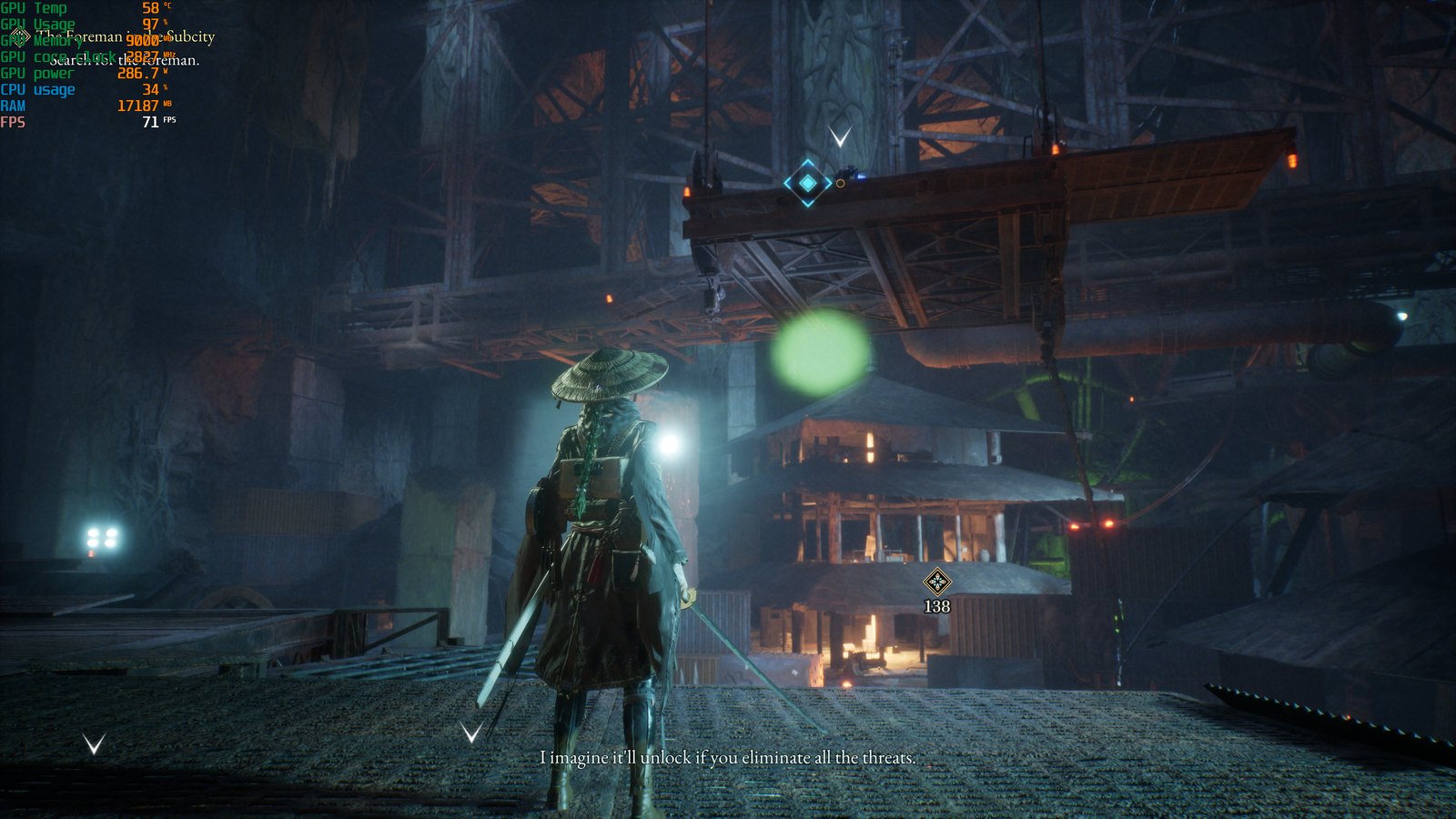
Beast of Reincarnation at 4K, Highest fidelity, ray tracing on, native rendering — MSI GeForce RTX 5080 16G. The overlay reads 71 FPS and 286.7 W at this moment, against a 74.9 FPS run average.
Test Setup: Hardware, Settings, and More
Hardware Setup
All five graphics cards ran on the same MSI platform, so the only thing that changes from result to result is the GPU itself.
- Motherboard: MSI MPG X870E CARBON WIFI
- CPU: AMD Ryzen 7 9800X3D
- CPU Cooler: MSI MEG CORELIQUID S360
- Memory: TOUGHRAM XG RGB D5 DDR5 6600MT/s 32GB (16GB × 2)
- Storage: MSI SPATIUM M570 PRO PCIe 5.0 NVMe M.2 FROZR
- Power Supply: MSI MEG Ai1300P PCIE5
- Graphics cards: MSI GeForce RTX 5080 16G, RTX 5070 Ti 16G, RTX 5070 12G, RTX 5060 Ti 16G, RTX 5060 8G
- GPU driver: NVIDIA 610.88
In-Game Settings
We ran two settings profiles — one for image quality, one for frame rate — and measured each of them twice at every resolution: once with upscaling off, once with DLSS on.
The two settings profiles used throughout this article
Profile
Graphical Fidelity
Upscaling Quality
Ray Tracing
Quality profile
Highest
NVIDIA DLSS — Ultra Quality
On
Performance profile
Medium
NVIDIA DLSS — Performance
On
What DLSS Ultra Quality and DLSS Performance actually do: both render the game at a lower internal resolution and upscale the result to your monitor's resolution. Ultra Quality renders at a higher internal resolution than Performance, so it upscales less aggressively and keeps more detail, at the cost of more GPU time. Performance mode is the opposite trade.
Ray tracing was on for every single run. We held it there across all five cards so one consistent baseline applies to every number in this article. Ray tracing is a setting you can adjust in Beast of Reincarnation, not a requirement, and turning it down will recover performance — but we did not measure that, so you will not find any RT-off figures here.
Beast of Reincarnation GPU Benchmarks for RTX 50-Series: DLSS ON vs. DLSS OFF
On the Performance profile, DLSS gains get bigger as you move down the RTX 50 lineup. At 4K the RTX 5060 nearly doubles its frame rate, gaining 92.8%, while the flagship RTX 5080 gains 55.0%. The RTX 5060 Ti, 5070 and 5070 Ti land in between at 85.4%, 72.9% and 60.4%. The same ordering holds at 1440p, from 54.0% on the RTX 5060 down to 21.8% on the RTX 5080, and at 1080p, from 43.1% down to 8.5%.
That ordering comes down to where each card is bottlenecked in Beast of Reincarnation. At native 4K the entry-level cards have their raster pipeline completely saturated, so cutting the internal render resolution frees an enormous amount of headroom; the RTX 5080 already has spare capacity, so there is less for DLSS to reclaim. The Quality profile does not follow that pattern — Ultra Quality renders at a far higher internal resolution than Performance, and at 4K the gains peak in the middle of the lineup at 30.4% on the RTX 5070, tapering to 26.6% on the RTX 5080 and 25.9% on the RTX 5060. We did not isolate why, so treat the Performance-profile ordering as the reliable one. There is a bonus, too — because DLSS renders fewer pixels, it also lowers power draw. In all 30 DLSS on/off pairs we logged, enabling it raised frame rates and reduced watts at the same time. At 4K Highest the RTX 5080 fell from 285.2 W to 261.8 W, and at 1080p Medium it dropped from 199.3 W to 134.8 W, a 32% cut, while gaining 13.7 FPS.
Beast of Reincarnation GPU Benchmarks for 4K: Best Visuals and Full Ray Tracing
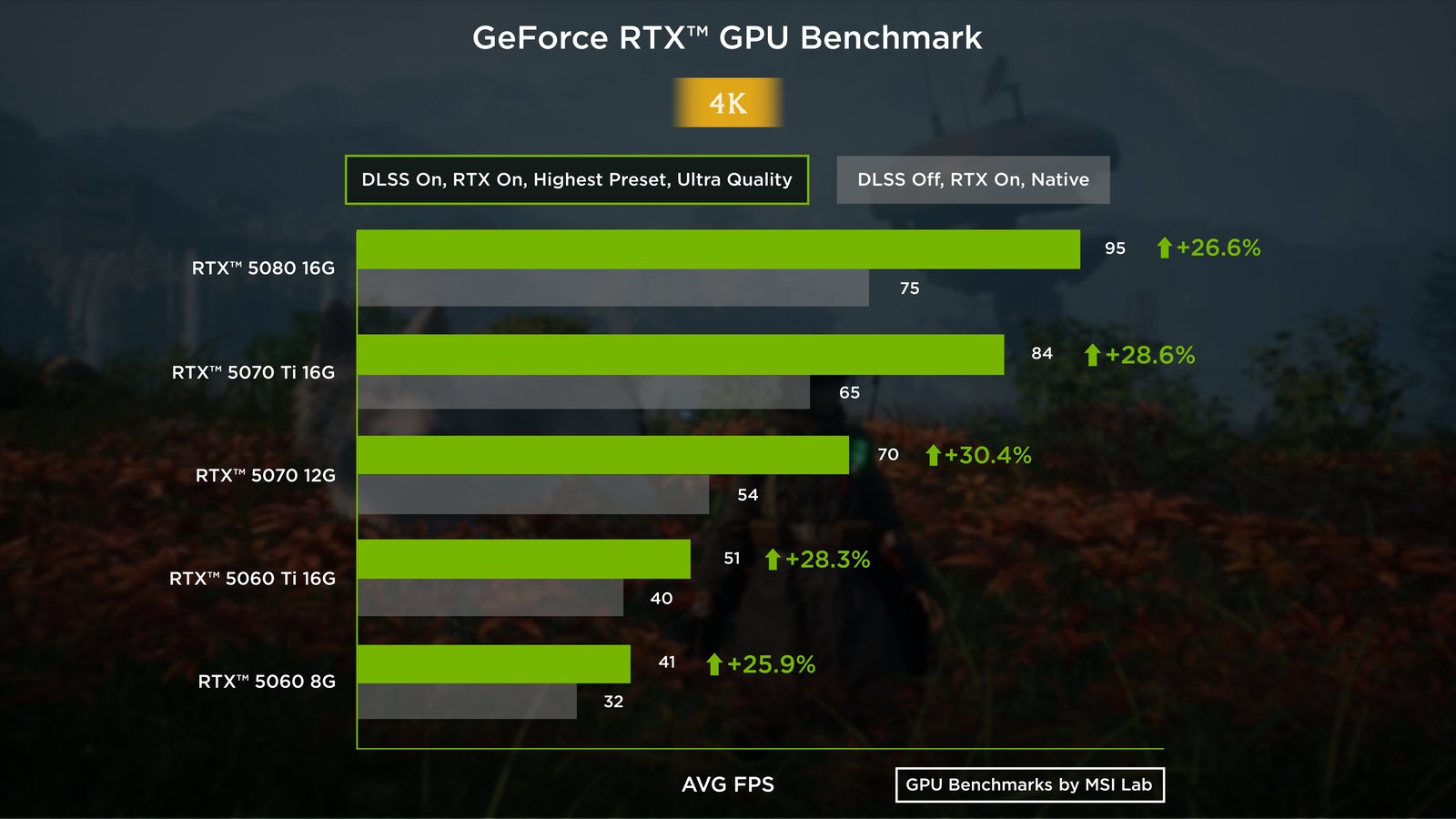
Beast of Reincarnation at 4K Highest, ray tracing on — DLSS Ultra Quality lifts the RTX 5080 from 74.9 to 94.8 FPS and the RTX 5070 Ti from 65.0 to 83.6 FPS.
Average FPS at 3840×2160, ray tracing on
Graphics card
Preset
DLSS Off
(Avg. FPS)
(Avg. FPS)
DLSS On
(Avg. FPS)
(Avg. FPS)
RTX 5080 16G
Highest
74.9
94.8 (Ultra Quality)
RTX 5080 16G
Medium
93.2
144.5 (Performance)
RTX 5070 Ti 16G
Highest
65.0
83.6 (Ultra Quality)
RTX 5070 Ti 16G
Medium
83.1
133.3 (Performance)
RTX 5070 12G
Highest
53.6
69.9 (Ultra Quality)
RTX 5070 12G
Medium
69.3
119.8 (Performance)
RTX 5060 Ti 16G
Highest
39.6
50.8 (Ultra Quality)
RTX 5060 Ti 16G
Medium
51.4
95.3 (Performance)
RTX 5060 8G
Highest
32.4
40.8 (Ultra Quality)
RTX 5060 8G
Medium
44.4
85.6 (Performance)
4K on the Highest Preset
At 4K with the Highest preset and ray tracing on, two of the five cards clear 60 FPS in Beast of Reincarnation without any upscaling: the RTX 5080 at 74.9 FPS and the RTX 5070 Ti at 65.0 FPS. Switch DLSS Ultra Quality on and the 5080 jumps to 94.8 FPS while the 5070 Ti settles at 83.6 FPS, with minimum frame rates of 85.0 and 74.9 FPS behind those averages. That is comfortable, high-fidelity 4K.
The RTX 5070 sits right on the edge natively at 53.6 FPS and reaches 69.9 FPS with DLSS. The two RTX 5060-class cards are not built for 4K at Highest, at 39.6 and 32.4 FPS native.
4K on the Medium Preset
The Medium preset changes the picture for the RTX 5060-class cards at 4K. Drop to Medium with DLSS Performance and every card in the lineup averages above 85 FPS at 4K, ray tracing still on. The RTX 5060 goes from 44.4 to 85.6 FPS, the RTX 5060 Ti reaches 95.3 FPS, and the RTX 5080 breaks 144 FPS, which is proper 4K high-refresh gaming. For anyone on an RTX 5070 or below with a 4K monitor, this profile is a far better experience than a stripped-back Highest preset.
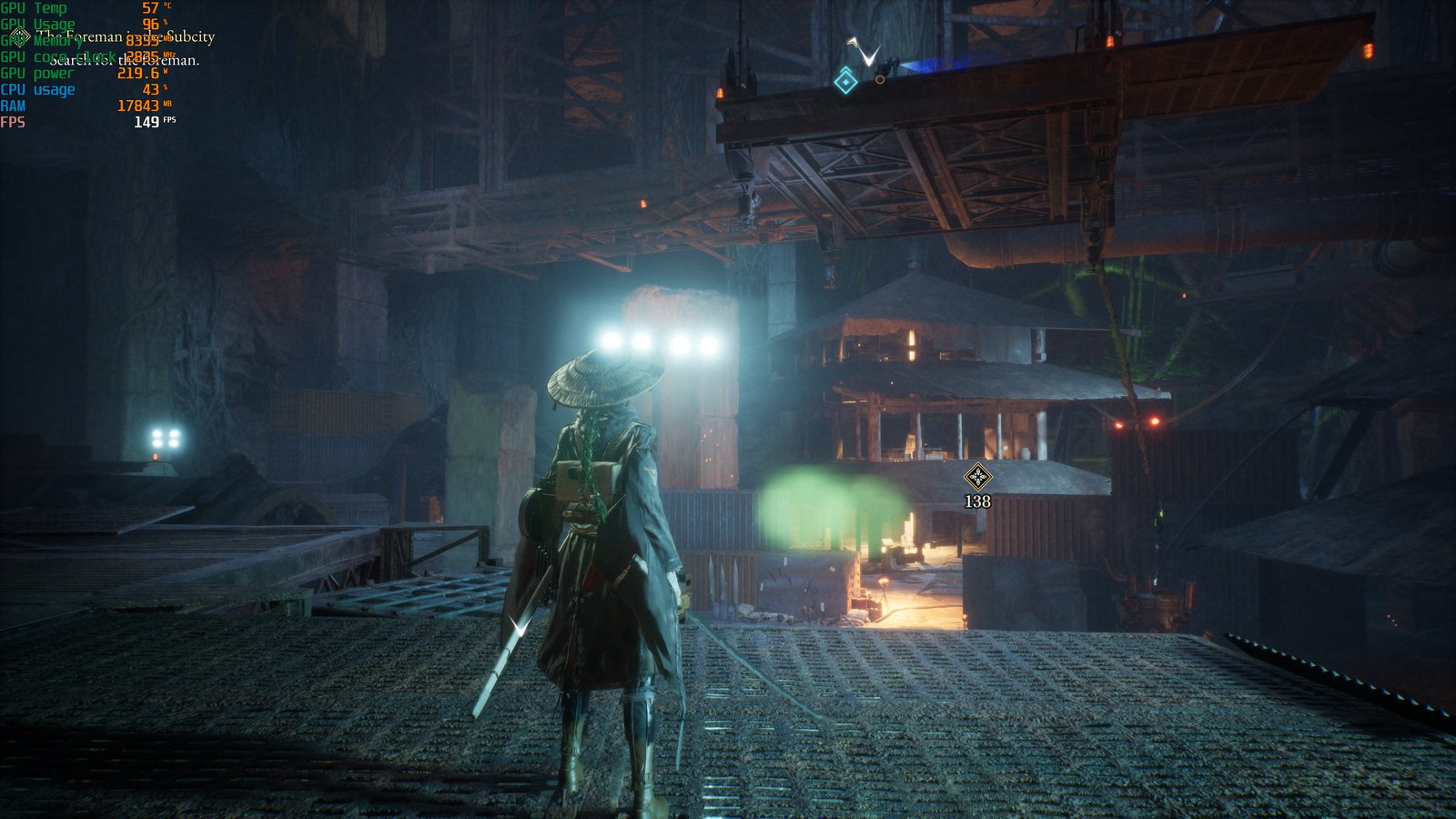
Beast of Reincarnation at the same scene at 4K on the Performance profile — Medium fidelity, DLSS Performance, ray tracing still on. The overlay reads 149 FPS and 219.6 W; the RTX 5080 averages 144.5 FPS across the run, against 93.2 FPS native.
Beast of Reincarnation GPU Benchmarks for 1440p: Balancing Visuals and High Frame Rates
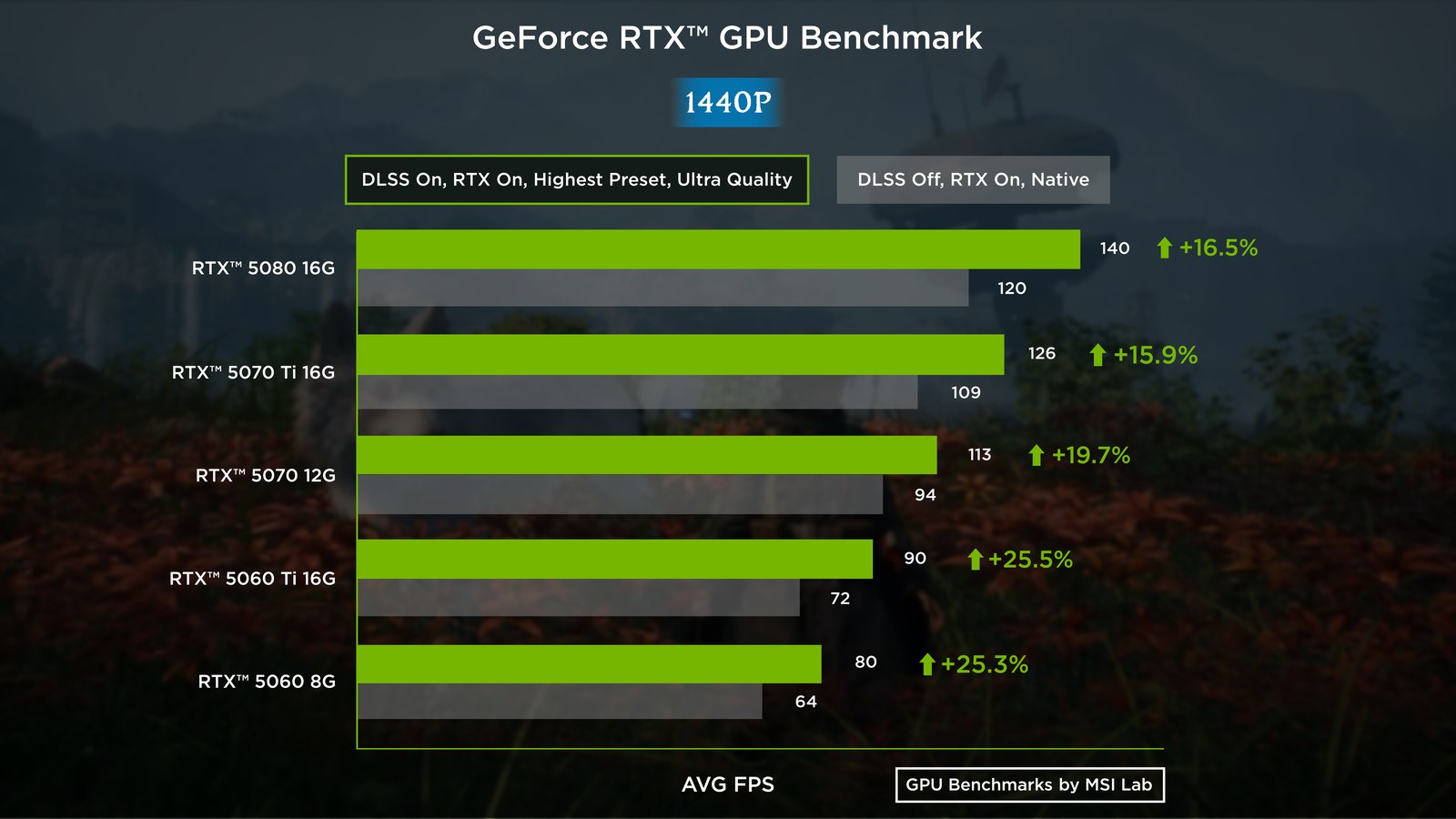
Beast of Reincarnation at 1440p Highest, ray tracing on — all five RTX 50 cards clear 60 FPS natively, from 63.6 FPS on the RTX 5060 to 119.7 FPS on the RTX 5080.
Average FPS at 2560×1440, ray tracing on
Graphics card
Preset
DLSS Off
(Avg. FPS)
(Avg. FPS)
DLSS On
(Avg. FPS)
(Avg. FPS)
RTX 5080 16G
Highest
119.7
139.4 (Ultra Quality)
RTX 5080 16G
Medium
139.6
170.0 (Performance)
RTX 5070 Ti 16G
Highest
108.9
126.2 (Ultra Quality)
RTX 5070 Ti 16G
Medium
127.2
157.7 (Performance)
RTX 5070 12G
Highest
94.4
113.0 (Ultra Quality)
RTX 5070 12G
Medium
114.8
154.6 (Performance)
RTX 5060 Ti 16G
Highest
71.7
90.0 (Ultra Quality)
RTX 5060 Ti 16G
Medium
89.9
133.3 (Performance)
RTX 5060 8G
Highest
63.6
79.7 (Ultra Quality)
RTX 5060 8G
Medium
79.4
122.3 (Performance)
1440p is the sweet spot for Beast of Reincarnation on RTX 50 hardware. At 1440p on Highest with ray tracing on, every card we tested clears 60 FPS natively — from 63.6 FPS on the RTX 5060 up to 119.7 FPS on the RTX 5080. No compromises, no upscaling needed.
Add DLSS Ultra Quality and the 5080 and 5070 Ti run past 120 FPS at full ray tracing, the RTX 5070 holds 113.0 FPS, and even the RTX 5060 averages 79.7 FPS at maximum fidelity. If you are feeding a 144 Hz panel, the Performance profile gets you there from the RTX 5070 upwards — 154.6 FPS on the RTX 5070, 157.7 FPS on the RTX 5070 Ti and 170.0 FPS on the RTX 5080, ray tracing still switched on. The RTX 5060 Ti and RTX 5060 land short at 133.3 and 122.3 FPS, and only the RTX 5080 clears 165 FPS at 1440p.
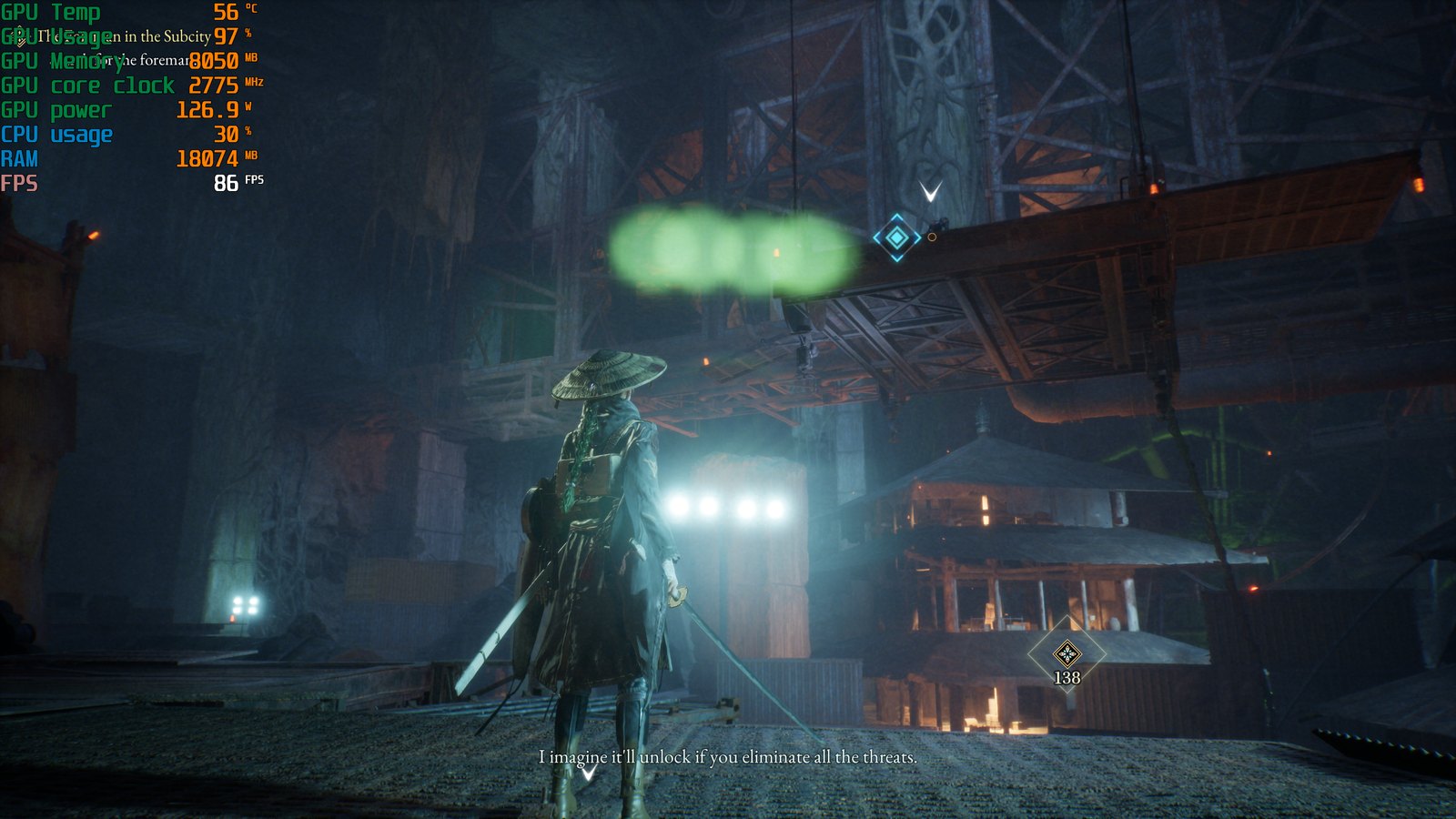
Beast of Reincarnation at 1440p, Highest fidelity, ray tracing on, DLSS Ultra Quality — MSI GeForce RTX 5060 Ti 16G, 86 FPS and 126.9 W on the overlay against a 90.0 FPS run average.
Beast of Reincarnation GPU Benchmarks for 1080p: High Refresh on Any RTX 50 Card
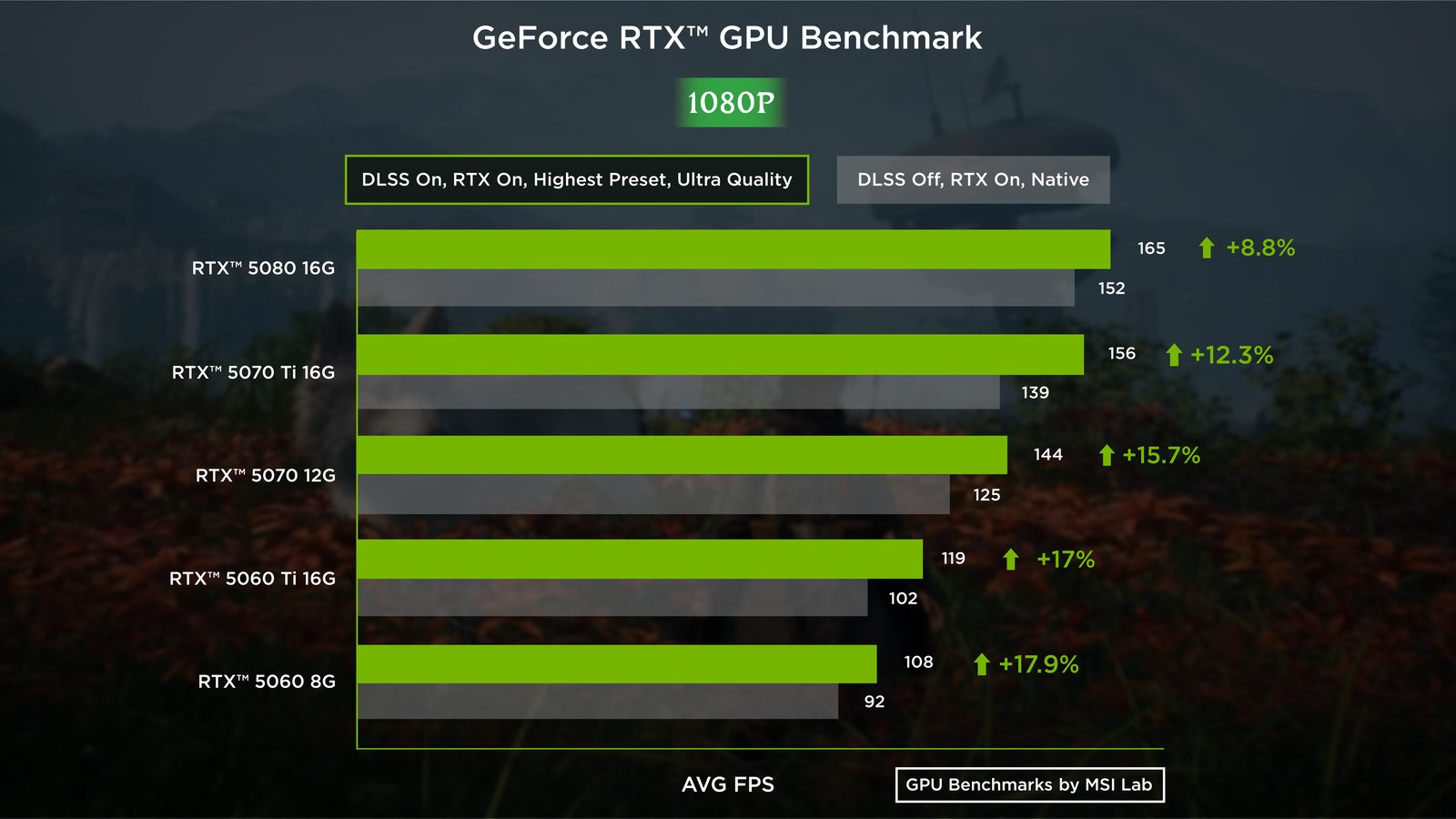
Beast of Reincarnation at 1080p Highest, ray tracing on — with DLSS Ultra Quality every card lands between 108.1 and 165.3 FPS.
Average FPS at 1920×1080, ray tracing on
Graphics card
Preset
DLSS Off
(Avg. FPS)
(Avg. FPS)
DLSS On
(Avg. FPS)
(Avg. FPS)
RTX 5080 16G
Highest
152.0
165.3 (Ultra Quality)
RTX 5080 16G
Medium
162.0
175.7 (Performance)
RTX 5070 Ti 16G
Highest
138.7
155.7 (Ultra Quality)
RTX 5070 Ti 16G
Medium
153.5
172.6 (Performance)
RTX 5070 12G
Highest
124.6
144.1 (Ultra Quality)
RTX 5070 12G
Medium
143.3
168.8 (Performance)
RTX 5060 Ti 16G
Highest
101.7
118.9 (Ultra Quality)
RTX 5060 Ti 16G
Medium
119.3
162.3 (Performance)
RTX 5060 8G
Highest
91.7
108.1 (Ultra Quality)
RTX 5060 8G
Medium
108.9
155.8 (Performance)
At 1080p, every RTX 50 card runs Beast of Reincarnation fast before you touch a single upscaling option — 91.7 FPS on the RTX 5060, 152 FPS on the RTX 5080. With DLSS Ultra Quality every card lands between 108.1 and 165.3 FPS, and on the Performance profile they bunch up between 155.8 and 175.7 FPS.
At 1080p, Beast of Reincarnation compresses the gap between the entry-level RTX 5060 and the flagship RTX 5080 to under 20 FPS on the Performance profile. Once the resolution stops being the limit, you do not need to spend flagship money to fill a fast 1080p monitor.
Let's Talk Memory: How Much VRAM Does Beast of Reincarnation Need at 4K, 1440p and 1080p?
Beast of Reincarnation allocates around 10 GB of VRAM at 4K on the Highest preset, 8.7–9.0 GB at 1440p and 8.2–8.3 GB at 1080p, all with ray tracing on and upscaling off. Raw FPS is the headline number, but VRAM capacity is what decides whether those frames arrive evenly. Ray-traced lighting and high-resolution textures both lean hard on the memory buffer, and once you run past what the card has, you get hitching and textures that fail to load in properly — the kind of thing an average frame rate never shows you.
Allocation is not the same as need.The figures below are VRAM allocation: how much memory the game reserves, not necessarily how much it actively requires. On a card with headroom, allocation usually runs above true demand. On a card at its limit, allocation simply stops at the ceiling, which tells you the card has run out rather than that the game needed less.
VRAM at 4K
At 4K on the Highest preset, without upscaling:
GPUs
(4K, Highest)
(4K, Highest)
Beast of Reincarnation
(DLSS Off) Avg. FPS
(DLSS Off) Avg. FPS
Beast of Reincarnation
(DLSS Off) VRAM Usage
(DLSS Off) VRAM Usage
RTX 5080 16G
74.9
10.8 GB
RTX 5070 Ti 16G
65.0
10.0 GB
RTX 5070 12G
53.6
10.1 GB
RTX 5060 Ti 16G
39.6
10.1 GB
RTX 5060 8G
32.4
7.3 GB
Without upscaling, Beast of Reincarnation allocates roughly 10 GB at 4K on the Highest preset. The RTX 5070 and its 12GB buffer are close to the line, while the 16GB cards have plenty of room to spare.
The RTX 5060 8G is the clear outlier, allocating just 7.3 GB — not because it needs less than the others, but because 7.3 GB is nearly everything it has once the driver and desktop have taken their share. It is running at its own ceiling.
The same test with DLSS Ultra Quality on:
GPUs
(4K, Highest)
(4K, Highest)
Beast of Reincarnation
(DLSS On) Avg. FPS
(DLSS On) Avg. FPS
Beast of Reincarnation
(DLSS On) VRAM Usage
(DLSS On) VRAM Usage
RTX 5080 16G
94.8
10.4 GB
RTX 5070 Ti 16G
83.6
9.4 GB
RTX 5070 12G
69.9
9.7 GB
RTX 5060 Ti 16G
50.8
10.3 GB
RTX 5060 8G
40.8
7.3 GB
DLSS renders at a lower internal resolution, so it takes a little pressure off the memory buffer too — the RTX 5080, 5070 Ti and 5070 give back 0.4 to 0.6 GB while gaining 26.6 to 30.4% more frames. The RTX 5060 Ti is the exception in the other direction, ticking up 0.2 GB — with 16GB free it has no reason to economise. The RTX 5060 8G does not move at all: 7.3 GB with DLSS off, 7.3 GB with DLSS on. There is nothing left for it to give back.
Why the RTX 5060 8G Behaves Differently
The RTX 5060 8G's memory ceiling shows up in frame consistency, not just in average FPS. At 4K Highest the RTX 5060 8G holds its minimum frame rate at only 66% of its average, where the other four cards hold 88–89%. In absolute terms that minimum drops to 21.5 FPS, against 34.7 FPS on the RTX 5060 Ti one tier above. That is the signature of a memory-limited card rather than a simply slower one.
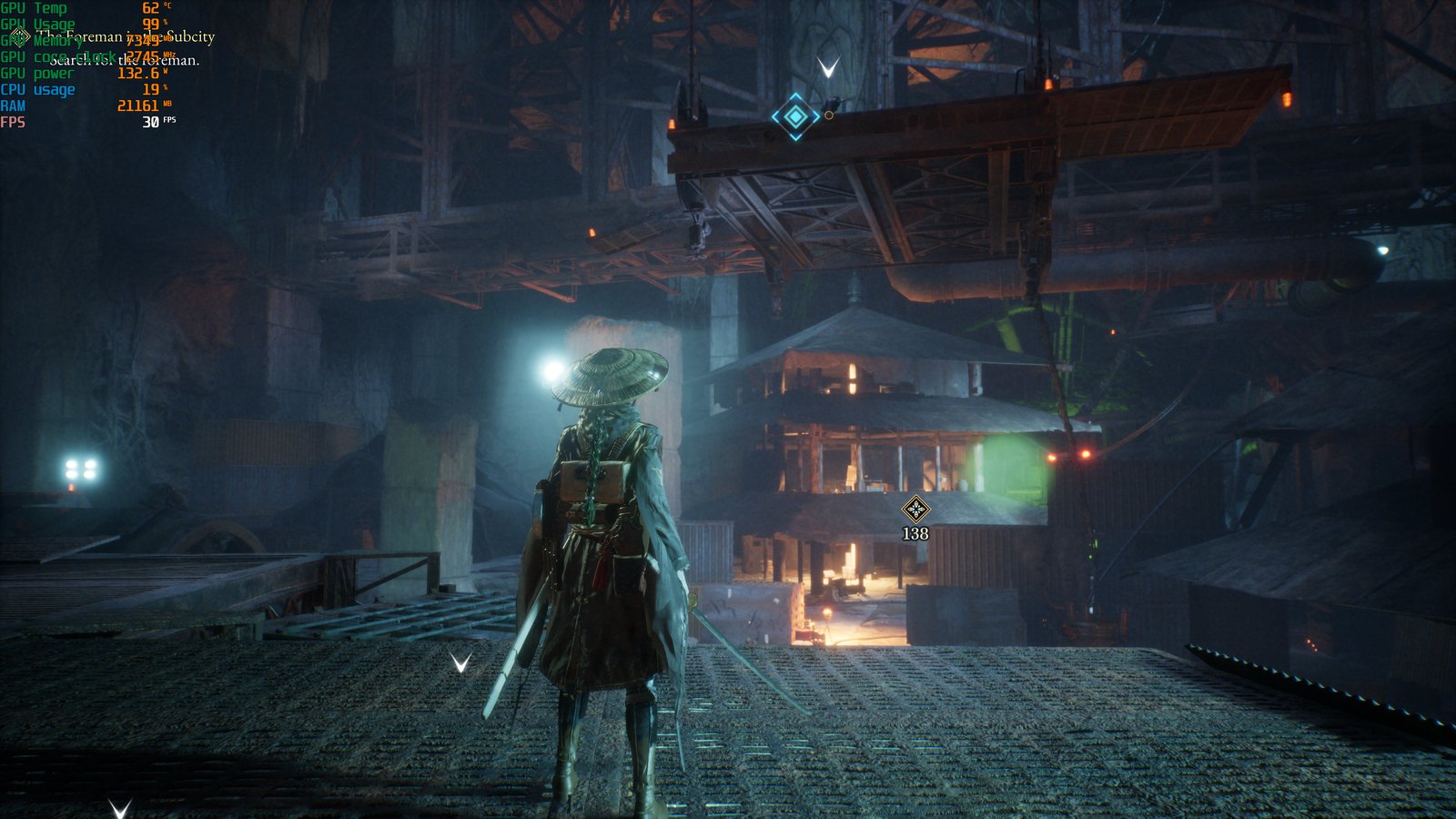
Beast of Reincarnation at the same 4K Highest scene on the MSI GeForce RTX 5060 8G — the overlay reads 7,349 MB of VRAM at 30 FPS, effectively the card's usable ceiling.
VRAM at 1440p and 1080p
Below 4K, the 8GB constraint stops mattering in Beast of Reincarnation. At 1440p the game asks for 8.7–9.0 GB, and at 1080p only 8.2–8.3 GB, with the RTX 5060 8G sitting at 7.3 GB and 7.0 GB respectively — inside its budget both times, and its minimum frame rate falls back in line with the rest of the lineup, at 88% of its average at 1440p and 89% at 1080p against 88–90% on the other four cards. So: 8GB is enough at 1080p, workable at 1440p, and at 4K with Highest fidelity and ray tracing on, 16GB is the more comfortable choice. That is exactly why the RTX 5060 Ti comes in a 16GB configuration.
What Graphics Card Do You Need for Beast of Reincarnation?
- 4K — MSI GeForce RTX™ 5080 16G GAMING TRIO OC: the only card that clears 70 FPS natively at 4K on the Highest preset with ray tracing on (74.9 FPS), reaching 94.8 FPS with DLSS and 144.5 FPS on the Performance profile.
- 4K on a budget — MSI GeForce RTX™ 5070 Ti 16G GAMING TRIO OC: 65.0 FPS native at Highest, 83.6 FPS with DLSS, 133.3 FPS on the Performance profile.
- 1440p — MSI GeForce RTX™ 5070 12G GAMING TRIO OC: 113.0 FPS at Highest with DLSS and 154.6 FPS on the Performance profile — enough to saturate a 144 Hz panel.
- 1440p and 1080p all-rounder — MSI GeForce RTX™ 5060 Ti 16G GAMING TRIO OC: 90.0 FPS at 1440p Highest with DLSS, 118.9 FPS at 1080p Highest, plus 16GB that keeps you clear of the 4K VRAM ceiling.
- 1080p high refresh — MSI GeForce RTX™ 5060 8G GAMING TRIO OC: 108.1 FPS at Highest with DLSS and 155.8 FPS on the Performance profile.
The best settings for Beast of Reincarnation, by card and resolution: Highest + DLSS Ultra Quality for 4K on an RTX 5080 or 5070 Ti, Medium + DLSS Performance for 4K on an RTX 5070 or below, and Highest + DLSS Ultra Quality for 1440p and 1080p on any card in the RTX 50 lineup.
Watch the Beast of Reincarnation RTX 50 Series Benchmark
See how Beast of Reincarnation performs on GeForce RTX 50 Series GPUs in this benchmark video.
Beast of Reincarnation Performance FAQ
Can the RTX 5060 run Beast of Reincarnation?
Yes. At 1080p on Highest with ray tracing and DLSS Ultra Quality it averages 108.1 FPS, rising to 155.8 FPS on the Performance profile. At 1440p Highest with DLSS it holds 79.7 FPS. 4K at Highest is beyond it at 40.8 FPS, but Medium plus DLSS Performance brings 4K to 85.6 FPS.
Is 8GB of VRAM enough for Beast of Reincarnation?
At 1080p, yes — the RTX 5060 8G requests only 7.0 GB there. At 4K on Highest it is not: cards with more memory allocate 10.0–10.8 GB, and the 8GB card's minimum frame rate falls to 66% of its average versus 88–89% on every other card. For 4K, 16GB is the safer choice.
What FPS does the RTX 5080 get at 4K?
74.9 FPS natively at Highest with ray tracing on, 94.8 FPS with DLSS Ultra Quality, and 144.5 FPS on Medium plus DLSS Performance.
How much performance does DLSS add?
Between +8.5% and +92.8%, depending on card, resolution and profile. Gains are largest at 4K on the Performance profile and on lower-tier cards.
What are the best settings for Beast of Reincarnation?
For 4K on an RTX 5080 or 5070 Ti, use Highest fidelity with DLSS Ultra Quality. For 4K on an RTX 5070 or below, use Medium fidelity with DLSS Performance. For 1440p and 1080p, Highest fidelity with DLSS Ultra Quality works on every card in the RTX 50 lineup, ray tracing included.
Which resolution is the sweet spot?
1440p. Every card we tested clears 60 FPS natively at Highest with ray tracing on, and all five exceed 79 FPS with DLSS enabled.