DDR4 vs DDR5: Which RAM Should You Choose for Your PC Build?
Motherboards
The Memory Dilemma Every PC Builder Faces
Selecting the right RAM has become a pivotal decision for PC enthusiasts in 2026. Within just half a year, we’ve shifted from a simple attitude of “fill it up” to a mindset shaped by delayed gratification, where availability and pricing dictate how much RAM you can realistically target. This change demands far more planning to optimally spec a PC DIY project, replacing a step that used to be relatively simple.
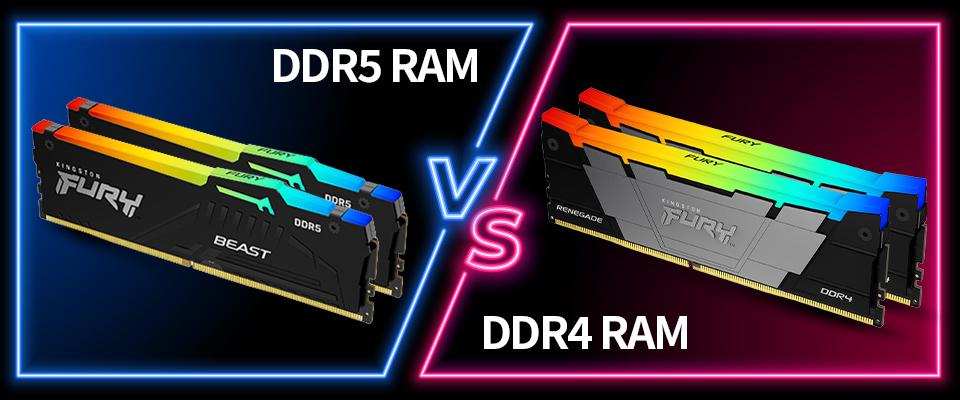
One of the biggest decisions a PC builder faces in the current environment is whether to configure a system using DDR4 or DDR5. As platforms evolve, the gap between generations has widened, leaving builders to wonder if the classic DDR4 still holds value or if DDR5 is the only way forward.
TL;DR: The Core Conclusion
- DDR5 is now the mandatory choice for 2026 flagship platforms, including AMD’s AM5 and Intel’s LGA1851.
- DDR4 remains a viable option only for budget-conscious upgrades on aging legacy platforms.
- Performance Gap: DDR4 peaks at approximately ~5333 MT/s (OC), whereas high-end DDR5 kits now reach blistering speeds of 9200+ MT/s (OC).
When evaluating the memory market situation, the price-to-performance ratio has shifted heavily in favor of the newer standard, making DDR5 the standard for any modern build. This is particularly true where your PC system will be used in content creation and professional workloads.
What Are the Core Differences Between DDR4 and DDR5?
Understanding the technical leap between these two generations is essential for a stable system. DDR5 is not just "faster"; it features a complete architectural overhaul, including on-die ECC for internal DRAM reliability and on-module Power Management Integrated Circuits (PMICs).
Specification Comparison Table
Feature
DDR4
DDR5
Frequency Range
2133 - 5333+ MT/s
4800 - 9200+ MT/s
Operating Voltage
1.2V
1.1V
Max Module Capacity
32GB
64GB+
Max System Capacity
128GB
256GB
Overclocking Tech
Intel XMP 2.0
Intel XMP 2.0 XMP 3.0 / AMD EXPO
Physical Slot
288-Pin (Incompatible)
288-Pin (Incompatible)
Crucially, the physical notch on the modules is different. To avoid purchasing parts that won't fit, always perform a motherboard compatibility check before finalizing your cart.
Does DDR5 Actually Improve Gaming Performance?
The transition to DDR5 in 2026 offers tangible benefits in high-refresh-rate gaming and productivity. Data shows that higher bandwidth directly translates to smoother 1% low FPS. Game testers pay close attention to this seemingly minor metric because 1% represents a substantial number of frames on a performant modern system, and these low-point dips can mar an otherwise slick and smooth experience.
In internal testing, using the Memory Extension Mode on DDR5-7200 configurations resulted in gaming performance gains of up to 21%. Furthermore, pairing DDR5-7600 with High-Efficiency Mode can boost average FPS by 6% to 12%.
Traditionally, for AMD users, memory speed was even more critical due to the Infinity Fabric architecture in Zen 1, 2, and 3 architectures. This has largely been addressed in Zen 4 and 5 with FCLK being decoupled from the memory speed. You can find more details in this DDR5 deep dive regarding how different speeds impact the latest Ryzen chips. However, recent guidance from AMD shows that its X3D chips can often mask the performance penalty of slower RAM.
Is DDR4 or DDR5 Compatible with Your Motherboard?
Compatibility depends entirely on your CPU socket and the specific motherboard model:
- AM5: AMD's current socket. Supports DDR5 only.
- AM4: AMD’s older socket. Supports DDR4 only.
- LGA1851: Intel's newest socket for 2026. Supports DDR5 only.
- LGA1700: Intel's previous socket. Supports either DDR4 or DDR5, depending on the specific motherboard model.
How to Confirm Compatibility:
- Step 1: Identify your CPU platform (e.g., Intel Core Ultra 200 or AMD Ryzen 9000).
- Step 2: Check the motherboard specification page on the manufacturer's website.
- Step 3: Use the MSI memory installation guide to verify the correct slotting and BIOS setup.
For guaranteed stability, always check the official RAM compatibility report for your specific motherboard model.
Which MSI Motherboards Support DDR5 in 2026?
MSI offers a wide range of motherboards optimized for the high frequencies of DDR5 system memory. We’ve tabulated and linked a representative sample from our stables, from the no-holds-barred high-end, to the sweet-spot mainstream foundations for your next PC system, below.
Model
Platform
Chipset
Max Speed (OC)
Max Capacity
How to Maximize DDR5 Performance with MSI Motherboards?
Buying fast RAM is only half the battle; you must configure it correctly in the BIOS to reach the advertised speeds. Here are three quick steps to get you started.
- Step 1: Enable XMP 3.0 (Intel) or EXPO (AMD) to set the rated frequency.
- Step 2: Activate MSI Memory Extension Mode to further optimize bandwidth.
- Step 3: Use Memory Try It! which provides over 50 overclocking presets for users wanting to push beyond stock limits.
Those are the essential steps, but advanced DDR5 latency optimization can be key for competitive gaming, so please follow the technical blog link for a deeper dive into memory tuning.
By using MSI’s High-Efficiency Mode, users can reduce latency by 12% to 16%, leveraging our pre-validated DDR5 timings. As documented in the MSI technical blog, our BIOS-level Memory Extension Mode framework can also increase bandwidth by 6% to 23% while significantly lowering frame times.
Should You Upgrade from DDR4 to DDR5 in 2026?
If you are still on a DDR4 system, the decision to upgrade depends on your hardware goals:
- Upgrade to DDR5 if: You are building a new AM5 or LGA1851 system, require 64GB+ capacity for professional work, or need maximum performance for AI and 4K gaming.
- Stay with DDR4 if: Your current AM4 or LGA1700 system is stable, your budget is extremely tight, and a 5% difference in gaming FPS is acceptable for your needs.
Making the Right Choice for Your 2026 Build
As we move through 2026, the choice between DDR4 and DDR5 ultimately depends on your specific performance needs and budget constraints if you are building or purchasing a new platform. DDR5 has clearly established itself as the new standard for cutting-edge speed, efficiency, and greater capacity. Nevertheless, DDR4 remains a reliable and cost-effective solution for many.
Ready to start your next PC project? Whether you choose the proven value of DDR4 or the high-velocity future of DDR5, MSI provides the stability and tools needed to power your computing experience. Our PC expert-created blog can also be a great tool for new product details, friendly guidance, and deep dives on all that matters to PC DIY enthusiasts.