Go For Best & Be The Best: Ultimate Laptop Buyer's Guide For STEM Use Or Content Creation
Laptops
If you study or work in STEM or Content Creation field, "Which laptop should I choose for my study?" is probably the question that you and your classmates or colleagues will always ask. Yes, besides listening to music, watching streaming shows or just browsing the web, you will always need to run a series of professional software like Adobe suites, VSC, MATLAB, or even install the VMware for further Linux environment build-up. With a suitable laptop can you finish all those assignments or projects rapidly & smoothly, leaving you more time for other works or further study. So in this article, we will provide you the ultimate laptop buyer’s guide, teaching you how to pick one ideal laptop for your work or study.

Performance: The Key To Everything
Performance is & will always be the most important thing of a laptop for people who work or study in STEM or Content Creation field. Only with great performance can you finish your assignments or projects smoothly so we will always recommend you go for a higher-performance model. CPU & GPU are two critical components primarily determining the laptop's performance. For CPU, it’s better to choose a laptop featuring Intel H/HX processor. Compared with U or P series processors, the H/HX series processors sport more cores and higher clock speed, promising smoother execution of those professional apps. Take the i9-13980HX which you can find on MSI Titan GT or Radier GE as example, it sports whopping 24 cores and shorter time needed for video transcoding or rendering can be expected; Its peak 5.6G clock speed can also accelerate a series of software that is sensitive to frequency like Photoshop
The importance of GPU also gets higher because NVIDIA continuously widens the support of graphics to a series of professional software that the people who work or study in STEM or Content Creation fields will use such as Adobe suites, Solidworks or AutoCAD. The exclusive CUDA cores also become more critical to AI-related workloads like Tensorflow. So it’s always better to go for laptops with discrete graphics from NVIDIA like GeForce RTX or even the pro-grade RTX A6000 series; If you’re more focused on 3D-related tasks like 3D design or rendering, heading to the GPU with larger VRAM like RTX 4080 or RTX 4090 will be a safer bet; Something nicer is that you can also count on it for PC gameplay, which makes the GPU even more important.
However, if you want to have the best performance of the CPU & GPU, you really need to check if the cooling system is powerful enough to dissipate all the heat generated from these two components. As a result, we will suggest you go for laptops featuring at least two fans and five heat pipes like MSI Cooler Boost 5 or Cooler Boost Titan cooling, which is powerful enough to drive Intel H/HX series processor & NVIDIA RTX 40 series graphics well.
Upgradability: Bigger, Much Better
If you want your laptops to last longer, the memory & SSD must be upgradable. So it’s always better to go for those models with at least one memory slot & SSD slot. Dual memory slots are even more preferred because you can upgrade your laptop with two identical memory sticks, promising even better compatibility & performance.
As for the total size, it’s always safer to choose the models with at least 16G RAM and 512G SSD. We will even recommend going for 32G or further 64G memory for virtualization applications like VMware, or editing software like Photoshop for serious design/editing of pictures with tons of layers. As for storage, if you will also take your laptop for serious gaming, going up to 1TB will be an even safer bet.
Display: What You See Is What You Get
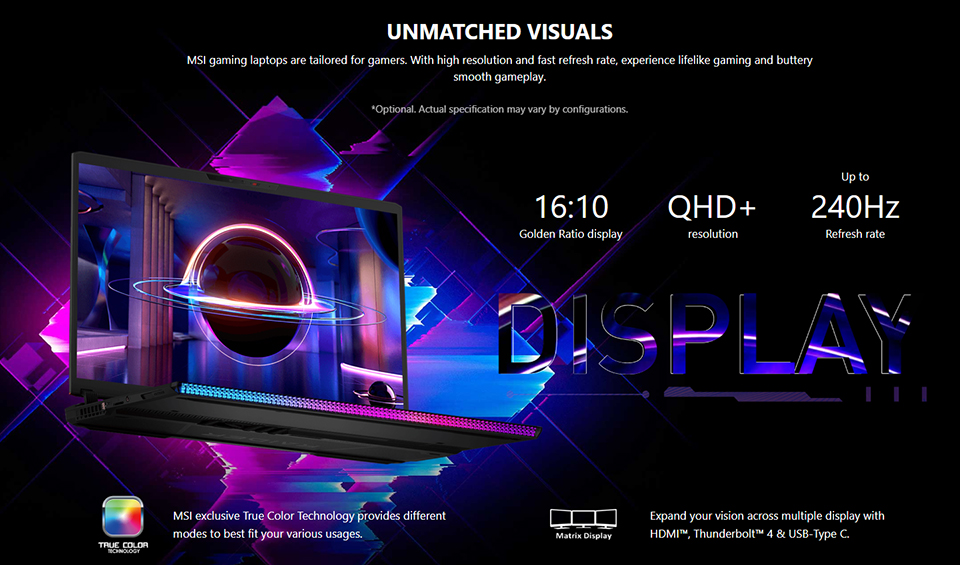
Display quality also matters, especially for content creation. Only with precise display can you get what you see. As a result, it’s suggested to go for the laptops which has been pre-calibrated, like the True Color or True Pixel certified laptops from MSI. The pre-calibration of the laptop display means that once you get it home or to the classroom or office, you can immediately have the most accurate color reproduction from the laptop display and no further calibration is needed, promising higher convenience and efficiency; If you’ve already stepped in the world of high-refresh-rate video production, it’s better to go for the models with higher-refresh-rate display like the 240Hz display on MSI Raider GE. Lastly, if your photo or video footage resolution exceeds 4K and need to attach external displays with even higher resolution like 5K or 6K, do remember to choose the models featuring HDMI 2.1 or Thunderbolt, which can support super high-res video output.

Connectivity: More Versatile, More convenient
Even though there’re plenty of adapters or dongles in the market, it’s still annoying & inconvenient to use with laptops so it’s always better to go for laptops with versatile connectivity. Besides the most-common-used USB-A and USB-C, HDMI is probably the most important port that you can count on for attaching a projector or monitor. If your laptop got one or two more video output ports like DisplayPort(via USB-C) or MiniDP, you will be amazed by the superior productivity from multiple screens. Thunderbolt is another port that promises great versatility because you can use it for attaching Thunderbolt docking, external monitors or high-speed portable drive. Last but not least, if you focus more on photo or video capturing, it’s always more convenient to go fo a model with SD card reader. The model from MSI like Titan GT or Raider GE even support SD Express, delivering the access speed up to 985 MB/s. It means that your 4K or even 8K footage can be rapidly transmitted from your SD cards to the laptops.
Portability: Embrace Great Performance Anytime, Anywhere
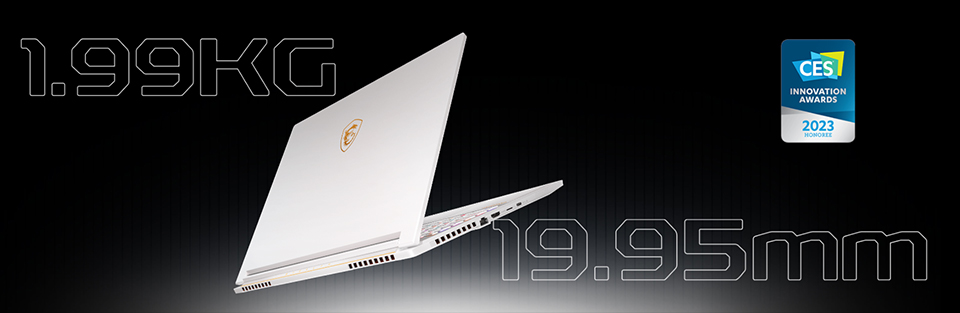
In the past it seems there’s no way that you can have a portable laptop with great performance. However, thanks to the development of silicon & cooling technology, now brands are able to squeeze more performance inside a portable chassis. If you really care about the portability of a laptop, we will suggest you going for a laptop with the weight less than 2kg and the thickness under 2cm, which meets the balance between great performance and acceptable performance. Of course there’re even lighter & slimmer laptops in the market but most of them features either P or U series processor with no discrete graphics, which is kind of hard to provide smooth using experience with professional software.
Ready To Get One?
Guess you have some ideas about how to choose a laptop for your study or work now. As a leading performance laptop brand, MSI recently unveiled a series of new models featuring the latest Intel 13th gen H/HX series processor and RTX 40 series graphics, and all other features mentioned above, delivering smooth & convenient user experience. Here are some models that might fit your need:
Top-of-the-line Performer: Titan GT/Rader GE/Vector GP
If you’re looking for a laptop with top-of-the-line performance for smoothest & fastest run of all those professional software needed, Titan GT, Raider GE and Vector GP series laptops are definitely the ones. The latest Titan GT77 is the most premium laptop of MSI and tops every aspect of laptop: performance, upgradability and keyboard. Its Cooler Boost Titan cooling can squeeze out the best performance from the latest Intel i9 HX processor and RTX 40 series graphics. You can also have the best upgradability with its tripe M.2 slots and even quad memory slots; It’s also one of the fewest laptops featuring Cherry MX mechanical keyboard, providing satisfying keypress feel.
Best Thin-and-light Performance Laptop: Stealth Series
The brand new Stealth series laptops including Stealth 16 & Stealth 14 is the perfect thin-and-light performance laptop built for those people who care about the laptop portability. Take the 14” Stealth 14 as example, it weighs only 1.7kg and its thickness is only 19mm. Yeah it looks might not that impressive if you compare it with the lightest models in the market but if you take a look its powerful spec including Intel 13th gen i7 processor and RTX 40 series graphics, you will know it’s quite portable. You will also be favored with tons features that can elevate user experience such as Windows Hello, webcam shutter, full-size RGB backlit keyboard with numpad, and enlarged touchpad. Lastly, even with its slim chassis, the Stealth still promises great upgradability with its dual memory slots and at least one M.2 slot, making it more future-proofing.
The True Competitor Of MacBook Pro: Creator Series
If you really love the design & performance of MacBook Pro but find the software you need to use for study or work is not compatible with MacOS, the latest Creator series laptop will be your saving grace. It features the top-notch build quality as MacBook Pro, thanks to its full CNC-milled aluminum uni-body. The built-in Intel i9 HX processor and RTX 40 series graphics can provide even more raw performance & better compatibility to a series of professional software. If you gonna take it for even serious professional tasks which require enormous amount of memory and storage, you won’t be struggled by the eye-watering upgrade fee on MacBook Pro: It got dual memory slots and single M.2 slot you can count on for upgrading with least expense. Last but not least, Creator series laptop is the only creator-focused laptop supporting the most advanced pen touch technology, which is MPP 2.6. It means that if you’re the one that rely on stylus a lot and at the same time need a powerful laptop to help you freely create, the latest Creator series laptop is definitely the one for you
In conclusion, if you study or work in STEM/Art/Design field and is searching for a ideal laptop that allows smooth run of those professional software, you really need to check the latest laptop lineup from MSI, which are powerful, versatile and upgradable.