How to choose the best budget gaming laptop in 2025?
Laptops

Being on a limited budget shouldn’t condemn you to choppy frames or constant thermal throttling. Whether you’re a student, a first-time employee, or a gamer who doesn’t want to spend an entire paycheck on a laptop, you still deserve smooth gameplay, stable temperatures, and a machine durable enough for everyday life.
What to Look for in a Budget Gaming Laptop
Choosing a budget gaming laptop isn’t about picking the cheapest option—it’s about maximizing the value of every dollar you spend. The right choice strikes a balance between GPU and CPU power, efficient cooling, display refresh rates, and build quality, ensuring that your investment translates into a smoother, more enjoyable experience—not just impressive specs on paper.
A.Why Entry-Level Doesn’t Mean Underpowered
When shopping for a budget gaming laptop, the most important metric is still performance—you want smooth gameplay, and that core goal can’t be compromised. The new entry-level RTX 50-series GPUs (5050/5060) introduce NVIDIA’s DLSS 4 with Multi-Frame Generation (MFG) and enhanced super resolution. This AI-driven technology doesn’t just render frames faster—it generates additional frames in between, delivering up to 8×1 performance gains while keeping latency low and gameplay fluid.
The RTX 5060, for instance, not only competes with but often outperforms the RTX 4070 in both 2K and FHD gaming. In Hogwarts Legacy at 2K Ultra with Multi-Frame Generation enabled, it delivers a massive +177% FPS uplift. In FHD, titles like Alan Wake 2 and Star Wars Outlaws show gains of +53% and +117%, proving the 5060 punches far above its weight class.
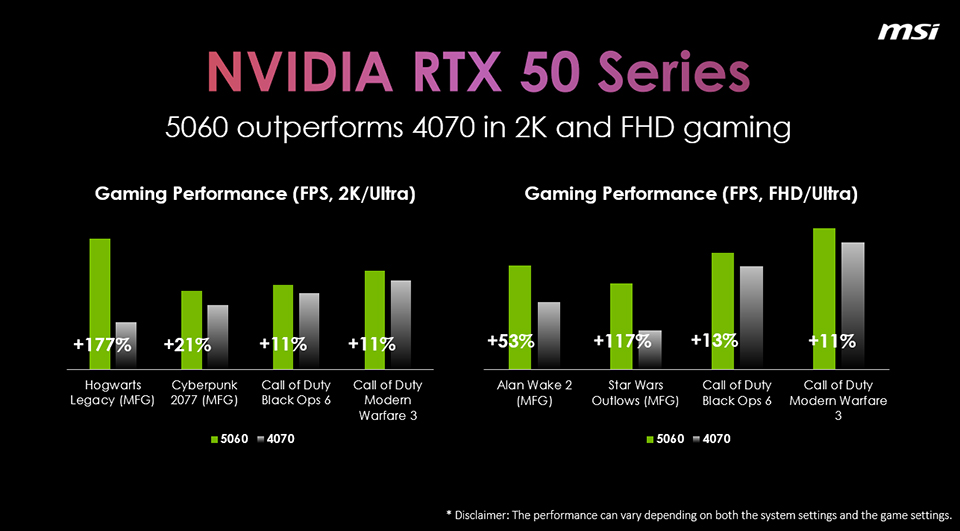
▲ RTX 5060 not only competes with but outperforms RTX 4070 in 2K and FHD gaming. In Hogwarts Legacy (2K Ultra), performance jumps +177%, while Alan Wake 2 and Star Wars Outlaws at FHD see +53% and +117% gains—proving the 5060 punches above its class.
Meanwhile, the RTX 5050 raises the bar for entry-level gaming, thanks to its upgraded VRAM, expanded from 6GB on the RTX 4050 to 8GB. In real-world testing, it already demonstrates clear advantages—delivering up to 30% higher FPS in The Talos Principle 2 and 10% in Horizon Zero Dawn at 2K resolution, along with a 42% uplift in Shadow of the Tomb Raider at FHD.
When Multi-Frame Generation is enabled, the gains become even more dramatic: nearly six times the performance in Cyberpunk 2077 at 2K and more than ten times in Star Wars Outlaws at FHD. These results make the RTX 5050 a remarkably strong entry point for budget-conscious gamers.
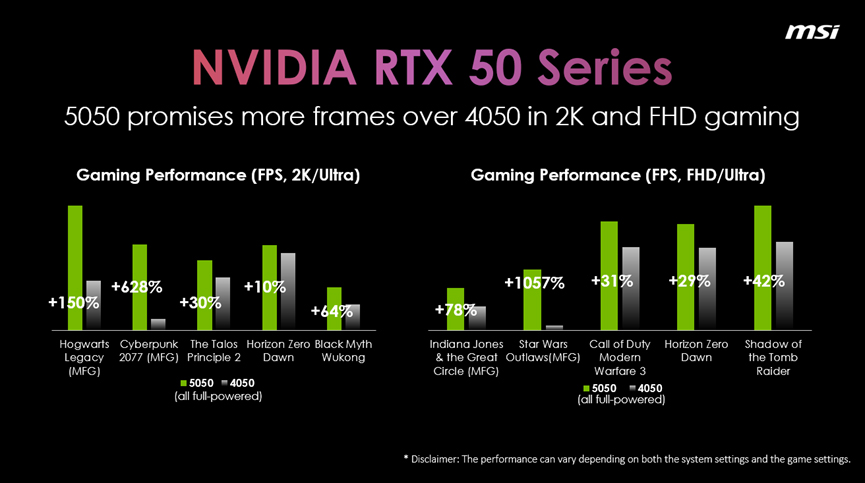
▲ The RTX 5050 sets a new benchmark for entry-level gaming, delivering huge leaps over the RTX 4050. In tests, it achieves over 6× the performance in Cyberpunk 2077 (2K Ultra), more than 10× the performance in Star Wars Outlaws (FHD), and about +42% higher FPS in Shadow of the Tomb Raider (FHD)—making the 5050 the ultimate performance uplift for budget gamers.
B.The Thermal Secrets Behind Stable FPS
In budget gaming laptops, thermal design often determines whether a system thrives or fails. Even the most powerful GPU can be undermined if the laptop overheats and throttles. That’s why advanced cooling modules are critical—by routing heatpipes across both the CPU and GPU, thermal efficiency is significantly improved, ensuring the CPU can sustain peak performance.
Airflow is just as critical. Systems with dual-, triple-, or even quad-vent layouts, combined with strong direct airflow paths, are far more effective at expelling heat quickly and keeping the system stable under heavy load.
Take the MSI Katana 15 HX as an example: it features a dual-fan, five-heatpipe Cooler Boost 5 thermal system with three direct airflow exhausts, plus a shared pipe design between the CPU and GPU—engineered to improve cooling efficiency and unleash full CPU performance.
When thermals stay stable, your performance stays consistent.

▲ MSI Katana 15 HX with Cooler Boost 5: dual-fan, five-heatpipe design with triple exhausts and shared pipe for maximum cooling efficiency.
C. Screens That Give You the Competitive Edge
Budget gaming laptops range from 14" to 18", with 18" models still rare at this price point. Most 15" and 17" systems use the classic 16:9 ratio, while 14" and 16" often adopt the more versatile 16:10 “golden ratio.” In the end, size comes down to personal preference and daily use—and MSI offers a wide range of options to match every need.
Equally important is the refresh rate. A high-refresh display instantly elevates gameplay. Even on budget laptops, 144Hz should be the baseline, with some models reaching 165Hz or 240Hz. Higher refresh means smoother visuals, less blur, and faster reactions in competitive titles. Paired with higher resolutions and wide-color-gamut panels (like 100% DCI-P3), these displays deliver richer, more vibrant visuals—ideal not only for gaming but also for creative tasks such as video editing and content creation.
Featuring a 15.6-inch QHD 165Hz display with optional 100% DCI-P3 (Optional) coverage, the MSI Katana 15 HX delivers lifelike visuals and ultra-smooth gameplay.
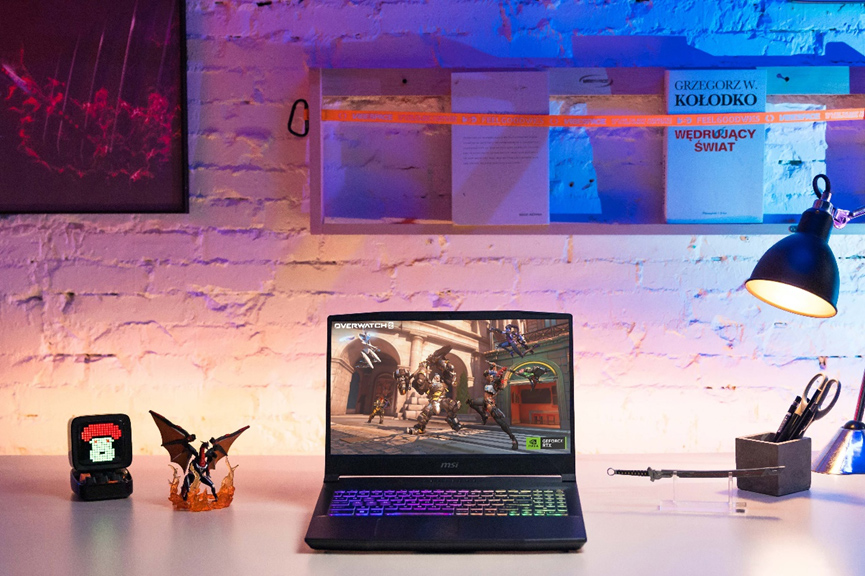
▲ MSI Katana 15 HX with 15.6" QHD 165Hz display and 100% DCI-P3 (Optional) for vivid, ultra-smooth gameplay.
D. Smarter Power, Longer Play
If you’re commuting or moving between classes, efficiency features matter. In addition to having basic fast-charging capability, look for smart GPU switching or Eco Silent modes that extend battery life while still keeping external display output functional when needed.
For example, the MSI Cyborg 15/17 series with the B-suffix model comes equipped with the Battery Boost feature, which switches off the discrete graphics to extend battery life while keeping HDMI output fully functional. Meanwhile, modes like Eco Silent are supported across all MSI gaming laptops and can be easily accessed through MSI Center.
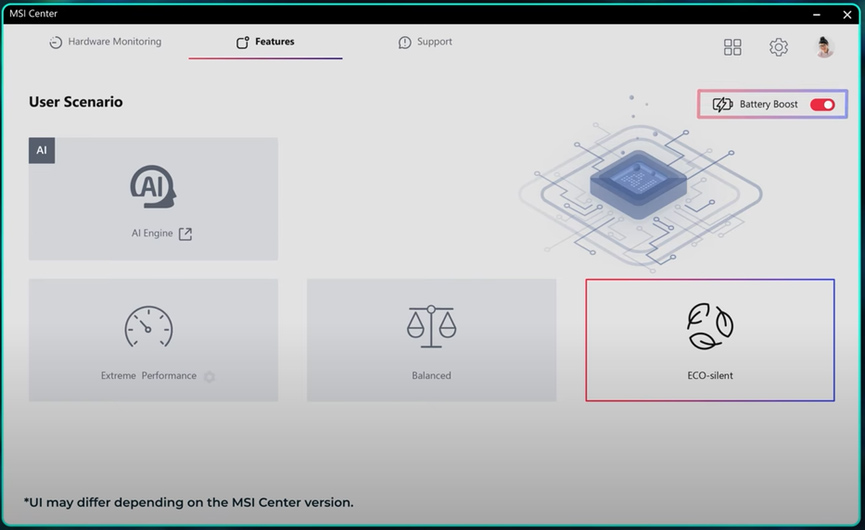
▲ MSI Center with Battery Boost and Eco-Silent modes for longer battery life.
E. Built to Last, Designed for Daily Life
Being on a budget doesn’t mean compromising on durability. A quality gaming laptop should feature a solid chassis built to endure daily commutes and the rigors of backpack travel. Moreover, thoughtful I/O placement—especially rear-facing ports—reduces cable clutter and keeps even a crowded desk neat and organized.
Equally important is a well-designed keyboard, whether it’s a clear layout with practical features like a full-sized left Ctrl key, Windows/FN key switch function, or more advanced touches such as RGB backlighting for gamers who want extra flair.
Take the MSI Crosshair 18 HX AI for example: it comes with a 24-zone RGB keyboard for a customizable gaming experience and thoughtful I/O placement, with DC-in, RJ45, and HDMI ports on the rear side to reduce cable clutter and keep your desk organized.
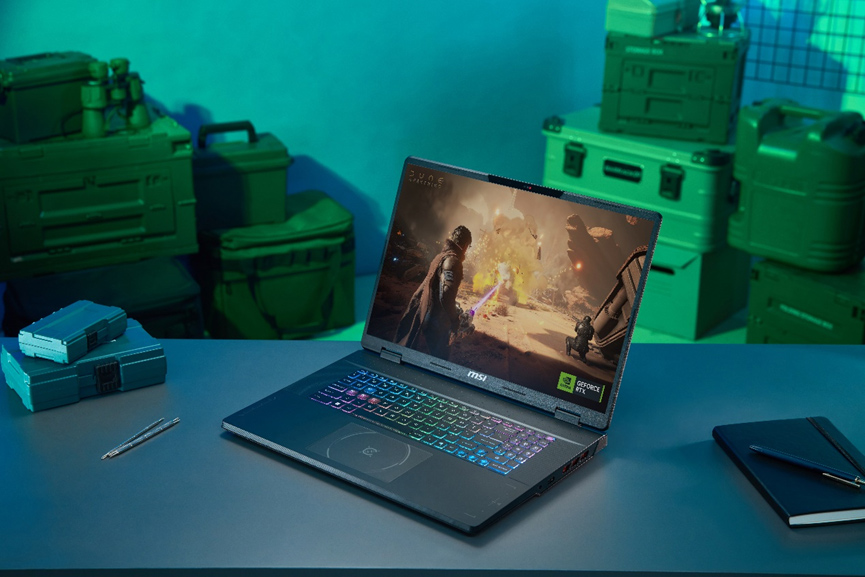
▲ MSI Crosshair 18 HX AI series features a spacious 18-inch display and 24-zone RGB keyboard, delivering a more immersive and customizable gaming experience.
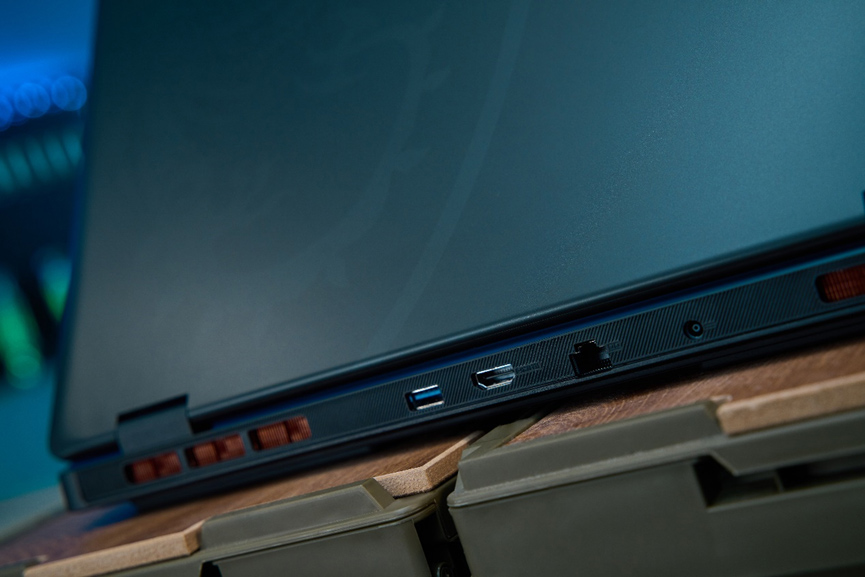
▲ Rear I/O design on the MSI Crosshair 18 HX AI keeps your desk clean and clutter-free.
3. MSI Picks for Value-Oriented Players
In light of the key considerations when choosing a budget laptop, MSI offers a range of gaming series tailored to different players' needs.
1. Katana HX series
The Katana HX series, equipped primarily with RTX 5050 and 5060 GPUs and available in either a portable 15-inch or a more immersive 17-inch display, strikes an excellent balance between affordability and reliable performance.
Compared to competitors in the same class, it delivers stronger 2K gaming performance and sustained CPU power without throttling, thanks to its triple-vent cooling system with direct airflow. A 4-zone RGB keyboard and refined UX design add everyday practicality, while its understated, low-key aesthetic appeals to users who value performance over flashy looks.
With the Katana 15 HX equipped with RTX 5050, the series stands out as a true sweet spot for budget-conscious gamers—available in select configurations at a price point that stays pleasantly within reach.
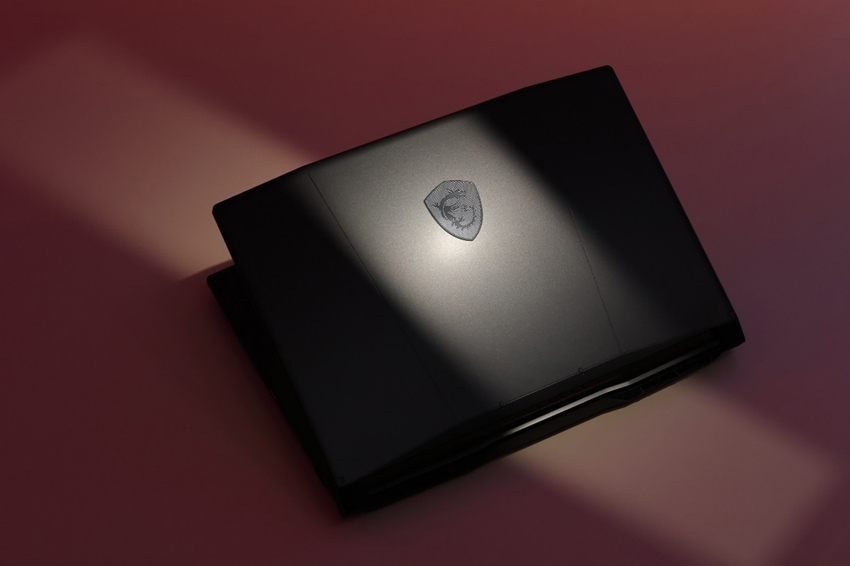
▲ The Katana series features a subtle, understated design—perfect for gamers who prefer to keep it low key.
2. Cyborg series
The Cyborg series, available in both 15- and 17-inch models with RTX 5050 or 5060 options, takes a bolder design approach. Its translucent exoskeletal styling and 180-degree flat hinge set it apart from typical budget laptops, giving it a futuristic edge. The 15-inch model is among the lighter gaming laptops at just 2.1 kg, while the 17-inch variant supports up to a QHD 240Hz display for ultra-smooth gameplay. In addition, Battery Boost technology helps extend battery life without sacrificing HDMI functionality. With a 4-zone RGB keyboard completing the package, the Cyborg is ideal for gamers who want something distinct and subtly eye-catching.
Even more impressive, RTX 5060 configurations are available at an accessible price, delivering performance that rivals RTX 4070 laptops—allowing players to step into the RTX 50 series and enjoy the latest technology with smooth, seamless gameplay.
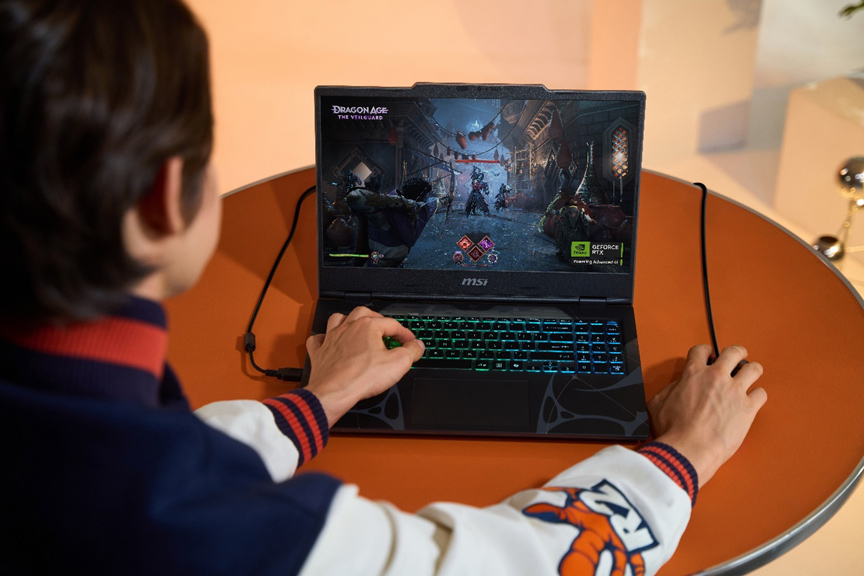
▲ The Cyborg 17 features a 17.3-inch variant that supports up to a QHD 240Hz display, paired with a 4-zone RGB keyboard. Its translucent exoskeletal styling further allows gamers to showcase their unique personality.
3. Crosshair HX series
Finally, the Crosshair HX series, available in 16-, 17-, and 18-inch options, delivers superior performance for both gaming and creative workloads. Powered by the RTX 5060, it achieves noticeable uplifts in 2K gaming and faster 3D rendering. Its advanced cooling design keeps surface temperatures lower under heavy load, ensuring comfort during long sessions. Combined with a thoughtful I/O layout for easier cable management, a centered touchpad, and a premium 24-zone RGB keyboard, the Crosshair stands out as a powerful yet practical desktop replacement—especially the 18-inch variant, which offers maximum screen real estate without sacrificing portability.
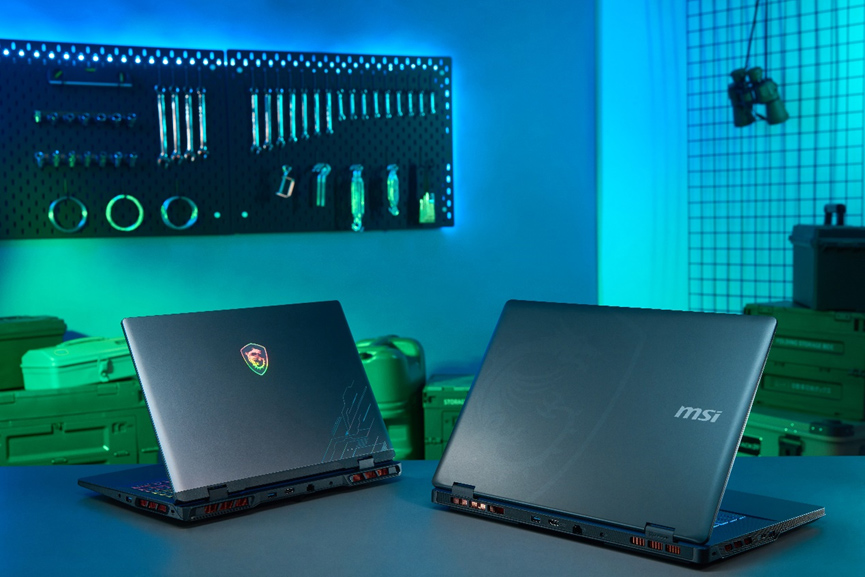
▲ The Crosshair HX series, available in 16-, 17-, and 18-inch options, offers powerful performance—especially the 18-inch model, which serves as a strong yet affordable desktop replacement with the added benefit of portability.
4. Ending
Choosing the right budget gaming laptop in 2025 is no longer about compromise—it’s about knowing where value truly lies. With the arrival of entry RTX 50-series GPUs, even affordable models now deliver performance once reserved for higher tiers, thanks to DLSS 4 and Multi-Frame Generation. Pair that with solid thermal design, high-refresh displays, and durable everyday usability, and you get a laptop that maximizes every dollar you spend.
MSI’s Katana, Cyborg, and Crosshair series embody this balance: Katana offers solid performance at accessible pricing, Cyborg stands out with bold design and dependable power, and Crosshair brings desktop-class capability into a portable form factor. Each line addresses different needs and price points, but all share one mission—bringing smooth gameplay, stable thermals, and lasting quality to gamers who demand more from a budget.
With MSI’s budget-friendly RTX 50 laptops, you don’t just save money—you invest in performance that keeps up with your ambitions, whether that’s finishing assignments, editing content, or conquering your next raid boss.
Learn More
Cyborg Series
Katana HX Series
Crosshair HX Series
Intel Version
16” - https://msi.gm/S8AABF8E
17” - https://msi.gm/S7FFA05B
18” - https://msi.gm/S7010B2C
16” - https://msi.gm/S8AABF8E
17” - https://msi.gm/S7FFA05B
18” - https://msi.gm/S7010B2C