MSI High-Efficiency Mode: One Click to EXPO Ultra Low Latency-Level Performance
Motherboards
AMD Extended Profiles for Overclocking (EXPO) is a memory overclocking technology developed by AMD, similar to Intel XMP. Memory manufacturers store validated overclocking profiles directly on the memory modules. Users can simply select the corresponding EXPO profile in the motherboard BIOS to quickly apply the frequencies and timings without the need for manual tuning.
AMD EXPO Ultra Low Latency (EXPO ULL) takes performance a step further by tightening select memory sub-timings to minimize latency. This reduced latency directly translates to a performance boost in specific scenarios, such as delivering higher frame rates in gaming.
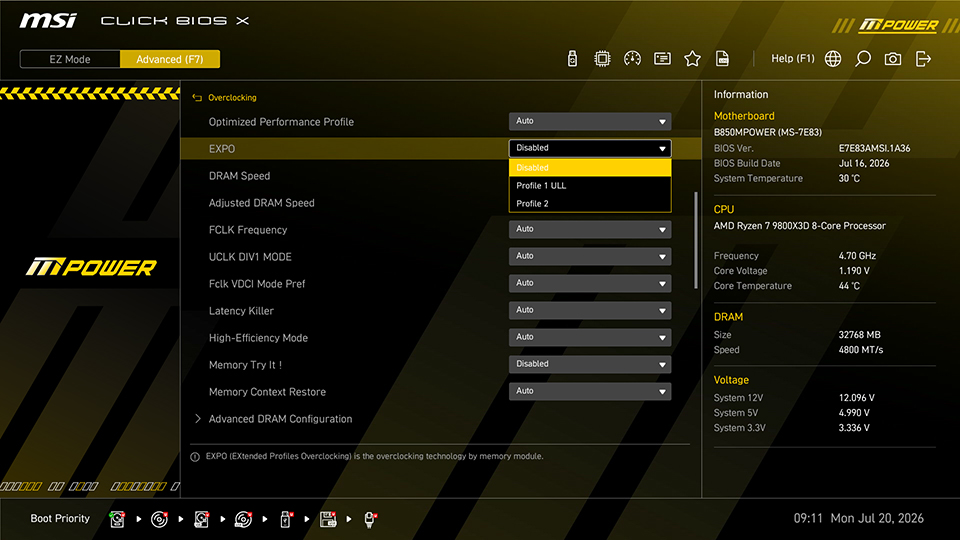
▲ When MSI Click BIOS X detects memory modules that support AMD EXPO Ultra Low Latency (EXPO ULL), "ULL" will be displayed. As shown in the image, this memory kit supports two EXPO profiles, with Profile 1 ULL supporting Ultra Low Latency.
With memory prices skyrocketing, you don't need to rush out and buy an AMD EXPO Ultra Low Latency (EXPO ULL) kit to enjoy lower latency. Instead, you can enable MSI High-Efficiency Mode to reduce memory latency and achieve performance close to Ultra Low Latency.
MSI High-Efficiency Mode Overview
High-Efficiency Mode is a built-in memory optimization feature in MSI motherboard BIOS. Users simply enable this function in the BIOS to boost memory performance and have lower latency.
High-Efficiency Mode offers four presets, Tightest, Tighter, Balance, and Relax, allowing users to choose the optimal mode based on their memory's overclocking headroom.
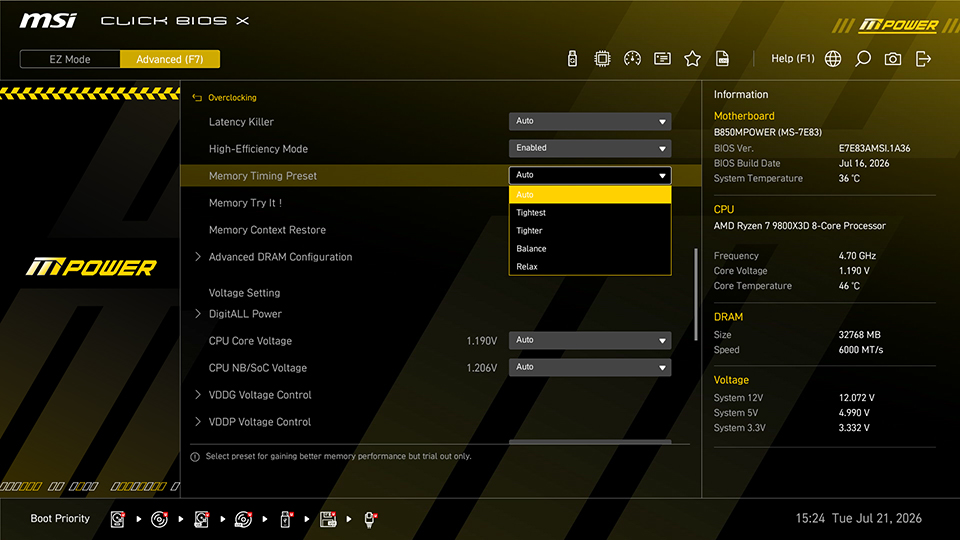
▲ MSI High-Efficiency Mode supports four preset configurations: Tightest, Tighter, Balance, and Relax.
Enable High-Efficiency Mode for Lower Latency
AIDA64 Memory Benchmark were used to compare the performance of memory kits with and without AMD EXPO ULL support. Taking an EXPO 6000 MT/s kit as an example, test results show that standard memory latency sits at around 79.4ns, lagging noticeably behind the EXPO ULL version’s 71.4ns. This confirms that the tighter out-of-the-box timings of EXPO ULL memory do offer a tangible latency advantage.
After enabling MSI High-Efficiency Mode (Tightest), the standard EXPO memory achieves low-latency performance close to that of the EXPO ULL version. For users who already own standard memory, there is no need to switch to an EXPO ULL kit. Simply enabling High-Efficiency Mode in the BIOS achieves a comparable performance boost.
However, since both EXPO ULL and High-Efficiency Mode work by optimizing specific memory timings, enabling High-Efficiency Mode on an EXPO ULL memory kit yields very limited performance gains.
Memory Specifications
Latency (High-Efficiency Mode Disabled)
Latency (High-Efficiency Mode Enabled)
EXPO 6000 CL30-38-38-96 (Standard)
79.4ns
71.6ns
EXPO 6000 CL30-38-38-32 (ULL)
71.4ns
71.1ns
Notes
- High-Efficiency Mode involves RAM timing adjustments and may lead to system instability.
- Performance results may differ based on system settings and hardware configuration.
Test Bench
- CPU: AMD Ryzen 7 9800X3D
- Motherboard: MSI B850MPOWER
- Memory: G.SKILL F5-6000A3038F16GX2-TZ5NXRK (EXPO ULL) 16GB x2 / F5-6000J3038F16GX2-TZ5N (Standard) 16GB x2
- Graphics Card: MSI GeForce RTX 5090 32G VANGUARD SOC
- CPU Cooler: MSI MPG CORELIQUID P13 360
- Power Supply: MSI MEG Ai1300P PCIE5
- Operating System: Microsoft Windows 11 25H2
FAQ
Q1: Do I need to update the BIOS to support EXPO ULL memory?
A: Yes, please visit the official MSI website to download a BIOS update indicating support for EXPO ULL.
Q2: What is the difference between the four High-Efficiency Mode presets?
A: The four presets differ in how aggressively the memory timings are tuned. Tightest applies the most aggressive (tightest) timings, while Relax uses the most conservative parameters. If your system experiences instability, try selecting a looser preset.