MSI Memory Extension Mode: Boost Your Intel Core Ultra 7 270K Plus Gaming Performance in One Click
Motherboards
Just picked up an Intel Core Ultra 7 Plus and want better gaming performance?
Reducing memory latency is one of the most effective and cost-efficient ways to improve gaming performance. However, memory optimization typically involves overclocking, such as manually tuning parameters like memory timings and voltage, which can be tricky if you're not familiar with the process. To address this, MSI offers Memory Extension Mode, with four built-in optimization presets: Performance, Benchmark, Memtest, and High-Efficiency Mode. No manual tuning needed — just pick a preset and you're good to go.
Benchmark Results – Lower Latency, Higher Gaming Performance
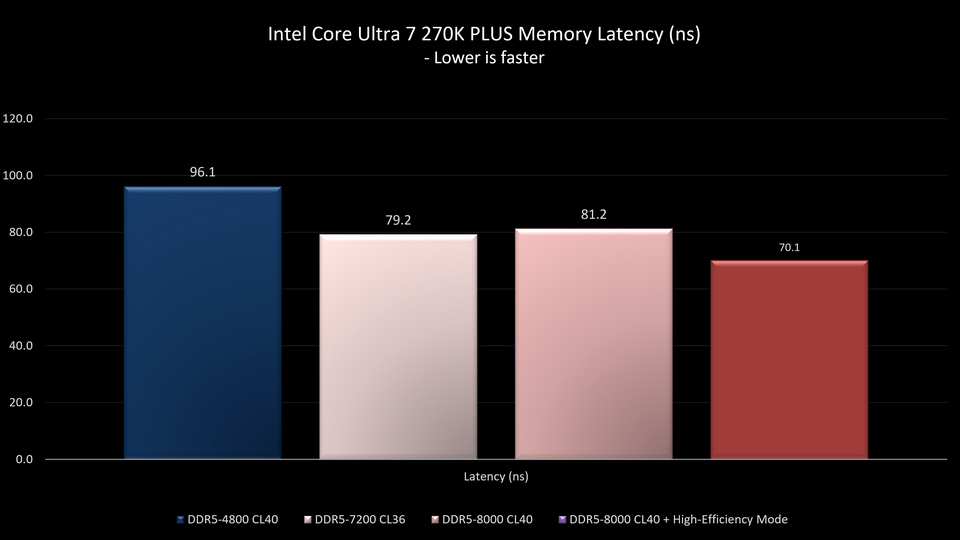
Test results show that compared to the default DDR5-4800, using XMP to raise memory frequency to DDR5-7200 or DDR5-8000 reduces memory latency by 16–18%. Enabling High-Efficiency Mode within Memory Extension Mode brings the latency reduction to approximately 27%.
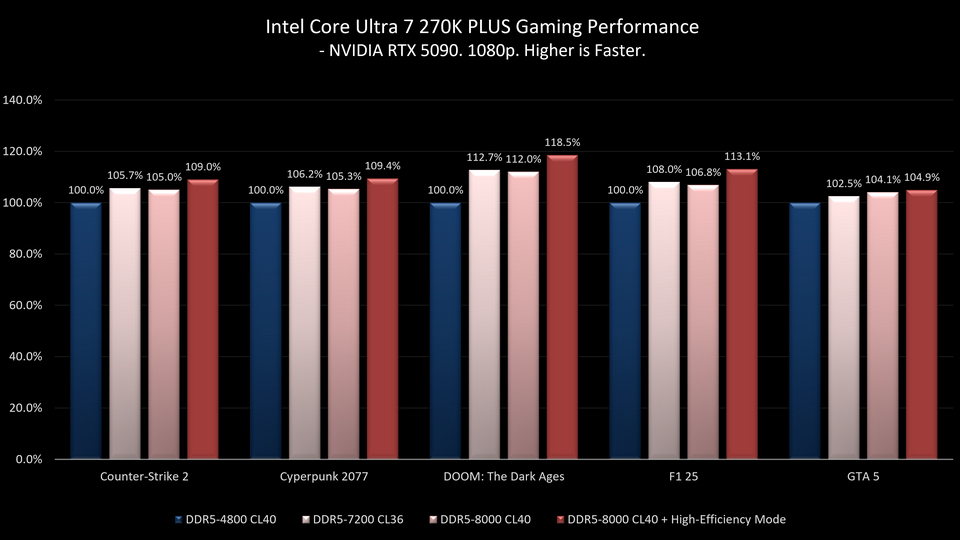
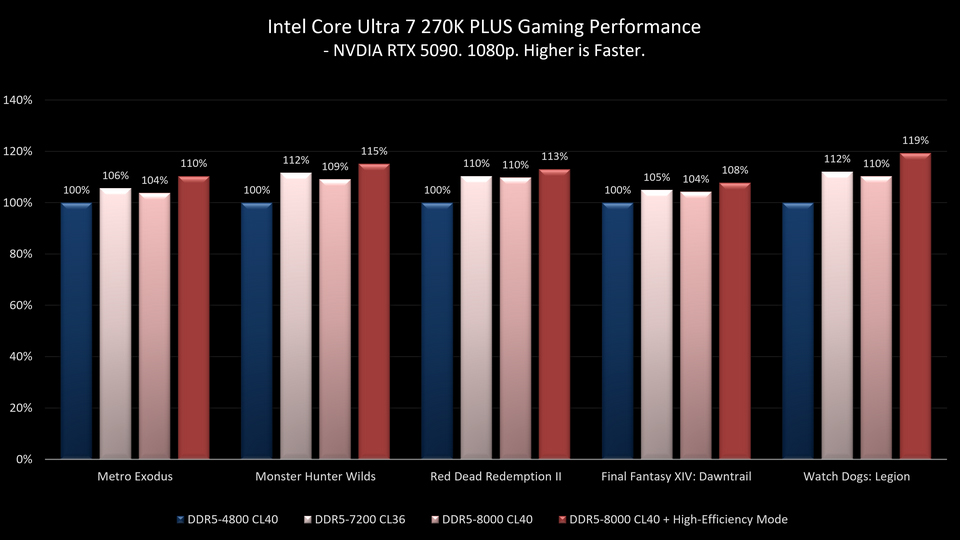
In terms of 1080p gaming performance:
- DDR5-8000 delivers 4-12% higher frame rates compared to DDR5-4800.
- DDR5-8000 with High-Efficiency Mode shows an improvement of 5-19%.
- Enabling High-Efficiency Mode on DDR5-8000 alone provides an additional 1–8% performance gain.
How to Enable Memory Extension Mode?
Just three steps to get started:
- Press Del during boot to enter the BIOS.
- Navigate to the Overclocking page and locate Memory Extension Mode.
- Select High-Efficiency Mode, save and reboot. Enjoy the performance boost.
Notes: Performance may vary depending on system and hardware configurations.
Test Platform:
CPU: Intel Core Ultra 7 processor 270K Plus
Motherboard: MSI MAG Z890 TOMAHAWK WIFI II
Memory: XPG LANCER NEON RGB DDR5 24GB x2
Graphics Card: MSI GeForce RTX 5090 32G VANGUARD SOC
CPU Cooler: MSI MPG CORELIQUID P13 360
Power Supply: MSI MEG Ai1300P PCIE5
Operating System: Microsoft Windows 11 25H2
Motherboard: MSI MAG Z890 TOMAHAWK WIFI II
Memory: XPG LANCER NEON RGB DDR5 24GB x2
Graphics Card: MSI GeForce RTX 5090 32G VANGUARD SOC
CPU Cooler: MSI MPG CORELIQUID P13 360
Power Supply: MSI MEG Ai1300P PCIE5
Operating System: Microsoft Windows 11 25H2
MSI Z890 Motherboards:
https://www.msi.com/Landing/best-z890-motherboard-for-ai-pc-build
https://www.msi.com/Landing/best-z890-motherboard-for-ai-pc-build