MSI Mystic Light or Portal X? Choose Your RGB Setup for Gaming
Motherboards
Users of MSI’s modern RGB-equipped PCs and components have two distinct ways to adjust their LED lighting setup. If they want to have software installed and ready for deep customization, multi-device sync, AI Engine integration, and have a host of other tools at their fingertips – the best choice is MSI Mystic Light, built-into MSI Center. If they prefer something lighter and simpler, with no extra apps installed on the PC, MSI Portal X runs directly in a browser with no system overhead after the settings adjustments are made. This makes Portal X ideal for a simple, lightweight set‑and‑forget RGB lighting setup.
The Wrong Tool Is the Real Problem
RGB lighting has become a standard feature in modern PC builds — but the RGB software that controls it hasn’t always kept up. Across PC communities, DIYers, builders, and enthusiasts consistently flag their RGB gaming PC or RGB motherboard software setup as one of the most frustrating parts of the build process. Typical issues include incompatible third-party utilities, background processes that run without any clear purpose, and sync failures across devices from different brands.
The problem isn’t the colorful LED lighting technology. It’s that most gamers are using the wrong RGB software for their setup — and paying the price in complexity, impacting PC maintenance and performance.
Meet Your Two Options
MSI recognizes that PC gamers and enthusiasts are a broad church, and have thus delivered two distinct but equally valid paths to RGB nirvana. Neither choice is universally "better." Rather, the right choice depends on what you actually need or want from your RGB software.
Mystic Light: For the Customization Enthusiast
Best for: Users who want full control over every device, every effect, and every sync scenario. MSI Center also does a lot more than just configure and control RGB lighting.
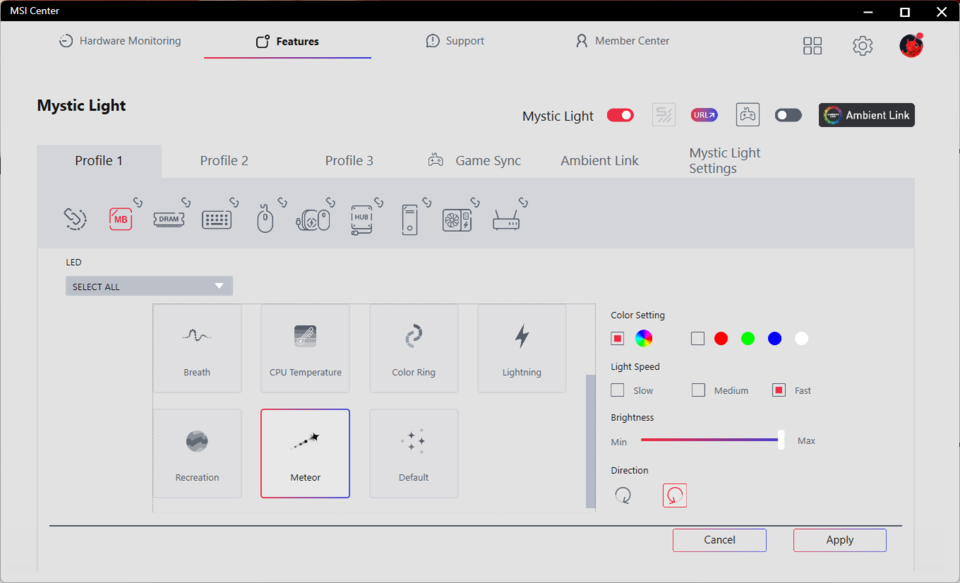
Key features:
- Multi-device sync (Mystic Light Sync ecosystem): Sync motherboard, GPU, RAM, fans, monitor, peripherals in one interface
- AI Engine integration:
- Detects when a game launches and automatically switches to a game-specific lighting profile (e.g., ambient → game color profile)
- This integration makes your RGB smarter and even more immersive
- Advanced effect editor: Per-zone customization, gradient, reactive, and custom animation modes
- Runs as part of MSI Center: One unified platform: hardware monitoring, performance profiles, tuning, and RGB lighting configuration — all in one place
Who should use Mystic Light:
- You have multiple MSI devices and want them synced
- You enjoy tweaking lighting scenes per game or mood to make the most of your RGB lighting hardware
- You're already using MSI Center for monitoring, customizing, or tuning your RGB gaming PC experience.
Portal X: For the Performance-First Gamer
Best for: Users who want RGB control software with zero installation overhead. Portal X is an efficient set-it-and-forget-it solution.
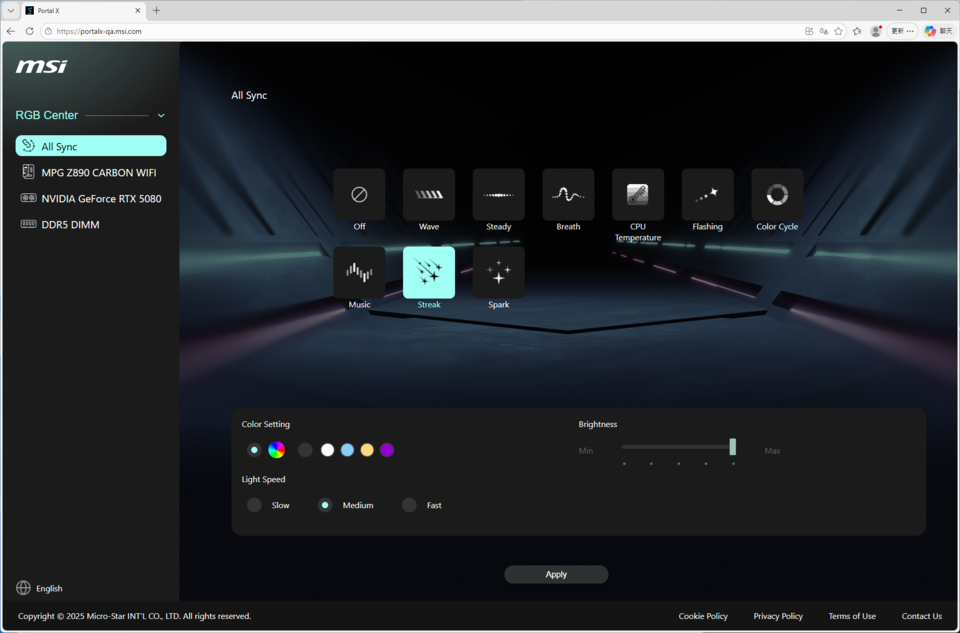
Key features:
- Browser-based interface — no software installation required
- No need to worry about updates as the browser loads the latest control software — and no manual patches are needed
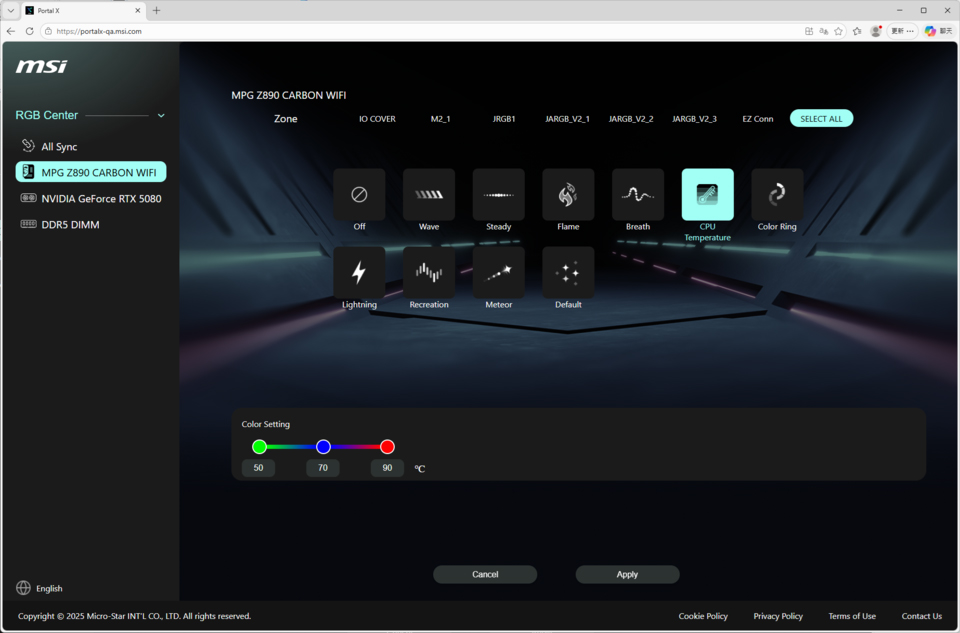
- Supports MSI’s 800 Series RGB motherboards & RTX 50 Series GPUs with RGB lighting
- Provides a quick, clean UI for fast adjustments
Who should use Portal X:
- You're a competitive gamer who wants less background processes, and fewer system apps to keep updated
- You only need occasional RGB software lighting adjustments (not real-time sync)
- You shun complex ‘essential’ accessory software every brand seems to insist on, and prefer a lightweight, no-fuss system setup
Quick Comparison Table
Interface type
Desktop app
Browser-based
Background process
Yes (MSI Center service)
Yes (Update automatically)
*Installation Size
Medium
Small
*CPU Usage
Medium
Low
*Memory Usage
Mainly dependent on file size
Mainly dependent on file size
Multi-device sync
Compatible with MSI devices and certified third-party RGB devices
Compatible with MSI devices and selected third-party memory modules (ENE-based RGB RAM)
AI Engine integration
Auto scene switching
Not available
Effect customization
Deep / per-zone
Basic
Hardware support
Broad MSI ecosystem
800 Series RGB motherboards and GeForce RTX 50 graphics cards
Auto-update
Via MSI Center
Via browser
Best for
Customization enthusiasts
Performance-first gamers
Scenario
Best suited for full synchronization and advanced configuration needs
Best suited for quick control and everyday customization
*Installation size, CPU usage, and memory usage are relative measurements derived from internal gaming benchmark testing and are provided for reference only.
FAQ
Q1: Do I need to pick one of MSI’s RGB software tools, or can I use both?
A: You can use both, as and when you feel convenient. Portal X and Mystic Light are not mutually exclusive. You can use Portal X for quick adjustments when gaming competitively, and switch to Mystic Light (via MSI Center) when you want to set up a full sync scene or configure AI Engine profiles. In this way they can serve different moments in your workflow. Or you might find other ways to fit these free MSI exclusive RGB software tools into your workflow. Neither tool takes priority, the actual lighting effect that is currently active will be the one set in the RGB software tool most recently used.
Q2: What is the difference between Portal X and Mystic Light?
A: Portal X is a browser-based app with a simple interface and once you have made your adjustments — ideal for quick RGB adjustments with a minimal system footprint. With Portal X you don’t need to install a dedicated app, or worry about updates, either. Mystic Light (via MSI Center) offers deeper customization, multi-device sync, and AI Engine integration for users who want full control. Many MSI PC system and RGB motherboard users will already have MSI Center installed for its broad range of system configuration, monitoring, and tuning tools.
Q3: Which MSI RGB tool is better for competitive gamers?
A: If your priority is eliminating every unessential background process, Portal X is likely the better choice — it runs entirely in the mainstream browser you already use and leaves no persistent service running after you are done, like when you are pursuing the max performance during gameplay. Mystic Light is the better choice if you want game-aware lighting scenes that switch automatically when you launch a title, or you insist on the ultimate level of granular RGB software control and syncing.
Q4: How can I reduce the system load caused by Mystic Light?
A: If you insist in squeezing every last ounce of competitive gaming performance from your RGB gaming PC and eschew control accessory software that runs in the background, even one using a fraction of a percent of your CPU time, check if Portal X offers enough options for your 800 Series motherboard and/or GeForce RTX 50 series graphics card. Portal X is a set-it-and-forget-it RGB lighting configuration tool which runs conveniently in your mainstream browser of choice. The standalone Mystic Light 2 and 3 RGB software releases are now only available for legacy RGB motherboards / systems / GPUs. So for newer system users, and those seeking the deepest control, configuration, and syncing, MSI Center’s Mystic Light component will need to be used.
*Please note that lighting effect implementations in RGB software are not fully standardized across different PC and component brands. Even when the same lighting mode is selected, the actual visual results may vary due to conflicting standards, and your desired RGB lighting may thus not always match expectations.
Conclusion — RGB and Performance Are Not Enemies
The real question was never "RGB on or off?" — it has always been "which tool are you using?"
MSI gives you two slick options:
- Mystic Light for the enthusiast who wants every device in sync
- Portal X for the competitive gamer who strives for zero overheads
Your RGB setup. Your call.
Learn more about Portal X:
https://www.msi.com/blog/portal-x-a-new-way-to-control-lighting-of-your-msi-products
Learn more about Mystic Light:
https://www.msi.com/Landing/mystic-light-rgb-gaming-pc
https://www.msi.com/blog/portal-x-a-new-way-to-control-lighting-of-your-msi-products
Learn more about Mystic Light:
https://www.msi.com/Landing/mystic-light-rgb-gaming-pc