Why Does 64MB ROM Matter on a Motherboard? A Complete Guide to BIOS Storage, Features & Future-Proofing
Motherboards
When choosing a motherboard, specifications such as power delivery, PCIe support, memory speed, and connectivity usually receive the most attention. But another specification is becoming increasingly important for modern platforms: BIOS ROM capacity.
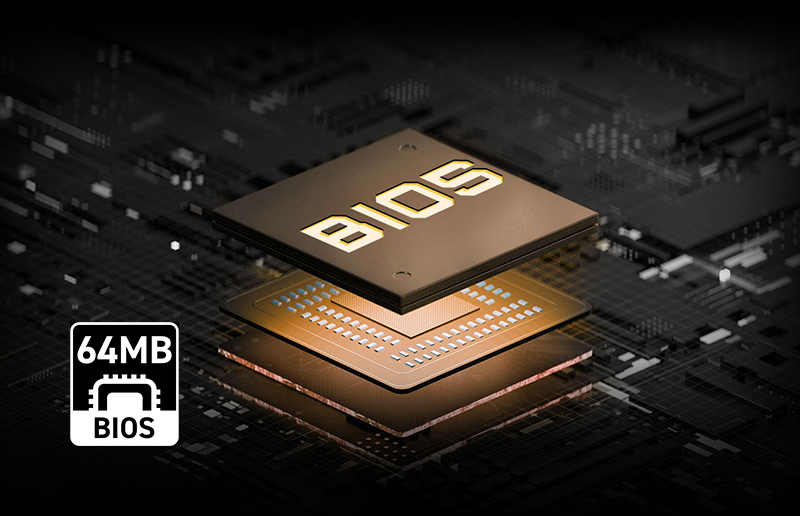
The ROM, or flash memory chip, on a motherboard stores its UEFI firmware. This firmware initializes the processor, memory, storage, graphics, and other hardware before the operating system starts. It also contains the BIOS interface and many of the configuration and compatibility components required to support different processors and system features.
As platforms become more sophisticated and support more generations of hardware, firmware also becomes more complex. This is where a larger 64MB BIOS ROM can provide an important advantage.
What Does the Motherboard ROM Chip Actually Store?
Think of the BIOS ROM as dedicated storage for the motherboard's firmware environment.
It contains processor initialization and compatibility code, memory initialization data, hardware configuration functions, security features, boot functionality, and the graphical UEFI interface.
On supported MSI motherboards, that interface includes Click BIOS X. It provides both EZ Mode and Advanced Mode so users can configure performance, memory, cooling, boot settings, and other motherboard functions.
As the number of supported processors and BIOS features increases, so does the amount of firmware data that needs to fit into the ROM.
Why Is 64MB ROM Better Than 16MB or 32MB?
The simplest advantage is more room for firmware.
BIOS ROM Capacity
Relative Capacity
Practical Consideration
16MB
1x
Less space for increasingly complex firmware
32MB
2x
More room for modern UEFI functions and compatibility data
64MB
4x
Greater headroom for richer firmware and future platform support
A larger ROM does not automatically make the CPU faster or increase gaming FPS. Instead, it gives motherboard engineers additional capacity for BIOS functionality, compatibility data, and future firmware development.
MSI's latest X870(E) MAX and EVO motherboards, for example, feature an upgraded 64MB BIOS ROM. The additional capacity is designed to provide comprehensive BIOS functionality with supported processors while offering greater flexibility for future CPU upgrades.
How Does a Larger ROM Enable More CPU Support?
Modern CPU support requires much more than simply recognizing a processor's model name. BIOS releases incorporate platform initialization code, CPU compatibility updates, memory compatibility improvements, security updates, and other firmware components.
As a socket remains on the market and additional processors are introduced, these requirements can grow.
A 64MB ROM provides more headroom for that expanding firmware environment, helping MSI maintain comprehensive functionality as the platform evolves.
Before installing or upgrading a processor, users should still check the motherboard's official CPU support report and confirm the required BIOS version. ROM capacity alone does not guarantee support for every processor.
What Advanced Features Are Available in MSI Click BIOS X?
The larger firmware environment also complements MSI's feature-rich Click BIOS X experience.
Depending on the motherboard and processor, Click BIOS X provides functions including performance tuning, memory configuration, hardware monitoring, BIOS profiles, M-FLASH, Favorites, Search, and other advanced settings.
Features such as EZ PC Tuning, Performance Preset, and Memory Try It! make it easier for enthusiasts to tune their systems without navigating unnecessarily complicated menus.
The key advantage of 64MB is therefore not one individual BIOS feature. It is the additional capacity available for MSI to deliver a comprehensive firmware experience while retaining room for platform evolution.
How Does 64MB ROM Help BIOS Updates Unlock New Hardware Support?
BIOS updates can significantly extend what an existing motherboard supports.
One example is MSI's AGESA BIOS update based on AMD AGESA ComboPI 1.2.0.3e.
The update expanded support across MSI AM5 motherboards for upcoming processors and high-capacity 64GB memory modules. With four 64GB modules installed, supported configurations can reach 256GB total memory capacity.
Updates like these demonstrate why firmware flexibility matters on a long-lived platform. A larger ROM provides additional capacity for increasingly comprehensive firmware as new CPUs, memory configurations, and platform optimizations are introduced.
What Is the Flash BIOS Button?
BIOS updates are important, but what happens if you need to update the motherboard before installing a newly supported CPU?
On compatible MSI motherboards, the Flash BIOS Button provides a convenient solution. Users can flash a compatible BIOS using a USB drive without needing to enter the normal BIOS interface, and supported implementations can operate without a CPU or memory installed.
This can be especially valuable when building a system with a processor released after the motherboard was manufactured.
It is important to distinguish this capability from ROM capacity: 64MB ROM does not itself make BIOS recovery safer or create Flash BIOS Button functionality. Flash BIOS Button is a separate motherboard feature. Together, however, a large BIOS ROM and convenient flashing tools make MSI motherboards easier to maintain and upgrade over the life of the platform.
How Do You Update an MSI Motherboard BIOS Using M-FLASH?
For a normally functioning system, MSI provides M-FLASH directly within the BIOS environment.
The basic process is straightforward:
- Find your exact motherboard model on MSI.com.
- Download the correct BIOS file from its support page.
- Prepare the BIOS file on a compatible USB drive according to MSI's instructions.
- Enter the BIOS and launch M-FLASH.
- Select the BIOS file and begin the update.
- Do not turn off or reset the system while flashing.
Always follow the instructions for your exact motherboard, as procedures and BIOS files can vary between models.
Which MSI Motherboards Feature 64MB BIOS ROM?
For users who specifically want 64MB BIOS ROM, MSI's latest AM5 lineup includes several options.
X870E Series
B850 Series
MEG X870E GODLIKE MAX
MEG X870E GODLIKE MAX MPG B850M EDGE TI MAX WIFI
MEG X870E ACE MAX
MAG B850 TOMAHAWK MAX WIFI II
MEG X870E UNIFY-X MAX
MAG B850 TOMAHAWK WIFI
MPG X870E CARBON MAX WIFI
MAG B850M MORTAR MAX WIFI
MAG X870E TOMAHAWK MAX WIFI
MAG B850M MORTAR MAX
MAG X870E TOMAHAWK MAX WIFI PZ
MAG B850 GAMING PLUS MAX WIFI
MAG X870E GAMING PLUS MAX WIFI
MAG B850M GAMING PRO MAX WIFI
MAG X870E GAMING MAX WIFI
MAG B850M GAMING PLUS MAX WIFI
For example, the MEG X870E GODLIKE MAX / MAG X870E TOMAHAWK MAX WIFI feature 64MB BIOS ROM and support AMD Ryzen 9000, 8000, and 7000 Series desktop processors, making them strong choices for users planning a high-end AM5 system with future upgrade flexibility.
CPU compatibility should always be verified on the individual motherboard support page before purchase or upgrade.
Is 64MB ROM a Spec Worth Prioritizing?
For a PC that will only use one CPU configuration throughout its life, BIOS ROM size may not be the first motherboard specification to consider.
For enthusiasts and users who expect to upgrade, however, 64MB BIOS ROM provides valuable firmware headroom.
It gives motherboard developers more capacity for comprehensive UEFI functionality, processor compatibility, platform updates, and an evolving BIOS feature set. Combined with technologies such as Click BIOS X, M-FLASH, and Flash BIOS Button on supported models, it contributes to a motherboard platform designed to remain flexible as hardware evolves.
That is the real value of 64MB BIOS ROM: it doesn't directly add FPS, but it gives the motherboard's firmware more room to grow with the platform.