Windows Secure Boot Certificate Expiration and Certificate Updates
Motherboards
Secure Boot is a UEFI-based security feature designed to ensure that only trusted software runs when your device boots up. It functions as a gatekeeper, verifying the digital signatures of pre-boot software against trusted certificates (also known as Certificate Authority, CA) stored in the device’s firmware.
The original Secure Boot certificates issued by Microsoft in 2011 are scheduled to expire starting in June 2026. To maintain uninterrupted system protection, Microsoft has released updated 2023 certificates.
What Happens If You Don't Update the Certificate?
Devices without the updated 2023 certificates will continue to boot, run normally, and receive standard Windows updates. However, the device will no longer be able to receive new security protections for the early boot process. Over time, protection against emerging threats will decrease.
How to Update Secure Boot Certificate?
Microsoft has released the new Secure Boot certificates. For most users, the easiest way to grab this update is by simply running Windows Update.
How to Check If You Are Successfully Updated?
You can check whether the certificates have been updated from "Device Security" in Windows 11:
- A green icon means that your device is sufficiently protected and there aren’t any recommended actions.
- A yellow icon means that there is a safety recommendation for you.
- A red icon indicates something that needs your immediate attention.
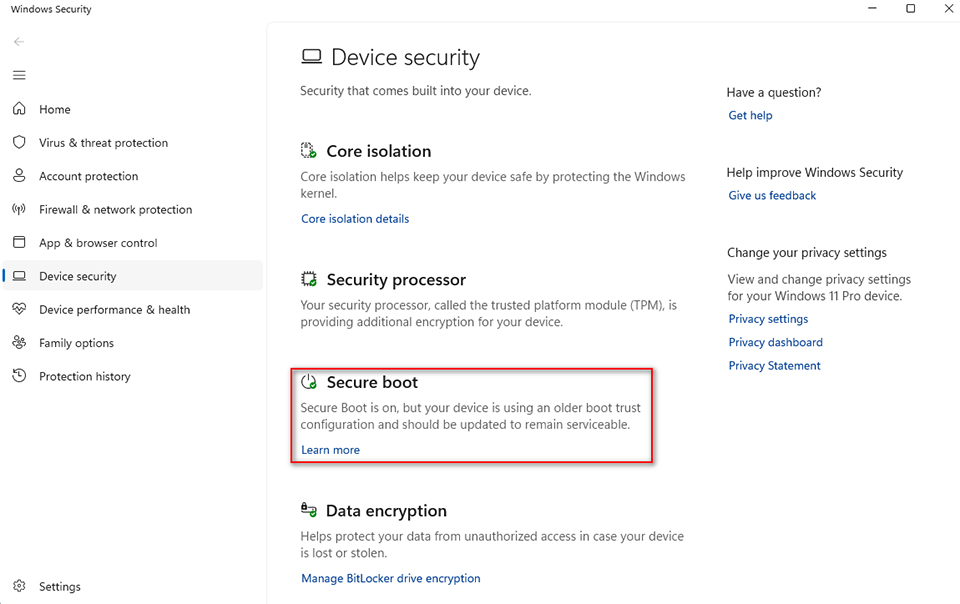
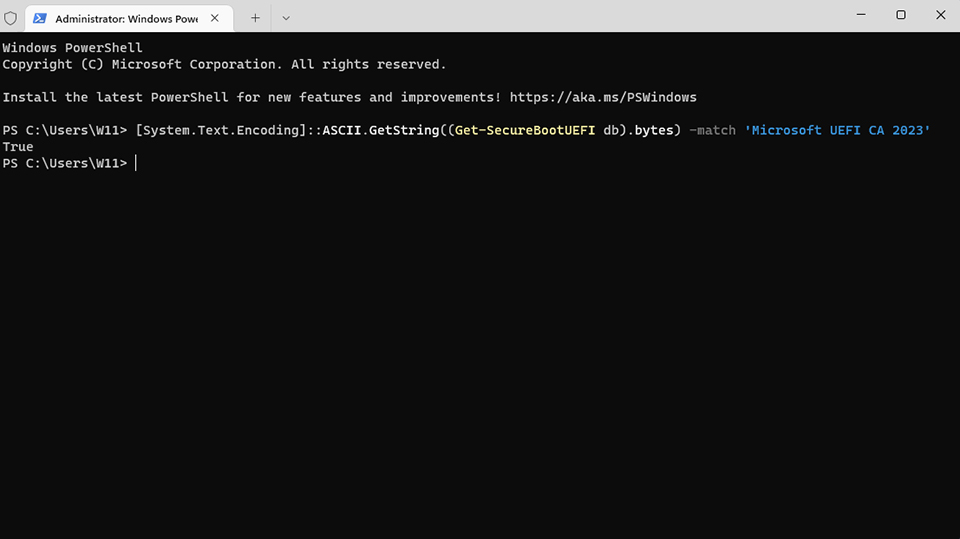
Or you can run PowerShell as administrator, then enter the following command:
[System.Text.Encoding]::ASCII.GetString((Get-SecureBootUEFI db).bytes) -match 'Microsoft UEFI CA 2023'.
If the system returns a value of “True”, it means your system has successfully updated to the new certificate.
More information:
Windows Secure Boot certificate expiration and CA updates:
https://support.microsoft.com/en-us/topic/windows-secure-boot-certificate-expiration-and-ca-updates-7ff40d33-95dc-4c3c-8725-a9b95457578e
https://support.microsoft.com/en-us/topic/windows-secure-boot-certificate-expiration-and-ca-updates-7ff40d33-95dc-4c3c-8725-a9b95457578e
Secure Boot certificate update status in the Windows Security app:
https://support.microsoft.com/en-us/topic/secure-boot-certificate-update-status-in-the-windows-security-app-5ce39986-7dd2-4852-8c21-ef30dd04f046
https://support.microsoft.com/en-us/topic/secure-boot-certificate-update-status-in-the-windows-security-app-5ce39986-7dd2-4852-8c21-ef30dd04f046