Putting AI Agents to Work
A Practical Framework for Business AI Deployment
In Issue #001, we discussed the rise of Agentic AI and the shift from prompt-based assistance to agents capable of pursuing specific objectives. Issue #002 focused on Hybrid AI and the reasoning behind allocating different workloads to appropriate computing environments. Issue #003 explored how organizations can assess the true business value of Agentic AI beyond mere productivity.
Issue #004 addresses the practical next question: How can businesses—from independent professionals and small teams to larger organizations—put AI agents to work responsibly, affordably, and effectively? For a comprehensive framework, please refer to MSI AI Insights Issue #004 — Putting AI Agents to Work: A Practical Framework for Business AI Deployment
Executive Summary
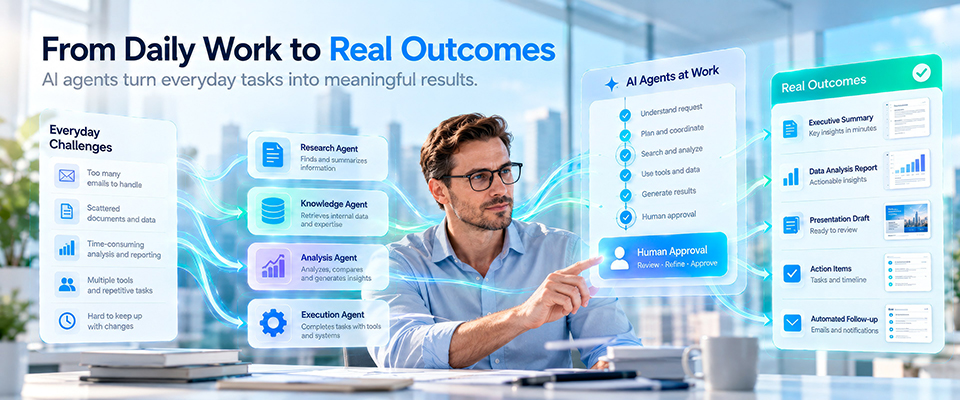
AI agents are transitioning from mere demonstrations to providing meaningful assistance in everyday work. However, successful deployment is not simply about installing a model, launching a chatbot, or connecting an agent to every application. It begins with a defined business workflow, a clear objective, appropriate access to tools and information, and a reliable method for measuring outcomes.
For a small business, an AI agent might sort customer inquiries, draft responses, or monitor supplier updates. In larger organizations, agents can assist with document reviews, knowledge retrieval, service operations, and cross-system reporting. In every scenario, the value of the agent depends less on its perceived autonomy and more on the reliability of the tasks it performs.
This guide introduces a practical deployment model that separates five key decisions: which workflow to improve, what information and tools the agent requires, where the workload should be processed, how to maintain human control, and how to measure and scale a successful pilot project. It also clarifies essential technical concepts—including models, retrieval-augmented generation (RAG), tool calling, orchestration, and local, cloud, or hybrid execution—without assuming that every business needs a dedicated AI engineering team.
The goal is not to automate every workflow completely but to determine the appropriate level of assistance, automation, and oversight for each task and to provide evidence that the results justify the investment.
Key Takeaways
- Start with a workflow, not a model. Choose a recurring problem with clear inputs, measurable outputs, and an accountable owner.
- An agent is a system, not merely an LLM. Useful deployment combines reasoning, knowledge, tools, permissions, monitoring, and human oversight.
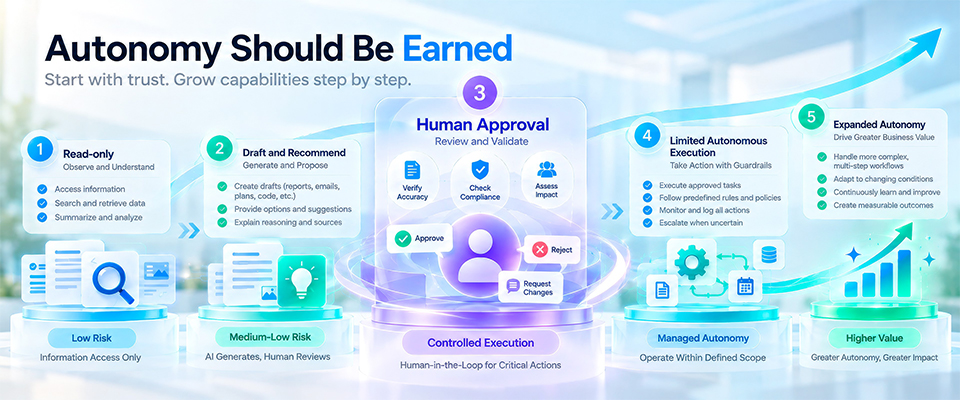
- Autonomy should be earned. Begin with read-only and draft actions, then expand permissions only after reliability is demonstrated.
- Local, cloud, and hybrid AI are workload decisions. Data sensitivity, latency, connectivity, model capability, operating cost, and maintenance all matter.
- Evaluate outcomes, not demonstrations. Measure completion quality, intervention rate, elapsed time, operating cost, and business impact.
- Build for change. Models, tools, regulations, and business requirements evolve; successful agent deployments need ongoing evaluation and ownership.
From AI Assistant to AI Agent
The Difference Is Responsibility for the Workflow
An AI assistant typically aids individuals in completing part of a task, such as summarizing a document, suggesting a response, or explaining a spreadsheet. In contrast, an AI agent can be assigned specific goals and carry out multiple steps to achieve those goals within established boundaries. An AI agent can retrieve relevant information, decide which approved tools to use, check results, and either return an outcome or request human approval.
This does not mean agents are universally more appropriate than assistants. A simple drafting assistant can be safer, cheaper, and easier to operate than an autonomous process. The right question is: which steps genuinely benefit from delegated execution, and which still require a person?
A practical spectrum is: Assist → Recommend → Execute with Approval → Execute within Limits → Monitor and Escalate. Organizations should select the least autonomous level that reliably meets the business need.
Is AI generating measurable business value?
A Concrete Example: Customer Inquiry Handling
Consider a customer who asks a question about product compatibility. An AI assistant can help an employee draft a response. A constrained AI agent can classify the inquiry, retrieve approved product information, prepare a suitable response, and flag any uncertainties. With explicit authorization, a more advanced agent might create a service ticket or update a customer record. However, these last steps introduce additional risks, as the agent alters a business system or communicates externally.
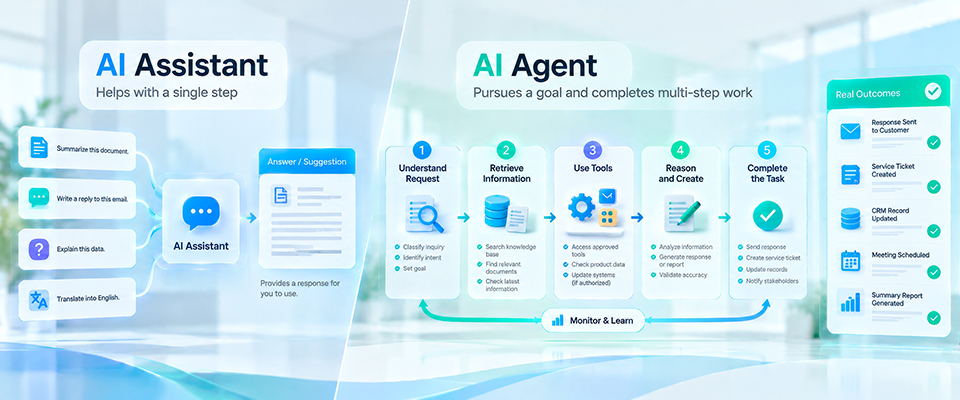
The distinction is important: a successful answer is not proof that an agent can safely send messages, modify records, or make commitments. Each additional action needs its own controls and tests.
Start with the Workflow, Not the Technology
Choose a First Use Case That Can Be Measured
The most effective pilot project is often not the flashiest demonstration, but rather a workflow characterized by consistent repetition, established rules, readily available information, and a clear definition of success. Ideal candidates include internal knowledge searches, recurring document classification, first-draft reporting, preparation for meeting follow-ups, support triage, and monitoring changes in approved information sources.
Avoid launching with a workflow that necessitates unrestricted access, irreversible actions, ambiguous accountability, or high-stakes decisions. For processes that could significantly impact safety, legal rights, finances, or customer relationships, it’s essential to keep human review at the forefront and involve qualified domain experts.
Not all repetitive tasks make good initial projects for automation. Suitable candidates have a clear trigger, a defined completion criteria, accessible information, and a designated person responsible for handling exceptions. Additionally, the task should occur frequently enough to provide useful insights during the pilot phase. In contrast, processes that frequently change, depend on undocumented judgment, or require irreversible decisions may benefit from an AI assistant that incorporates human oversight.
Before prioritizing a workflow, consider four practical questions: Is the input sufficiently structured? Can success be independently verified? Can the agent safely pause and seek assistance? And will the improvement have a positive impact on customers, employees, or business outcomes? A high-volume process with manageable complexity frequently offers a stronger starting point than an ambitious autonomous project with outcomes that are difficult to evaluate.
For example, a small distributor might begin by classifying incoming product inquiries and drafting responses using approved product documentation. The pilot should not begin by automatically committing to pricing, inventory, or delivery dates. Those actions can be introduced only after the organization has tested source accuracy, exception handling, and approval rules.
A Simple Pilot Scorecard
- Business need: What problem or delay does the workflow create today?
- Frequency and baseline: How often does it occur, and what does it currently cost in time, quality, or rework?
- Information readiness: Are the source documents accurate, current, and permitted for use?
- Action boundaries: Can the agent start by reading and drafting rather than changing systems?
- Success criteria: What minimum accuracy, turnaround, and escalation performance is acceptable?
- Ownership: Who approves access, reviews failures, and decides whether to continue?
A narrow, measurable workflow can generate more reliable learning than an ambitious agent that tries to perform an entire department’s work from day one.
The Building Blocks of a Working AI Agent
Models, Knowledge, Tools, and Orchestration
A large language model (LLM) interprets instructions and generates language or structured outputs. It is an important component, but it does not by itself provide reliable knowledge of a company’s latest policies or permission to interact with business systems.
Retrieval-augmented generation (RAG) lets an application retrieve relevant content from an approved knowledge source and provide it as context to a model. A well-designed RAG system requires document permissions, indexing, freshness checks, and a way to cite or trace source material. Retrieval can reduce unsupported answers, but it does not guarantee correctness.
Tool calling enables an agent to request a specific function, such as searching a catalog, reading a permitted folder, creating a draft ticket, or querying a database. Tool access should be narrowly scoped, authenticated, logged, and separated by risk. The model should not be treated as a substitute for application-level authorization.
Orchestration coordinates the sequence of steps, tool execution, retries, timeouts, and escalation. It may also route work among specialized agents. Multiple agents are not automatically better: additional handoffs can increase latency, cost, complexity, and failure modes. A single agent with a few dependable tools is often the better starting point.
The language model provides reasoning and language capabilities, but it is not the entire agent. Retrieval-augmented generation (RAG) can supply relevant passages from approved knowledge sources at the time of a request. Tool calling enables the agent to request an action from a defined application interface. An orchestration layer decides which steps are allowed, in what order, and under which conditions the workflow should stop or return control to a person.
Memory also needs careful definition. Short-term context helps an agent follow a task across several steps; persistent memory may preserve selected preferences or workflow state across sessions. Neither should be treated as an unrestricted archive of confidential information. Businesses should specify what is stored, for how long, who may retrieve it, and how incorrect or outdated information is corrected.
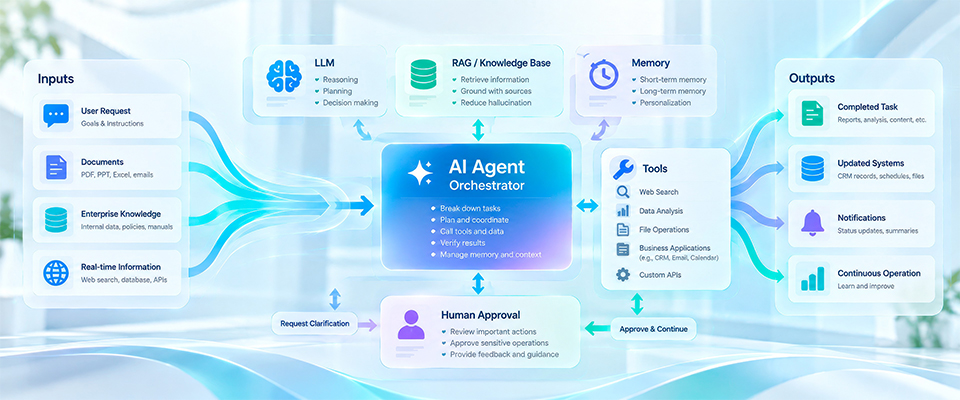
A Reference Workflow
Business Request → Validate Scope → Retrieve Approved Knowledge → Plan or Select Action → Call Authorized Tool → Verify Result → Human Approval When Needed → Record Outcome
This workflow is designed to be modular, allowing a business to replace the model, knowledge store, or execution environment without the need to redefine its objectives. This modularity also facilitates error identification: Was the information outdated? Did the model misinterpret the request? Did a tool fail? Was any necessary approval missing?
Consider an incoming customer request asking whether a product meets a specific requirement. First, the agent classifies the request and retrieves relevant passages from the approved product knowledge base. Next, it checks if the cited information is up-to-date and whether the answer requires data from another system, such as inventory or service eligibility. The agent then drafts a response with supporting evidence. If a specification is unclear, a source is missing, or a commercial commitment is necessary, the request is sent to a designated employee.
After obtaining approval, the response can be sent via an authorized communication tool. The workflow also records its sources, actions, timestamps, and any human interventions. This allows the organization to measure key metrics such as turnaround time, factual accuracy, escalation rate, and customer satisfaction. This example illustrates why an agent is more than just a chatbot: it coordinates a sequence of defined actions while maintaining clear boundaries on what it can independently decide.
Where Should the Agent Run?
Local AI, Cloud AI, and Hybrid AI
Issue #002 established that AI deployment should prioritize workloads. The same principle applies to agents. An agent can utilize a local model, a cloud-hosted model, or a combination of both. The appropriate choice depends on various factors, including the sensitivity of information, model requirements, connectivity, responsiveness, operating costs, and system maintenance capability.
Local AI can keep certain data and inference within a device or managed environment, support selected offline workflows, and offer more predictable per-use infrastructure spending once capacity is available. However, local operation still requires security controls, updates, sufficient memory and compute, and operational support. Local does not automatically mean private or compliant.
Cloud AI can offer access to powerful models, elastic capacity, managed services, and rapid experimentation. Trade-offs may include recurring usage costs, network dependence, data-handling considerations, and service availability. Actual latency depends on the model, network, workload, and implementation; cloud is not inherently slower.
Hybrid AI routes different tasks to the most appropriate environment. A local component might classify information or retrieve approved documents while a cloud service handles a demanding reasoning step under an approved data policy. Another workflow may run entirely locally or entirely in the cloud. The goal is not to maximize architectural complexity; it is to match the workload to business requirements.
Local execution can be particularly advantageous when sensitive information must remain in a controlled environment, network access is unreliable, or a predictable workload benefits from dedicated computing resources. However, running a model locally does not automatically ensure that the entire workflow is private; external searches, email communications, telemetry, updates, and connected tools may still transfer data outside the device or network. Security hinges on the complete data path.
Cloud AI provides access to larger or frequently updated models and managed services without requiring the same level of local infrastructure maintenance. In return, businesses must assess data handling practices, service terms, recurring costs, connectivity issues, and the operational impact of potential provider outages. Hybrid designs can direct different processes to different environments—for instance, locally retrieving internal documents while employing cloud-based reasoning for an approved, minimized input.
The placement decision should be made per workload rather than per brand or model. Compare quality requirements, response-time targets, expected volume, total cost of ownership, available IT skills, data residency needs, and failure recovery. A workload that looks inexpensive during a short demo may become costly at scale; equally, local infrastructure may be underutilized if usage is sporadic.
A Practical Workload Placement Checklist
- Data: What information leaves the device, office, or controlled environment?
- Capability: Does the selected model reliably handle the language, context, and reasoning demands?
- Performance: What response time and throughput does the workflow require?
- Availability: What happens when the network or model service is unavailable?
- Economics: What are the full costs of hardware, inference, integration, administration, and support?
- Governance: Can the organization audit actions, manage access, and meet its applicable obligations?
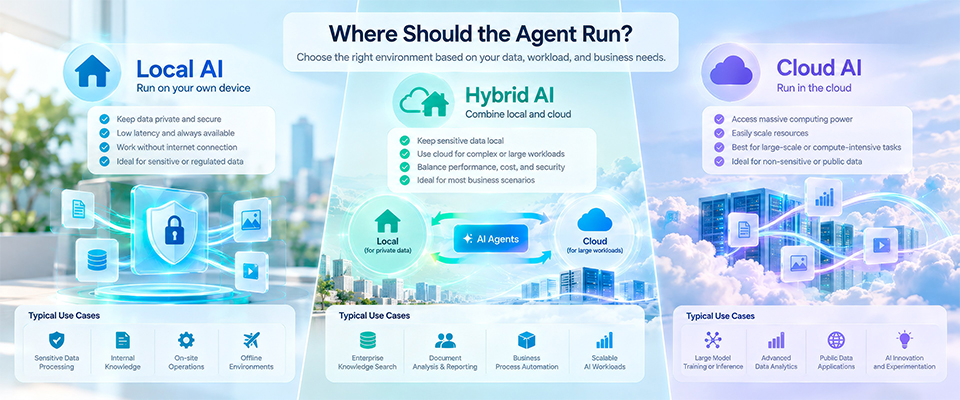
Deployment architecture should follow a tested workload, not a blanket rule that every agent must run locally or in the cloud.
Designing for Trust, Security, and Human Control
Permissions Before Autonomy
Agents can encounter untrusted text in emails, websites, documents, and retrieved material. That content may contain misleading instructions or attempts to redirect an agent. Treat external content as data rather than authority. System-level instructions, tool permissions, and business policies must remain enforced outside the model wherever possible.
Use least-privilege access. Separate read, draft, and write permissions; require approval for sensitive actions; and avoid giving a general-purpose agent unrestricted credentials. Actions that spend money, send external communications, change records, or delete information deserve stronger controls than internal summarization.
A practical authorization ladder begins with read-only access, followed by draft creation, then actions requiring human approval, and only later narrowly scoped autonomous execution. Each step should have a named owner and acceptance criteria. For example, an agent may draft a purchase request but should not independently authorize payment merely because it can access a procurement application.
Prompt injection is another operational concern: instructions embedded in a retrieved webpage, document, or message can attempt to redirect an agent. Retrieved content should be treated as data rather than a new source of authority. Restricting tools, validating inputs and outputs, isolating credentials, and requiring approval for consequential actions reduce the potential impact of an unsafe or mistaken instruction.
Make Failure Recoverable
A reliable agent should know when to stop. Define confidence or validation checks, escalation routes, spending and time limits, and rollback or recovery procedures. Log tool calls and significant decisions with appropriate privacy safeguards. For workflows with real-world consequences, use deterministic checks and human authorization rather than relying solely on a model’s self-assessment.
Governance shouldn’t be an afterthought added once a pilot succeeds; it should be integrated into the initial design. The level of control must be proportional to the potential impact of the agent’s actions.
Organizations should anticipate that some outputs from agents may be incorrect, incomplete, delayed, or duplicated. Consequently, reliable workflows must include timeouts, retries with limits, measures to prevent duplicate actions, and a clear process for human intervention. For transactions, maintaining a record of both intended and completed actions can assist teams in deciding whether to retry, reverse, or manually resolve an operation.
Logging must capture enough evidence to investigate failures while avoiding unnecessary exposure of confidential content. Important records should include the workflow version, approved knowledge sources, tool calls, permission decisions, exception categories, and final outcomes. Regular reviews can help identify patterns that a single successful demonstration might overlook.
From Pilot to Everyday Operations
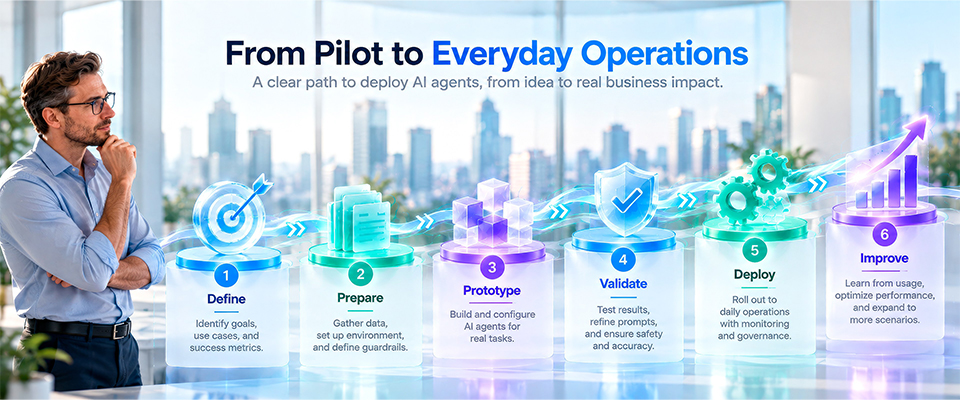
A Six-Step Deployment Roadmap
- Define: Select one workflow, owner, target outcome, and operating boundary.
- Prepare: Review knowledge sources, data permissions, tool access, and infrastructure needs.
- Prototype: Begin with a constrained assistant or agent and representative test cases.
- Validate: Compare results against the baseline, including failures and human corrections.
- Deploy: Introduce limited production access, approval checkpoints, logging, and support.
- Improve: Review outcomes, refresh knowledge, adjust models and permissions, and expand only when justified.
This sequence can be applied both by a solo professional using a small set of approved tools and by an IT team integrating multiple internal systems. Although the complexity of the infrastructure may vary, the core requirements of accountability, measurable results, and controlled access remain constant.
During the preparation phase, create a small but representative evaluation set that includes typical requests, ambiguous requests, outdated documents, incomplete information, and intentional attempts to exceed permissions. Before launching, agree on minimum thresholds for answer quality, completion rate, acceptable cost, and escalation procedures. This ensures that the decision to expand the pilot is based on evidence rather than a polished demonstration.
Deployment should be incremental. Begin with a limited user group, monitor actual usage, and collect both successful and unsuccessful examples. Assign responsibilities for maintaining knowledge sources, reviewing access rights, updating prompts or workflow logic, and addressing incidents. The pilot becomes fully operational when these responsibilities extend beyond the original project team.
Measure What Matters After Launch
A pilot should focus on more than just task completion. It is important to track successful end-to-end outcomes, the rate of human intervention, severity of errors, time taken to complete tasks, the amount of rework, operating costs per completed workflow, and the overall impact on users or customers. Additionally, monitor exceptions and any deviations over time. A faster process that leads to more downstream corrections may not provide a positive return on investment.
Use a simple comparison: Baseline Workflow → AI-Enabled Workflow → Verified Outcome → Business Value. This directly connects Issue #004 deployment decisions to the measurement approach introduced in Issue #003.
A balanced scorecard should include both outcome measures and operating measures. Outcome measures might involve turnaround time, service capacity, error reduction, customer experience, or revenue-related conversions. Operating measures could include task completion rates, the percentage of cases needing human intervention, tool failures, model usage, and the cost per successfully completed workflow.
When evaluating results, compare them against the pre-deployment baseline, and be sure to differentiate between assisted completions and fully autonomous ones. A higher rate of automation is not necessarily a success if it leads to increased corrections or risks. Similarly, a system that frequently escalates difficult cases can still deliver significant value by accurately resolving routine requests and allowing employees to focus on more complex tasks.
Business Scenarios Across Organization Sizes
SOHO and Independent Professionals
A consultant or independent creator might use an agent to organize reference materials, prepare meeting follow-ups, or draft initial proposals. The main benefits of this approach include consistency and time savings. However, some risks are also involved, such as incorrect content, accidental disclosure, and excessive setup effort. A narrow, approval-based workflow is usually the best choice in this scenario.
Small and Medium Businesses
An SMB may use an agent to compare supplier documents, triage incoming requests, monitor approved inventory reports, or draft recurring sales summaries. A shared knowledge base and a few well-defined tool connections can improve coordination without requiring a large AI operations team. Ownership of the source data and process is essential.
For an SMB, a practical multi-step example could connect product documentation, customer inquiries, and a customer relationship management system. An agent can categorize requests, retrieve approved answers, prepare a suggested response, and create a follow-up task. A salesperson approves any commercial commitments. This approach can reduce repetitive coordination without requiring the business to build a large custom AI platform.
Multi-agent architecture becomes useful only when distinct roles or tools justify the additional coordination. One agent may specialize in document retrieval, another in preparing structured comparisons, and a supervisor component may validate that required steps were completed. However, more agents introduce additional latency, cost, permission boundaries, and failure modes. A well-designed single agent with clearly defined tools is often the better first deployment.
Larger Organizations
For organizations with multiple departments, coordinating agents across service, operations, marketing, or IT workflows can be advantageous. However, this setup brings challenges such as identity management, data boundaries, auditability, integration with existing systems, and change management. Multi-agent coordination should only be introduced when the specialization of agents demonstrably improves outcomes—not simply because the architecture permits it.
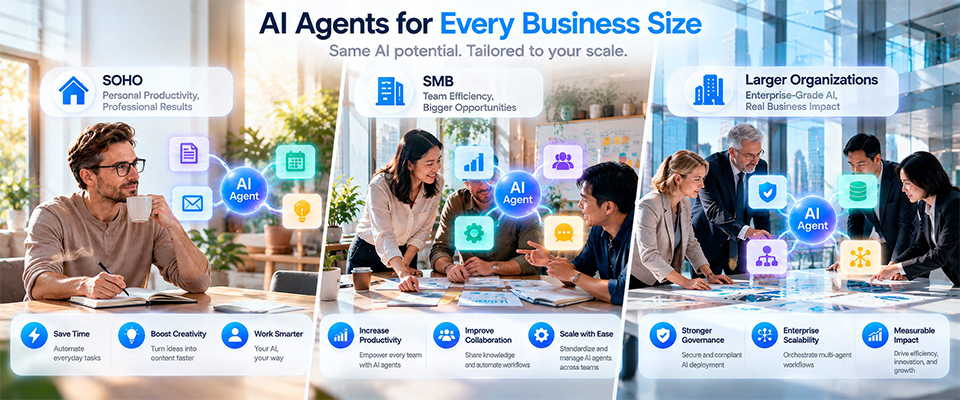
Across all three segments, the central principle remains the same: the design of the agent should be guided by the desired business outcome, not the other way around.
Looking Ahead
From AI Experiments to Reliable Business Capability
The next stage of Agentic AI adoption will not be defined only by more capable models or more autonomous demonstrations. It will be defined by repeatable workflows that people can understand, supervise, and trust. Businesses that build this discipline early will be better positioned to evaluate new models and tools without constantly restarting their AI strategy.
The progression across MSI AI Insights is now clear: understand why agents matter; understand where workloads run; understand how value is measured; and put the right agents to work with appropriate controls.
The goal is not to deploy the most AI agents. It is to build the capability to improve real work—safely, measurably, and sustainably.
Take the next step toward Hybrid AI with MSI PRO MAX EDGE AI+, and stay tuned for the upcoming MSI EdgeMesa N AI+.
Key Questions for Business Leaders
Q1. What is the difference between an AI assistant and an AI agent?
through multiple approved steps, using knowledge and tools within explicit limits.
Q2. Does a business need its own AI model to deploy an agent?
No. Many deployments use an existing local or hosted model. The important work is defining the workflow, connecting permitted information and tools, and validating results.
Q3. What is RAG, and when is it useful?
Retrieval-augmented generation brings relevant content from approved knowledge sources into a model’s context. It is useful when answers must reflect current business documents, but source quality and access controls still matter.
Q4. What is tool calling?
Tool calling lets an agent request an authorized application function, such as searching a catalog or creating a draft. The application must independently enforce permissions and validate inputs.
Q5. Is a multi-agent system necessary?
Not usually for a first pilot. Multiple specialized agents may help complex workflows, but they add coordination and monitoring requirements. Start with the simplest architecture that works.
Q6. Should AI agents run locally or in the cloud?
Choose based on data sensitivity, model capability, cost, availability, latency, and operational capacity. Some workloads benefit from hybrid execution; there is no universal answer.
Q7. Can a local agent operate without the internet?
Some local models and tools can work offline, provided all required data and services are available locally. Cloud-dependent tools, updates, and external integrations still require connectivity.
Q8. How can organizations reduce agent risk?
Use least-privilege permissions, trusted knowledge sources, approval checkpoints, validation, logging, limits on actions, and clear escalation to humans.
Q9. How should an AI agent pilot be measured?
Compare baseline and AI-enabled workflows using outcome quality, completion time, intervention rate, errors, rework, cost, and business impact—not only prompts or model benchmarks.
Q10. Where should a small business begin?
Select one recurring, low-risk workflow with measurable value. Begin with read-only or draft actions, test against real cases, and expand access only after results are reliable.
Continue the MSI AI Insights Journey
Previous Issue
MSI AI Insights — Issue #003 | Beyond Productivity: Measuring the Real Business Value of Agentic AI
Explore why time saved is only the beginning, and how workflow economics, business outcomes, and human value shape a stronger AI business case.
https://www.msi.com/blog/ai-insights-beyond-productivity-of-agentic-ai
MSI AI Insights — Issue #002 | The Hybrid AI Enterprise: Building Enterprise AI Around Work, Not Infrastructure
https://www.msi.com/blog/the-hybrid-ai-enterprise
Explore why AI workload placement should reflect business needs rather than a single infrastructure model.
MSI AI Insights — Issue #001 | The Rise of Agentic AI
Understand the shift from prompt-based assistants toward AI agents that can participate in multi-step work.
https://www.msi.com/blog/the-rise-of-agentic-ai
Current Issue
MSI AI Insights — Issue #004 | Putting AI Agents to Work
A practical framework for turning Agentic AI strategy into real-world business deployment.
References
- NIST — Artificial Intelligence Risk Management Framework (AI RMF 1.0)
https://doi.org/10.6028/NIST.AI.100-1 - NIST — AI RMF Generative Artificial Intelligence Profile
https://doi.org/10.6028/NIST.AI.600-1 - OWASP — Top 10 for Large Language Model Applications
https://genai.owasp.org/llm-top-10/ - MITRE — ATLAS: Adversarial Threat Landscape for Artificial-Intelligence Systems
https://atlas.mitre.org/ - Microsoft — 2025 Work Trend Index
https://www.microsoft.com/en-us/worklab/work-trend-index/2025-the-year-the-frontier-firm-is-born - McKinsey — The State of AI
https://www.mckinsey.com/capabilities/quantumblack/our-insights/the-state-of-ai - Stanford HAI — 2026 AI Index Report
https://hai.stanford.edu/ai-index/2026-ai-index-report
Further Reading
- NIST — AI Resource Center
https://airc.nist.gov/ - OECD — AI and Work
https://www.oecd.org/en/topics/ai-and-work.html - Anthropic — Economic Index
https://www.anthropic.com/economic-index - NVIDIA — AI Blueprints
https://www.nvidia.com/en-us/ai/
About MSI AI Insights
MSI AI Insights is an editorial series exploring how artificial intelligence is reshaping computing, work, and business strategy. Each issue examines a critical question emerging from the evolution of Generative AI, Agentic AI, Hybrid AI, deployment, business value, and intelligent computing. Rather than focusing solely on model performance, the series connects AI capabilities with practical decisions for professionals, developers, business leaders, and organizations of different sizes.
About MSI
Micro-Star International Co., Ltd. (MSI) is a global technology company with expertise spanning computing hardware, AI PCs, business and productivity solutions, gaming, content creation, and enterprise computing. Through products, technology partnerships, and ongoing AI initiatives, MSI aims to make advanced computing technologies more accessible and practical across a broad range of users and industries.
About This Publication
Publication: MSI AI Insights — Issue #004
Title: Putting AI Agents to Work: A Practical Framework for Business AI Deployment
Publication Date: October 2026 (Draft; confirm before publication)
Publisher: Micro-Star International Co., Ltd.
Language: English
Disclaimer
This publication is intended for informational and educational purposes only. The perspectives presented are based on publicly available research, industry trends, and editorial analysis at the time of preparation. AI technologies evolve rapidly; readers should consult current official documentation, relevant security guidance, and applicable legal requirements before making technology or business decisions. Technical scenarios are illustrative, not guarantees of product functionality or business results. Third-party company names, trademarks, products, and technologies remain the property of their respective owners.
Copyright
© 2026 Micro-Star International Co., Ltd. All rights reserved.
No part of this publication may be reproduced, distributed, transmitted, or stored in any form without prior written permission from Micro-Star International Co., Ltd., except for brief quotations used for review, research, or educational purposes with appropriate attribution.