Best MSI PC Case Configuration with NVIDIA GeForce RTX™ 40 Series Graphics Cards
Case & Components
With the release of NVIDIA’s GeForce RTX™ 40 Series graphics cards coming out in waves, many users were left wondering how to best configure their PC builds. With the increased size of NVIDIA’s GeForce RTX™ 40 Series graphics cards, picking the correct PC case and setting up the internal airflow will be all the more important. Below, we demonstrated the best configuration utilizing three MSI PC cases while each is paired with two different graphics cards.
MEG PROSPECT 700R + GeForce RTX™ 4090 SUPRIM LIQUID X 24G
This configuration takes advantage of the larger interior space offered by the MEG PROSPECT 700R. The GeForce RTX™ 4090 SUPRIM LIQUID X 24G’s radiator is installed on the inside of the front of the case. The three pre-installed front fans provide cooling to the radiator by bringing in cold air. One pre-installed back fan works as an exhaust to get rid of internal system heat. The MEG CORELIQUID S360 liquid cooler’s radiator is installed at the top of the fan while the radiator fans cool off the radiator while working as an exhaust to push out hot air from the top of the case.
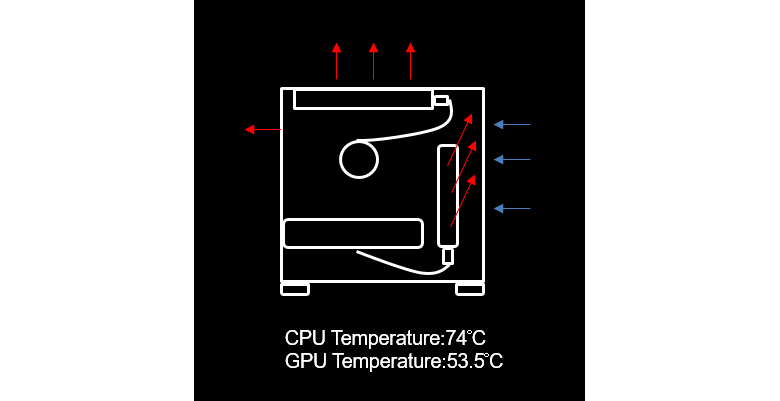
MEG PROSPECT 700R + GeForce RTX™ 4090 SUPRIM X 24G
This setup takes a more traditional approach. The graphics card used is the GeForce RTX™ 4090 SUPRIM X 24G so no additional radiator needs to be installed. The MEG CORELIQUID S360 remains mounted at the top to work as an exhaust to get rid of internal hot air. The three front fans are mounted to bring in cold air while the back fan provides an exhaust function to get rid of heat.
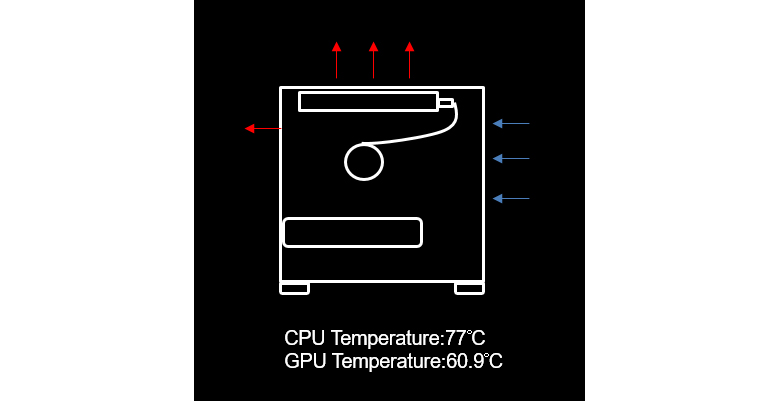
MPG VELOX 100P AIRFLOW + GeForce RTX™ 4090 SUPRIM LIQUID X 24G
With this setup, it serves as the best configuration for cooling performance and maximizing any potential to get rid of excess heat. Place the MEG CORELIQUID S360 liquid cooler on the top to work as an exhaust blowing the hot air out while cooling the CPU. Since the PC case used in this configuration is the MPG VELOX 100P AIRFLOW, we decided to mount the GeForce RTX™ 4090 SUPRIM LIQUID X 24G’s radiator on the side to function as an additional exhaust. Lastly, the three front fans bring in cold air to the system while the one back fan acts as a final exhaust to blow out hot air.

MPG VELOX 100P AIRFLOW + GeForce RTX™ 4090 SUPRIM X 24G
This is a different configuration while still using the MPG VELOX 100P AIRFLOW PC case but the graphics card is now the GeForce RTX™ 4090 SUPRIM X 24G. To have the best cooling performance, the MEG CORELIQUID S360 remains mounted at the top to provide an exhaust function to get rid of hot air. The three front fans are still mounted to bring in cold air while the back fan remains to get rid of hot air.

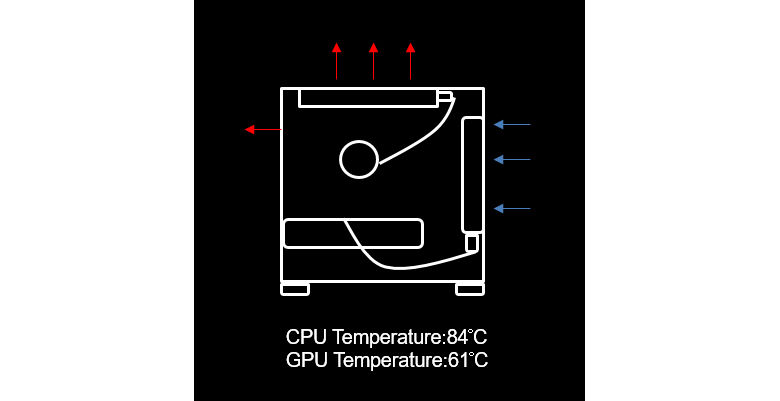
MAG VAMPIRIC 300R + GeForce RTX™ 4090 SUPRIM LIQUID X 24G
This setup using the MAG VAMPIRIC 300R performs well with heat dissipation. This is achieved by placing the MEG CORELIQUID S360 liquid cooler on the top to work as an exhaust blowing the hot air out while cooling the CPU. The GeForce RTX™ 4090 SUPRIM LIQUID X 24G’s radiator is mounted at the front of the case to bring in cold air while providing GPU cooling. Lastly, the fan at the back acts as an exhaust to blow out hot air.
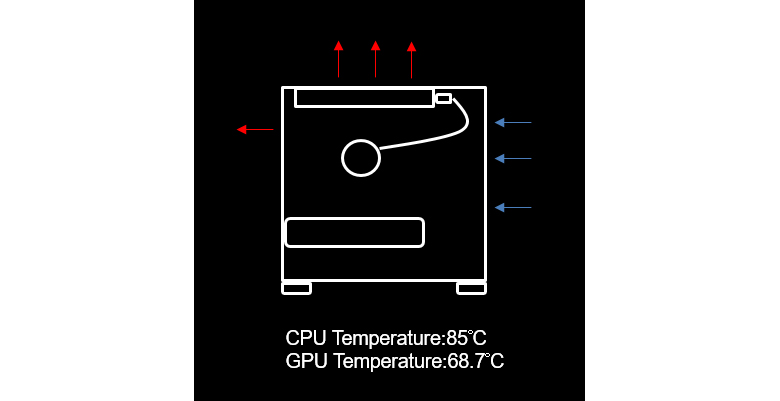
MAG VAMPIRIC 300R + GeForce RTX™ 4090 SUPRIM X 24G
This configuration uses the GeForce RTX™ 4090 SUPRIM X 24G. For the best cooling performance, the MEG CORELIQUID S360 remains mounted at the top to provide an exhaust function to get rid of hot air. The front of the case now has three fans mounted to bring in cold air while the back fan remains to get rid of hot air.
For more information, please refer to MSI’s website.
MEG PROSPECT 700R https://www.msi.com/PC-Case/MEG-PROSPECT-700R
MPG VELOX 100P AIRFLOW https://www.msi.com/PC-Case/MPG-VELOX-100P-AIRFLOW
MAG VAMPIRIC 300R https://www.msi.com/PC-Case/MAG-VAMPIRIC-300R
MAG VAMPIRIC 300R MIDNIGHT GREEN https://www.msi.com/PC-Case/MAG-VAMPIRIC-300R-MIDNIGHT-GREEN
MAG VAMPIRIC 300R PACIFIC BLUE https://www.msi.com/PC-Case/MAG-VAMPIRIC-300R-PACIFIC-BLUE