[Troubleshooting] The Notebook Cannot Power On or Enter the Operating System
Answer
When an MSI device cannot power on, displays a black screen, or cannot properly enter the Windows operating system, the issue may be related to a hardware conflict, an incorrect boot path, or changed BIOS settings. Follow the standard troubleshooting process below in order to restore normal system operation.
This article applies to all MSI notebook products.
Basic Hardware and System Environment Reset
- Remove all external devices and non-factory-installed hardware
This includes solid-state drives (SSDs), memory (RAM), external monitors, mice, keyboards, and all USB devices. - Restore the BIOS default settings
- Restart the computer and repeatedly press the Delete key when the MSI logo appears to enter the BIOS menu.
- Go to “Save & Exit” > “Load Optimized Defaults,” then save the changes and exit.
- Update or reflash the BIOS
Refer to [How To] BIOS Update Guide.
Solutions for Specific Error Messages
- Blue screen error “INACCESSIBLE_BOOT_DEVICE”
This issue is usually related to the storage controller. Enter the BIOS and check the VMD option. If the setting differs from its previous state, restore the correct setting so that the system can detect the storage drive again.
Please refer to [How To] Set Up RAID in BIOS.

- The storage drive is not detected: “Hard drive not detected,” “Operating system not found,” or “No bootable device found”.
- Refer to [Troubleshooting] The Notebook Cannot Power On or Displays a Black Screen After Pressing the Power Button to perform an EC (Embedded Controller) reset.
- Enter the BIOS menu and check “Storage Information” to confirm whether the solid-state drive is detected correctly.
If the solid-state drive is not detected in the BIOS, reinstall or replace the drive. - Confirm that the drive contains a complete bootable operating system.
If the solid-state drive does not contain a bootable operating system, go to Download Windows 11 to install the operating system.
- The system automatically enters a special interface during startup
- The system enters the BIOS menu immediately after startup
Refer to [Troubleshooting] The System Enters the BIOS Page Immediately After Startup - The system enters EFI Shell immediately after startup
Refer to [How To] Install Windows on an MSI Device Shipped with FreeDOS.
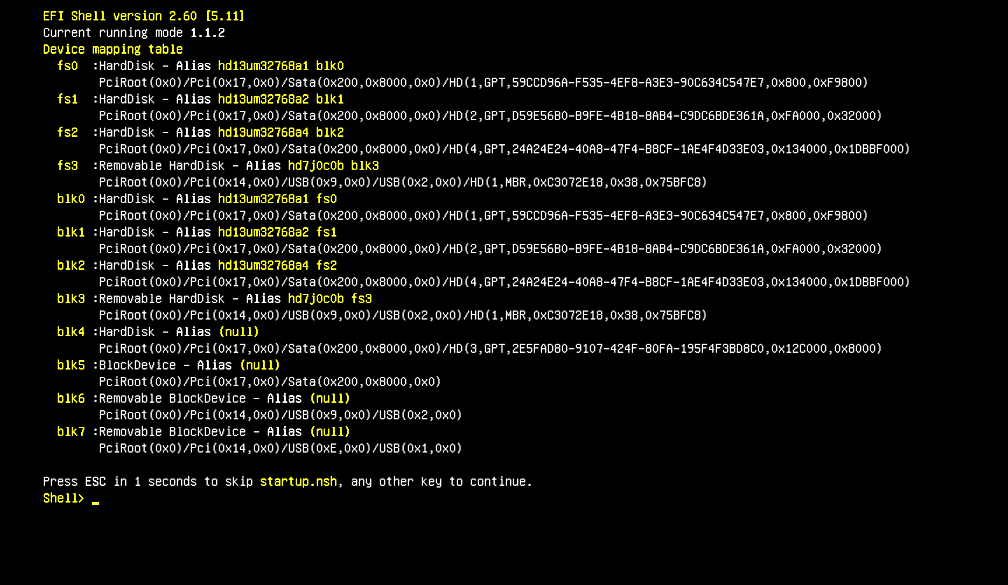
- The system enters the Windows Recovery Environment (WinRE) immediately after startup
Refer to [Troubleshooting] The System Enters the WinRE Page After Startup and Still Cannot Enter Windows After Restarting
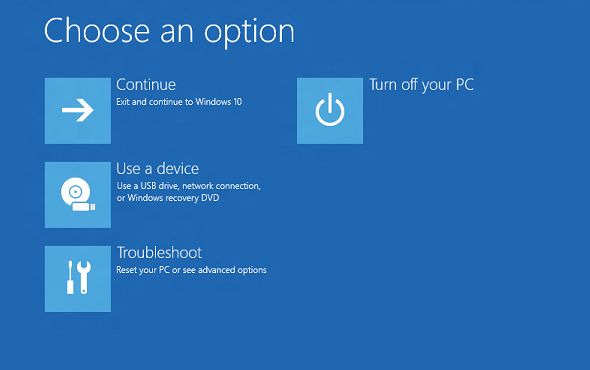
- The system enters the BIOS menu immediately after startup
- No display after startup or repeated restarts
- No display appears after the MSI logo
- After pressing the power button, the screen remains black and the power indicator does not light up
- After pressing the power button, the screen remains black but the power indicator lights up
Refer to [Troubleshooting] The Notebook Cannot Power On or Displays a Black Screen After Pressing the Power Button - The device is stuck in a restart loop
Refer to [Troubleshooting] The Notebook Repeatedly Restarts After Startup
If the issue persists after completing all the steps above, contact the local MSI service center for further professional inspection and assistance.
FAQ
Q: Why does my computer suddenly display “No bootable device found”?
A: This means that the system cannot find a bootable storage drive. Possible causes include changed BIOS boot settings, such as a change to the VMD option, a temporary hardware connection issue, or a defective solid-state drive (SSD). Loading the BIOS default settings and performing an EC reset can help identify the cause.
Q: Why do I need to remove the memory and external storage drive that I installed?
A: Some non-factory-installed hardware or external devices may cause hardware conflicts or abnormal power delivery, resulting in a failure during the Power-On Self-Test (POST). Removing all external devices is the most direct way to determine whether the issue originates from the notebook itself or from a peripheral device.