Build the Best Multi-Monitor Setups for Gaming and Streaming
Monitors
Multi-monitor setups are (still) often portrayed as the domain of the stereotypical hacker or genius programmer in media and entertainment.
The world of dual or triple monitors has become far more accessible and now offers tangible benefits to a broad range of users, whether you're a gamer, a streamer, a professional, or just someone who wants to enjoy a premium visual experience.
The world of dual or triple monitors has become far more accessible and now offers tangible benefits to a broad range of users, whether you're a gamer, a streamer, a professional, or just someone who wants to enjoy a premium visual experience.
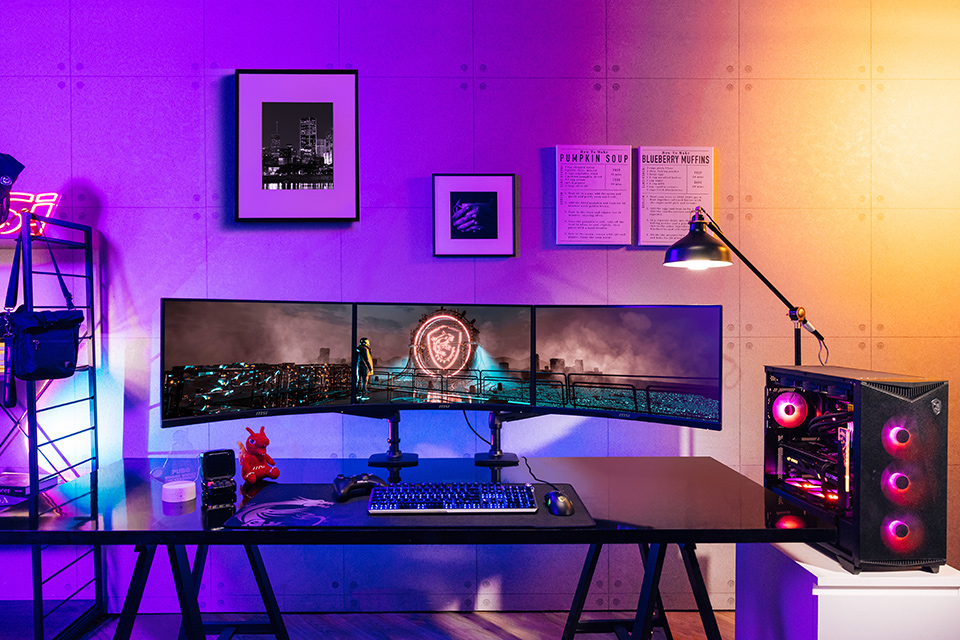
Benefits of Multi-Monitor (Dual/Triple) Setups
When it comes to high-end gaming, streaming, or even productivity, having multiple monitors enhances your experience to such an extent that it’s become the norm for those who have the space for it.
Additional monitors also reduce the amount of information concentrated on your main display and moves some stuff to your peripheral vision – allowing you to experience a sense of realism and boost productivity to a level that’s impossible on a single screen.
Let’s go over some key benefits of multi-monitor setups before talking about how to create the perfect one for you!
Additional monitors also reduce the amount of information concentrated on your main display and moves some stuff to your peripheral vision – allowing you to experience a sense of realism and boost productivity to a level that’s impossible on a single screen.
Let’s go over some key benefits of multi-monitor setups before talking about how to create the perfect one for you!
− Unmatched Immersion: Wider Field of View and Enhanced Realism
Whether you're into sim racing, flight simulations, or playing open-world games, the wider field of view in a multi-monitor setup elevates your gaming experience to a whole new level.
Imagine exploring massive virtual worlds like Cyberpunk 2077 or Red Dead Redemption 2, with landscapes extending far beyond the constraints of a single screen, enveloping your field of vision. You're not just playing; you're living the experience.
For flight sim enthusiasts and sim racers, it gets even better. The extended, peripheral view allows you to feel the thrill of actually being in the driving seat or cockpit.
Imagine exploring massive virtual worlds like Cyberpunk 2077 or Red Dead Redemption 2, with landscapes extending far beyond the constraints of a single screen, enveloping your field of vision. You're not just playing; you're living the experience.
For flight sim enthusiasts and sim racers, it gets even better. The extended, peripheral view allows you to feel the thrill of actually being in the driving seat or cockpit.
− Gaining a Competitive Edge: More Space for Everything
Those extra screens can help you keep more information within your view. Whether its map strategies, talent trees, statistics, or even walkthroughs for that particularly tricky puzzle you just can’t figure out, you can look at what you need without ‘Alt + Tab’ing constantly and wasting time.
An extended field of view also enables better awareness of your surroundings. You’ll be able to spot enemies faster and detect movement in your peripheral vision without compromising on your ability to focus on your primary target.
An extended field of view also enables better awareness of your surroundings. You’ll be able to spot enemies faster and detect movement in your peripheral vision without compromising on your ability to focus on your primary target.
− Enhanced Productivity: Multitasking at Your Fingertips
A multi-monitor setup is essential for productivity these days. You can easily juggle multiple applications and your hundred open browser tabs, by spreading them across more than one display.
Some might even need a third monitor in a different orientation to further boost their productivity.
For example, streamers using a single monitor can either play or keep track of their Twitch/YouTube chat. Although overlays offer a solution here, they do visually impact both your gaming experience and audience interactions. Another monitor, preferably vertical, could be the ideal setup for you in this case.
Some might even need a third monitor in a different orientation to further boost their productivity.
For example, streamers using a single monitor can either play or keep track of their Twitch/YouTube chat. Although overlays offer a solution here, they do visually impact both your gaming experience and audience interactions. Another monitor, preferably vertical, could be the ideal setup for you in this case.
Ultrawide vs. Multiple Monitors
Although both ultrawide and multiple monitors grant you access to more screen real estate, they take very different approaches to do so. It’s important to weigh the advantages and disadvantages of each one before picking what’s right for you.
Size and Simplicity
Ultrawide monitors and dual monitor setups vary greatly in size and setup simplicity. The former, ranging from 29 to 49 inches, takes up less space on your desk due to needing only a single stand, and requires one HDMI or DisplayPort cable and one power cable.
Dual monitors, on the other hand, range from 18 to 34 inches each and require more desk space to accommodate two stands or a dual monitor arm. This necessitates additional setup and cable management, potentially adding complexity. However, you can combine multiple monitors to create a larger, panoramic setup that allows for an immersive gaming experience.
Dual monitors, on the other hand, range from 18 to 34 inches each and require more desk space to accommodate two stands or a dual monitor arm. This necessitates additional setup and cable management, potentially adding complexity. However, you can combine multiple monitors to create a larger, panoramic setup that allows for an immersive gaming experience.
− Viewing Experience and Flexibility
The viewing experience differs significantly between ultrawide monitors and dual monitor setups. Ultrawides offer a seamless, panoramic, but limited view, for immersive experiences, while lacking flexibility in positioning.
Dual monitors, on the other hand, are far more flexible, with their ability to divide tasks across screens and featuring arrangement options like vertical or horizontal setups. Ultrawide monitors can become more challenging when managing multiple windows and apps, especially with fullscreen applications.
Dual monitors, on the other hand, are far more flexible, with their ability to divide tasks across screens and featuring arrangement options like vertical or horizontal setups. Ultrawide monitors can become more challenging when managing multiple windows and apps, especially with fullscreen applications.
− Price
Ultrawide monitors are generally more expensive, particularly when trying to match the combined resolution of dual or triple monitors. What’s more, dual monitors offer higher total resolutions, often at a lower cost – making them an excellent pick for a broad range of audiences.
If you’re looking for the best value and good balance between immersion and productivity, a dual or triple monitor setup is the way to go.
If you’re looking for the best value and good balance between immersion and productivity, a dual or triple monitor setup is the way to go.
− Multitasking Experience
When it comes to multitasking, the separation in dual monitors allows for better management of tasks across screens.
Ultrawides, although visually impressive, can’t offer the same ease in multitasking. The choice between these options here ultimately depends on what you value the most when working or gaming.
Ultrawides, although visually impressive, can’t offer the same ease in multitasking. The choice between these options here ultimately depends on what you value the most when working or gaming.
Multiple Monitor Setups: Factors to Consider
Common Types of Multi-Monitor Setups
The flexibility of multiple monitors can be a double-edged sword at times. Why? Well, because you can create scores of types of monitor setups and they’ll all make sense for someone’s work or entertainment needs.
However, the important part is figuring out what you need from your gaming and/or work setup and picking the right monitor models to buy before building your perfect setup.
However, the important part is figuring out what you need from your gaming and/or work setup and picking the right monitor models to buy before building your perfect setup.
Side-by-Side (Horizontal) Setups
A typical gaming setup focuses on spreading out all available monitors in the same orientation. Also, a curved monitor allows for even more area within your field of view, so that’ll be so curved monitors would be the ideal pick for this type of setup.
Here’s what a dual monitor gaming setup would look like:
A typical gaming setup focuses on spreading out all available monitors in the same orientation. Also, a curved monitor allows for even more area within your field of view, so that’ll be so curved monitors would be the ideal pick for this type of setup.
Here’s what a dual monitor gaming setup would look like:

As you can see, the 1000R curve of each MAG 275CQRF-QD Curved Gaming Monitor allows the screen to bend ‘around’ the user – enhancing immersion and realism. And what if we kick it up a notch?
Well, here’s a triple curved monitor gaming setup:
Well, here’s a triple curved monitor gaming setup:

It’s like the dual curved monitor setup, but just so much better. The central monitor acts as your primary display, while the other two monitors give you realistic peripheral vision for an unforgettable gaming experience that surrounds you.
Monitor Options: MAG 275CQRF-QD / MAG 325CQRF-QD
All these monitors feature the ideal 1000R curve that matches the curvature of our eyes – ensuring that each additional monitor slots into your field of vision perfectly. They also boast Rapid VA panels, which offers fast response times without sacrificing the gorgeous colors and deep blacks characteristic of a VA panel.
Landscape + Portrait Monitor Setups
Streamers unfortunately don’t have the luxury of being laser-focused on their game. They also need to interact with their audience, keep an eye on their live chat, camera, broadcasting software, and so much more.
That’s why serious streamers will need a different setup than a gaming one to maximize interactions with their audience and to boost productivity during livestreams. Here’s one of the most basic dual-monitor setups that will work for most streamers:
Streamers unfortunately don’t have the luxury of being laser-focused on their game. They also need to interact with their audience, keep an eye on their live chat, camera, broadcasting software, and so much more.
That’s why serious streamers will need a different setup than a gaming one to maximize interactions with their audience and to boost productivity during livestreams. Here’s one of the most basic dual-monitor setups that will work for most streamers:

The primary gaming monitor is a high-resolution flat monitor (in this case, the MAG 323UPF 4K 160Hz Gaming Monitor) that sits right in front of you.
On the right/left (depending on your preference), you can add a flat monitor in a vertical orientation to manage chat, comms, and anything else you need. As all these applications on the secondary display will be text-heavy, a portrait orientation will eliminate the need for constant scrolling. A quick glance, and you’re all caught up!
On the right/left (depending on your preference), you can add a flat monitor in a vertical orientation to manage chat, comms, and anything else you need. As all these applications on the secondary display will be text-heavy, a portrait orientation will eliminate the need for constant scrolling. A quick glance, and you’re all caught up!

Stacked Monitor Setups
If you want to go to the next level, here’s a triple-monitor setup that’s perfect for hardcore streamers who can’t compromise:
If you want to go to the next level, here’s a triple-monitor setup that’s perfect for hardcore streamers who can’t compromise:

Here, you can see that we’ve retained the essence of the basic streaming setup and added another horizontal monitor above your primary monitor. This gives you ample space for video previews, broadcast software, etc., without ever needing to Alt + Tab away from your precious chat and livestream windows.
You can now enjoy a completely immersive gaming experience with the large curved 4K primary gaming monitor, while all your other applications and windows are distributed across the vertical monitor and the second horizontal monitor above.
You can now enjoy a completely immersive gaming experience with the large curved 4K primary gaming monitor, while all your other applications and windows are distributed across the vertical monitor and the second horizontal monitor above.
Monitor Options: MAG 274UPF (Vertical) | MAG 323UPF (Horizontal) / MAG 325CQRXF-QD (Curved Horizontal Primary)
The monitors in this setup boast a crisp 4K resolution with a high refresh rate for a fluid gaming experience. What’s more, the 27-inch MAG 274UPF Gaming Monitor’s stand supports a 90-degree rotation – enabling a horizontal + vertical setup like the one showcased above.
Connectivity
It’s important to consider the connectivity available to your PC or laptop before running out to buy additional monitors. Make sure you have enough display output ports (HDMI / DisplayPort / USB Type-C with Display Support) to connect all the monitors that you want to get for your setup.
You can check your motherboard or laptop or graphics card’s technical specifications page to find out how many display output ports you have.
You can check your motherboard or laptop or graphics card’s technical specifications page to find out how many display output ports you have.
Monitor Size and Curvature
Buying the correct monitor size is paramount when considering multi-monitor setups. In addition to the space you’ll need, buying multiple expansive monitors will become very uncomfortable to use.
For a dual screen gaming setup (horizontal only), stick to an upper limit of 32 inches, and for a triple-monitor setup (horizontal only), stick to 27 inches. Don’t opt for vertical monitors larger than 32 inches as the top of the monitor will become uncomfortably high for you to read and glance-at when needed.
For a dual screen gaming setup (horizontal only), stick to an upper limit of 32 inches, and for a triple-monitor setup (horizontal only), stick to 27 inches. Don’t opt for vertical monitors larger than 32 inches as the top of the monitor will become uncomfortably high for you to read and glance-at when needed.
Bezel Sizes
Monitor bezels are the borders (usually black) you see between your panel (screen) and the plastic/metal frame of your monitor. Every monitor will have ‘some’ bezel, as it protects the LCD panel and electronics from damage.
However, when you’re shopping for multiple monitors, thicker bezels can be very distracting. Make sure the monitors you’re considering feature thin bezels for as seamless a viewing experience as possible.
However, when you’re shopping for multiple monitors, thicker bezels can be very distracting. Make sure the monitors you’re considering feature thin bezels for as seamless a viewing experience as possible.

Mounts, Stands, and Adjustments
Unlike single monitors, multi-monitor setups require a certain degree of flexibility with respect to monitor placement, angle, and position.

▲ Ergotron Dual Stacking Tall Pole Arm with one Extension arm
Monitors you’re considering for a dual or triple-screen setup should offer stands with tilt and rotation (if you need a vertical display). If not, make sure the monitors are VESA-compatible so you can attach a monitor arm to them for this flexibility.
Multiple Monitors, Amplify Your Victories
MSI is committed to enhance and amplify your skill, regardless of what you do.
Whether you’re a gamer, streamer, power user, or content creator, a multi-monitor setup truly elevates your experience. However, it’s important to make the right choices to maximize your productivity and immersion. Head over to our dedicated Multi-Monitor Setup page to find guides, videos, and recommended monitors to build your own setup!
Whether you’re a gamer, streamer, power user, or content creator, a multi-monitor setup truly elevates your experience. However, it’s important to make the right choices to maximize your productivity and immersion. Head over to our dedicated Multi-Monitor Setup page to find guides, videos, and recommended monitors to build your own setup!