How to Choose the Right Power Supply for a Gaming PC
Case & Components
The PSU Is the Foundation of Every Stable Gaming Build
A gaming PC's power supply affects stability, component protection, noise, efficiency, and upgrade flexibility. Start with your complete system's estimated demand, add sensible headroom, and confirm the GPU connector requirements. For a modern gaming build, an 80 PLUS Gold efficiency rating and support for ATX 3.1 and PCIe 5.1 provide a strong baseline. A fully modular design can also simplify installation and improve cable management.
How Do I Calculate the Right Wattage for My Gaming PC?
Do not choose a PSU by adding only the CPU and GPU thermal design power figures. Those numbers do not fully represent motherboard power, storage, cooling, USB devices, component boosting, or short power spikes. Instead, enter the complete component list into the MSI Power Supply Calculator, then compare the estimate with the GPU manufacturer's recommended system power. MSI's support guide also explains how to determine your system's wattage requirement.
As a practical rule, leave approximately 20-30% capacity above typical peak demand when the budget and case allow. This gives the PSU breathing room for transient loads, keeps it from operating near maximum output for long periods, and leaves space for modest upgrades. More wattage does not mean the PC constantly consumes more electricity: the system draws the power it needs, while PSU efficiency affects the additional energy lost during conversion.
What Wattage PSU Do I Need for an RTX 5090 or RTX 5060 Build?
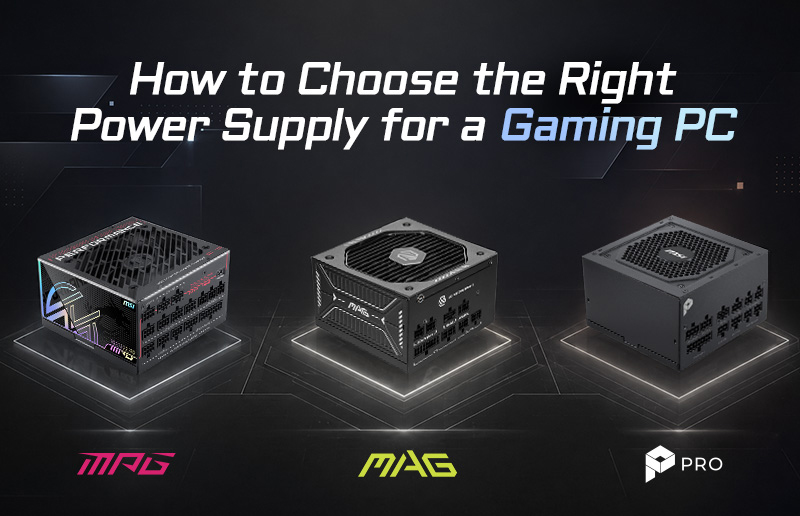
The GPU is usually the largest single load in a gaming PC. GeForce RTX 5060-class systems typically fit comfortably within the 650-750W range when paired with a mainstream CPU, although the exact requirement depends on the complete configuration. The 750W MSI MAG A750GLS PCIE5 is a strong match for this tier: it supports ATX 3.1 and PCIe 5.1, carries an 80 PLUS Gold certification, and includes a native 12V-2x6 connector with MSI's dual-color cable design.
An RTX 5090 has much greater power demand. MSI's RTX 5090 PSU guide identifies 1000W as the baseline for a conventional system and recommends more capacity for demanding CPU combinations or expanded builds. For builders who want premium protection, extensive headroom, and room for future high-power upgrades, the MSI MPG Ai1600TS PCIE5 is MSI's flagship recommendation for an RTX 5090 system. It delivers 1600W, 80 PLUS Titanium efficiency, two native 12V-2x6 connectors, ATX 3.1 support, and GPU Safeguard+ monitoring for real-time protection.
MSI also offers PRO Series power supplies for professional creators, engineering workstations, AI development systems, and business PCs that prioritize efficiency and long-term reliability. The PRO A850PL PCIE5 is a balanced choice for professional systems with moderate GPU demand, while the PRO A1000PL PCIE5 provides additional capacity for higher-performance GPUs and expanded workstation configurations. Both combine ATX 3.1 and PCIe 5.1 readiness with 80 PLUS Platinum efficiency.
What Does the 80 PLUS Efficiency Rating Actually Mean?
The 80 PLUS program grades how efficiently a PSU converts wall power into the DC power used by PC components at defined loads and input conditions. Higher efficiency generally means less energy is lost as heat. That can support cooler operation and reduce the work required from the PSU fan, but certification alone does not describe every aspect of electrical performance, acoustics, component quality, or protection design.
For most gaming PCs, 80 PLUS Gold offers a practical balance of efficiency and price. Professional and flagship builds may benefit from the higher efficiency tiers offered by the 80 PLUS Platinum PRO A850PL and PRO A1000PL or the 80 PLUS Titanium MPG Ai1600TS. Buyers should also look for protections such as over-current, over-voltage, over-power, over-temperature, under-voltage, and short-circuit protection.
Should I Choose a Fully Modular, Semi-Modular, or Non-Modular PSU?
A fully modular PSU lets builders connect only the cables required by the system. This reduces unused cable clutter, makes routing easier, and can create more open space around fans and components. A semi-modular PSU permanently attaches essential cables while making the remaining connections optional. A non-modular PSU keeps every cable attached and may suit cost-focused builds, but unused cables still need to be stored inside the case.
MSI's MAG A750GLS PCIE5, MPG Ai1600TS PCIE5, and PRO A850PL/PRO A1000PL PCIE5 models use modular cabling to support cleaner gaming and professional builds. Their dual-color 12V-2x6 cable design also provides a clear visual cue: insert the connector until the yellow portion is no longer visible, then avoid sharply bending the cable immediately next to the plug. Always use cables supplied for that exact PSU model.
What Is ATX 3.1 and Why Does It Matter for My GPU?
ATX 3.1 power supplies are designed around the demands of modern platforms, including brief power excursions that can exceed normal operating draw. The standard works with the updated 12V-2x6 high-power connector used by current graphics cards. Compared with relying on multiple legacy connectors and an adapter, a native cable can produce a cleaner installation with fewer connection points.
The connector still needs careful installation. Push it in completely, confirm that it is fully seated, keep the cable free from excessive sideways pressure, and recheck it after cable management. MSI's dual-color connector makes this inspection easier on compatible MAG and MPG models.
How Do I Check If My PSU Is Compatible with My Graphics Card?
Before buying, complete these four checks:
- Confirm the GPU maker's recommended system wattage and adjust for your CPU, drives, fans, pumps, and expansion cards.
- Match the required GPU connector: legacy 6-pin or 8-pin PCIe, or a native 12V-2x6/16-pin connection.
- Verify that the PSU physically fits the case and that there is enough clearance for cables and airflow.
- Use only the modular cables packaged with the PSU, and connect high-power GPU cables exactly as instructed.
For additional guidance, review MSI's power supply compatibility report and the RTX 50 Ready PC Build resource before finalizing the parts list.
Frequently Asked Questions
Is 750W enough for a gaming PC in 2026?
For many mainstream and upper-mainstream systems, yes. A 750W PSU is often suitable for an RTX 5060-class build, but CPU choice, GPU model, overclocking, and the rest of the system must be considered. Use a calculator and follow the GPU manufacturer's guidance.
Does a higher-wattage PSU use more electricity?
Not 100% true. A 1000W rating is the maximum continuous output capacity, not constant consumption. The PC draws according to its workload, with some additional loss determined by PSU efficiency.
What is the difference between continuous and peak wattage?
Continuous wattage is the output a PSU is designed to sustain under specified conditions. Peak or excursion figures describe short-duration demand. Choose the PSU by its continuous rating and its ability to handle transient loads, not by an advertised peak figure alone.
Which MSI PSU Should You Buy for Your Gaming Build?
Choose by system tier, not by the GPU name alone. For a mainstream RTX 5060-class gaming PC, the MAG A750GLS PCIE5 provides a 750W, ATX 3.1-ready platform with Gold efficiency and a native 12V-2x6 connection. For an RTX 5090 system, the MPG Ai1600TS PCIE5 and MPG Ai1300TS PCIE5 delivers Titanium efficiency, dual 12V-2x6 connectors, and advanced GPU Safeguard+ protection. For professional creators and workstation users, the PRO A850PL PCIE5 offers an efficient 850W option, while the PRO A1000PL PCIE5 adds more headroom for higher-performance GPUs and expanded configurations.
The best power supply is not simply the model with the largest number on the label. It is the PSU that provides the right continuous wattage, native connectors, efficiency, electrical protection, physical fit, and upgrade headroom for your complete PC. Build your parts list, run the MSI PSU Calculator, and then select the MSI MAG, MPG, PRO, or MEG power supply that matches the way you game, create, and upgrade.