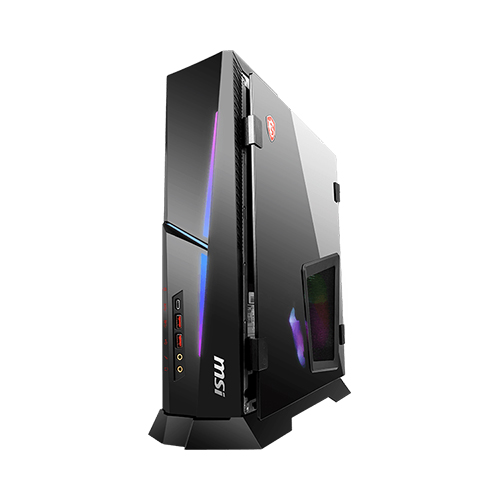
The 1080p gaming setting guide for RTX 4060 & RTX 4060 Ti and MAG Infinite S3.
Desktops

1080p gaming is the most popular game setup according to the Steam Hardware Survey. Because it is an easy way to get the budget devices and also to get the best experience to play games. NVIDIA notice that and launched the RTX 4060 and 4060 Ti to fulfill this kind of user's demand. Today we are going to teach you how to run the game smoothly and also get the best image quality on MAG Infinite S3 13th and MAG Codex 5 13th.
Nowadays, game development becomes mature. The game developer always tries to make the game image quality look amazing to bring an immersive experience for players. When the user’s system hardware has the ability can support more detail of the image or some background. Like lighting and shadows, distant view, or background detail. But if you prefer the fluency of the game. Focus on the FPS of the game, then you can through a few options adjust to improve the game experience.

Diablo IV, Ultra, High Medium Graphic Setting Comparison in real gameplay
1. To lower the graphics level to high or Medium
1080p is Full High Definition resolution, it is the basic standard resolution in TV, tablet, or smartphone for user watching. In that resolution, we can enjoy most of the image detail. If you want to see deeper, then you need to increase to 1440p or 2160p resolution. Next, you can enjoy seeing more gorgeous detail in the images. This is the same to play games. But we are in 1080p gaming, for maximum game performance within the entry or medium graphic cards, we usually can lower the graphic level from top to medium. And it still can keep nice image quality and have better game FPS.

Forza 5 Extreme, Ultra, High Graphic Setting Comparison in real gameplay
If we want to better image quality, then we should use a 1440p or 2160p monitor. Then it can see more delicate detail. However, we also need a powerful system to support it.
2. Enable NVIDIA DLSS function to boost up the frames
Except to lower the graphic level to improve the game’s performance. NVIDIA also provides AI technology to help enhance players’ gaming experience. Such as DLSS, or NVIDIA Image Scaling function. More and more 3A games keep supporting the DLSS function. The frame generation can boost up the whole game FPS to reach a fluent level. If the game you play doesn’t support DLSS, NVIDIA also supports the NVIDIA Image Scaling (NIS) function for the game haven’t support DLSS. You still can boost up the FPS in the game with NVIDIA graphic cards in MAG Infinite S3 and Codex 5.

Cyberpunk 2077 Ultra, Ultra & DLSS Quality within Frame Generation Graphic Setting in real gameplay

Assassin's Creed Valhalla doesn’t support DLSS, but NIS also can help to improve game performance
Finally, let’s check the other battle royal game from a fan’s wish, Call of Duty: Warzone performance in MAG Infinite S3 13th within RTX 4060.

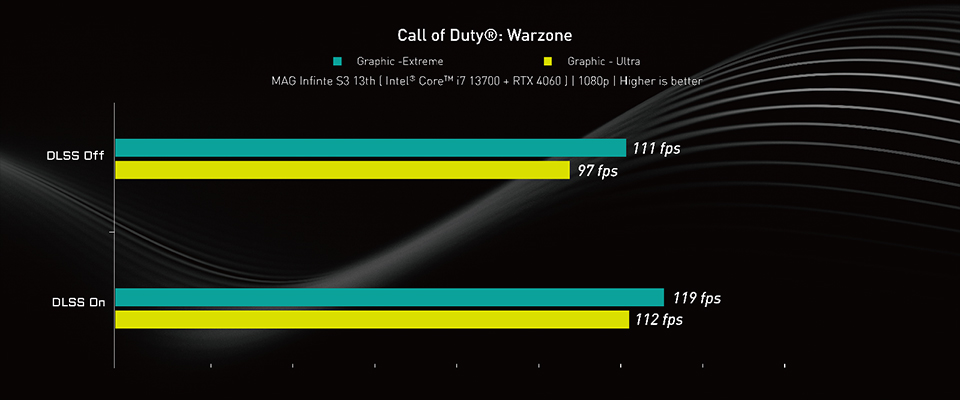
Call of Duty: Warzone Game FHD Performance Table
Let's summarize the conclusion, For most 1080p 3A gaming we can use entry or medium graphic cards and enable NVIDIA DLSS, NIS functions, or lower graphic settings in the game. Then we still can get a good performance and image quality when we play the game. We strongly recommend enabling NVIDIA DLSS function first if the game supports it. If the game doesn’t support DLSS yet, then try to enable NIS or lower graphic settings for better performance.

If you are interested in playing different games on MSI gaming desktops or monitors, you can visit our website to find a suitable setup. Select the game you want to play, your preferred monitor size and resolution, and the system will show you how the game performs.
Find My Favor: https://www.msi.com/Landing/find_my_favor